UTM Tracking for PartnerStack: How to Build and Validate Partner Campaign Links
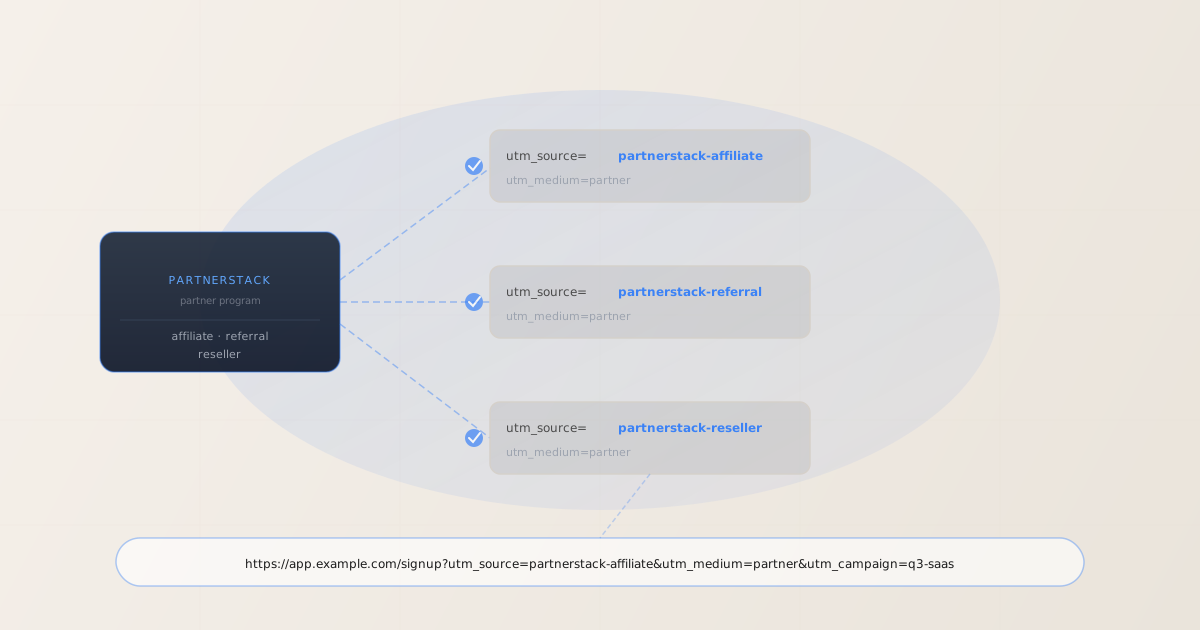
To add UTM tracking for PartnerStack, add UTM parameters to the program destination URL — the signup or landing page URL you configure in your PartnerStack program settings — not to the ps.partnerstack.com partner link your partners share. GA4 reads UTM parameters from the URL at the moment the tracking tag fires, after PartnerStack’s redirect resolves to your destination page. Use MissingLinkz mlz build to generate normalized, per-partner-type destination URLs for each of PartnerStack’s three tracks — affiliate, referral, and reseller — and mlz check to validate the ps.partnerstack.com redirect chain before your program goes live. That is the correct setup. But here is where SaaS companies lose attribution data: PartnerStack routes every partner-referred click through its own tracking infrastructure before forwarding to your destination. If your SaaS app’s login redirect, a CDN caching rule, or any internal URL rewrite strips query parameters before the page loads, GA4 fires with no campaign data. A parameter syntax checker would show the URL as valid. mlz check follows the entire redirect chain and confirms UTM parameters survive to the final destination — the check that prevents silent attribution failure in PartnerStack programs.
How PartnerStack’s tracking architecture interacts with UTM parameters
PartnerStack is a partner relationship management (PRM) platform built specifically for SaaS companies. Unlike traditional affiliate networks that primarily serve e-commerce merchants, PartnerStack manages three distinct partner tracks: affiliate partners (content creators, review sites, and marketers who earn commissions on referrals), referral partners (existing customers who refer new users), and reseller partners (agencies, VARs, and system integrators who resell or bundle the product). This three-track structure is one of the key reasons SaaS companies choose PartnerStack over traditional affiliate networks.
When a partner shares a PartnerStack referral link, the click first routes through PartnerStack’s tracking infrastructure at ps.partnerstack.com (or a custom domain configured by the SaaS company). PartnerStack records the click, assigns its own click identifier to attribute the eventual conversion to the correct partner, and then redirects the browser to the program’s destination URL configured in the program settings.
This redirect architecture has one important consequence for UTM tracking: UTM parameters belong on the program destination URL you configure in PartnerStack, not on the ps.partnerstack.com partner link. The PartnerStack tracking link carries its own parameters (the group key and transaction ID for commission attribution) that are entirely separate from your GA4 UTM data. The reliable approach is to configure UTM parameters on the destination URL inside the PartnerStack program dashboard.
GA4 attribution works by reading utm_source, utm_medium, and utm_campaign from the URL at page load time — the URL the browser is on when the GA4 tag fires. For a SaaS signup funnel, this is typically the moment a visitor lands on the signup page or the marketing site. If any redirect in the chain between PartnerStack’s tracking link and the final page strips UTM parameters, GA4 attributes the session as Direct or Organic with no partner data.
PartnerStack’s platform records conversions independently of GA4, using its own click identifiers and transaction tracking. Both systems coexist: PartnerStack tracks partner conversions for commission payouts via its own attribution; GA4 tracks channel attribution via UTM parameters on the destination URL. For a broader overview of UTM parameters and redirect chain validation, see the UTM tracking for developers guide.
Building per-partner-type UTM destination URLs for PartnerStack with mlz build
PartnerStack’s three-track structure (affiliate, referral, reseller) creates a natural segmentation for UTM source values. Giving each partner type a distinct utm_source lets GA4 show you whether your signup conversions are coming from affiliate-driven paid traffic, customer referrals, or reseller-driven enterprise deals — data that matters for understanding which partner tracks to invest in.
Generating these per-track destination URLs manually introduces casing inconsistencies and naming drift that fragments GA4 channel data. mlz build generates normalized destination URLs from structured input, enforcing lowercase-hyphenated values, and stores each link for an auditable record of what is configured in the PartnerStack program.
The standard convention for PartnerStack programs is utm_source=[partner-track], utm_medium=partner, and utm_campaign=[program-name]. Use utm_content to differentiate promotional materials within the same partner track.
$ mlz build \
  --url "https://app.example.com/signup" \
  --source "partnerstack-affiliate" \
  --medium "partner" \
  --campaign "q3-saas" \
  --content "review-post" \
  --validate

{
  "tracked_url": "https://app.example.com/signup?utm_source=partnerstack-affiliate&utm_medium=partner&utm_campaign=q3-saas&utm_content=review-post",
  "params": {
    "utm_source": "partnerstack-affiliate",
    "utm_medium": "partner",
    "utm_campaign": "q3-saas",
    "utm_content": "review-post"
  },
  "destination_url": "https://app.example.com/signup",
  "link_id": "lnk_ps_aff_q3s",
  "campaign_id": "cmp_q3-saas",
  "stored": true,
  "created_at": "2026-06-30T09:10:00.000Z"
}
For the referral partner track (customer-referred signups):
mlz build --url "https://app.example.com/signup" --source "partnerstack-referral" --medium "partner" --campaign "q3-saas"
For the reseller partner track (agency or VAR-driven enterprise deals):
mlz build --url "https://app.example.com/signup" --source "partnerstack-reseller" --medium "partner" --campaign "q3-saas"
The tracked_url value from each mlz build call is what you configure as the signup URL or destination URL in your PartnerStack program settings. Each partner track gets a distinct utm_source. For naming conventions and how consistent casing prevents GA4 data fragmentation, see the UTM naming conventions guide. To generate these at scale via the REST API or npm, see how to build UTM links programmatically.
Validating the PartnerStack redirect chain with mlz check
Once you have the UTM-tagged destination URL for each partner track, validate it end-to-end before configuring it in PartnerStack. mlz check follows the complete redirect chain from your destination URL, confirms the server responds with a 200, and verifies there are no configuration issues that would strip UTM parameters. Run this before your PartnerStack program activates — not after months of partner-attributed traffic appearing in GA4 as Direct with no source or campaign data.
$ mlz check "https://app.example.com/signup?utm_source=partnerstack-affiliate&utm_medium=partner&utm_campaign=q3-saas"

{
  "url": "https://app.example.com/signup?utm_source=partnerstack-affiliate&utm_medium=partner&utm_campaign=q3-saas",
  "valid": true,
  "checks": [
    { "check": "url_format", "status": "pass", "message": "URL format is valid." },
    { "check": "ssl", "status": "pass", "message": "URL uses HTTPS." },
    { "check": "resolution", "status": "pass", "message": "Destination responded with 200.", "details": { "status_code": 200, "response_time_ms": 184 } },
    { "check": "redirects", "status": "pass", "message": "No redirects detected." },
    { "check": "response_time", "status": "pass", "message": "Response time: 184ms.", "details": { "response_time_ms": 184 } }
  ],
  "status_code": 200,
  "response_time_ms": 184,
  "validated_at": "2026-06-30T09:11:30.000Z"
}
A clean result means the destination URL resolves correctly and query parameters survive to the final page. If valid is false, the checks array identifies exactly which hop in the chain failed. The most common failure mode in SaaS PartnerStack setups is a redirect on the product’s own signup flow — an authentication provider redirect that strips query strings, a post-signup onboarding URL rewrite, or a CDN edge rule that rewrites the destination before the tracking tag fires. For a detailed walkthrough of diagnosing redirect chain failures, see how to check if a redirect strips UTM parameters.
PartnerStack UTM tracking gotchas for SaaS partner programs
- SaaS signup flows often introduce redirects that strip UTM parameters
- SaaS products frequently route users through multi-step signup flows: landing page → signup form → authentication provider (Auth0, Okta, Cognito) → onboarding wizard. Each step is a potential parameter-stripping point. Authentication provider redirects are the most common culprit — OAuth flows that redirect back to the application often drop all query parameters in the process. Before your PartnerStack program launches, trace the full redirect chain from your signup URL to the point where GA4 fires using
mlz check. If the authentication redirect strips UTM parameters, GA4 never records the partner-sourced session. - Configure UTM parameters on the destination URL, not on the PartnerStack tracking link
- The link PartnerStack generates for partners looks like
https://app.example.com?grsf=partner-keyor routes throughps.partnerstack.combefore forwarding to your program destination. UTM parameters added to the PartnerStack tracking link itself are not reliably forwarded to your destination page. The correct location is the signup URL or destination URL in the PartnerStack program settings. Configure the UTM-tagged URL there and PartnerStack uses it as the landing target for all partner-generated links in the program. - PartnerStack’s
grsfparameter and UTM parameters serve different tracking systems - PartnerStack appends its own tracking parameter (typically
grsf, the group referral share field, or a custom parameter) to the destination URL to track which partner drove the conversion for commission purposes. This parameter coexists with UTM parameters on the destination URL and serves PartnerStack’s attribution, not GA4’s. Do not remove it. GA4 reads the UTM parameters and ignores PartnerStack’s tracking parameters; PartnerStack reads its own parameter and does not rely on UTM data. Both systems work in parallel on the same destination URL. - Custom domains in PartnerStack programs require separate validation
- Some SaaS companies configure PartnerStack to use a custom tracking domain (e.g.
partners.example.com) rather thanps.partnerstack.com. A custom domain introduces its own DNS resolution, TLS certificate, and redirect configuration that may differ from the default PartnerStack infrastructure. Validate the destination URL chain through the custom domain configuration before the program goes live, the same way you would validate any custom redirect chain.mlz checkfollows the chain regardless of which tracking domain PartnerStack uses. - Three partner tracks may require three distinct destination URLs in PartnerStack
- PartnerStack allows configuring separate signup or landing page URLs for each partner group (affiliate, referral, reseller). If your program uses this configuration, each group needs its own UTM-tagged destination URL with the appropriate
utm_sourcevalue. Generate the three URLs usingmlz buildand validate each one withmlz check. If all three tracks point to the same URL, use a single URL with a genericutm_source=partnerstack— but you lose the per-track attribution that PartnerStack’s three-track structure is designed to support.
Frequently asked questions
- Where do I add UTM parameters in the PartnerStack program settings?
- In the PartnerStack dashboard, navigate to your program and find the Signup URL or Destination URL field in the program configuration. This is where you paste the UTM-tagged URL generated with
mlz build. The value looks like:https://app.example.com/signup?utm_source=partnerstack-affiliate&utm_medium=partner&utm_campaign=q3-saas. PartnerStack uses this URL as the landing target when a partner’s referral link is clicked, appending its own tracking parameter before forwarding the browser. If your program has separate configurations for affiliate, referral, and reseller partner groups, configure a distinct UTM-tagged URL for each group. - Does PartnerStack’s redirect strip UTM parameters from the destination URL?
- PartnerStack’s redirect is designed to forward the destination URL intact, including query parameters. Parameter stripping typically occurs on the SaaS product’s own side: authentication redirects, post-signup onboarding flows, or CDN edge rules that rewrite the URL for performance or routing purposes. Validate the complete destination URL chain with
mlz checkbefore the program goes live. Pay particular attention if your signup flow passes through an external authentication provider (Auth0, Firebase Auth, Okta, etc.) — OAuth flows frequently strip query parameters during the authorization redirect. - What is the grsf parameter in PartnerStack links and how does it interact with UTM parameters?
- The
grsfparameter is PartnerStack’s group referral share field — it identifies which partner in which group referred the visitor, for commission attribution within the PartnerStack platform. PartnerStack appends it to the destination URL when forwarding a partner-referred click. The final URL your site receives looks like:https://app.example.com/signup?utm_source=partnerstack-affiliate&utm_medium=partner&utm_campaign=q3-saas&grsf=abc123. GA4 reads the UTM parameters and ignoresgrsf. PartnerStack readsgrsfand does not rely on UTM data. Both coexist without interfering. - Should I use utm_medium=partner or utm_medium=affiliate for PartnerStack traffic?
- Use
utm_medium=partneras a consistent value across all three PartnerStack tracks. This distinguishes partner-sourced traffic from your other affiliate programs (which might useutm_medium=affiliate) and makes the three PartnerStack tracks distinguishable in GA4 by theirutm_sourcevalues (partnerstack-affiliate,partnerstack-referral,partnerstack-reseller). Themediumvalue describes the channel type;partneris more accurate thanaffiliatefor PartnerStack’s three-track model. For a full taxonomy reference, see the UTM naming conventions guide. - How do I validate UTM tracking across all three PartnerStack partner tracks before launch?
- Generate the three per-track destination URLs using
mlz build(one for eachutm_sourcevalue) and runmlz checkagainst each. For programs with multiple landing pages per track (e.g. separate pages for different geographies or product tiers), validate each destination URL individually. If you manage program configuration through a CI/CD pipeline, see automating campaign link validation in CI/CD to gate configuration changes on a passing validation result before deployment.
Build PartnerStack-compatible UTM destination URLs and validate every redirect chain
mlz build generates correctly normalized UTM destination URLs for each PartnerStack partner track. mlz check validates the full redirect chain — catching the SaaS signup flow redirects and authentication hops that silently strip UTM parameters before GA4 fires.
1,000 links/month free. No credit card.
Your API key
Save this now — it won't be shown again.
npm install -g missinglinkz
Free plan: 1,000 links/month. No credit card. See the UTM tracking for developers guide for the full programmatic workflow.