UTM Tracking for RedTrack: How to Build and Validate Campaign Links
RedTrack is a cloud-based performance marketing tracking platform used by media buyers, affiliate marketers, and ecommerce advertisers to consolidate campaign data across Google Ads, Facebook, TikTok, native networks, and affiliate programs. Like other server-side ad trackers, RedTrack generates campaign tracking URLs that route every click through RedTrack's cloud servers — recording click timestamp, device, IP, geo, and its own internal click ID — before redirecting traffic to your landing page or offer URL. The redirect architecture is what makes UTM tracking for RedTrack complicated. RedTrack's own attribution relies on its internal click ID and conversion postback system, which operates completely independently of UTM parameters. But GA4, Triple Whale, Northbeam, and any analytics tool that fires a pixel on your landing page reads UTM parameters from the URL at page load — not from RedTrack's click data. For those attribution tools to correctly credit RedTrack campaign traffic, UTM parameters must survive RedTrack's redirect chain and land on the destination URL where your analytics pixel fires. Use mlz build to generate correctly normalized UTM destination URLs for the landing page field inside RedTrack's campaign configuration. Use mlz check on the full RedTrack campaign tracking URL to validate that the redirect chain preserves UTM parameters from RedTrack's servers all the way to the final landing page.
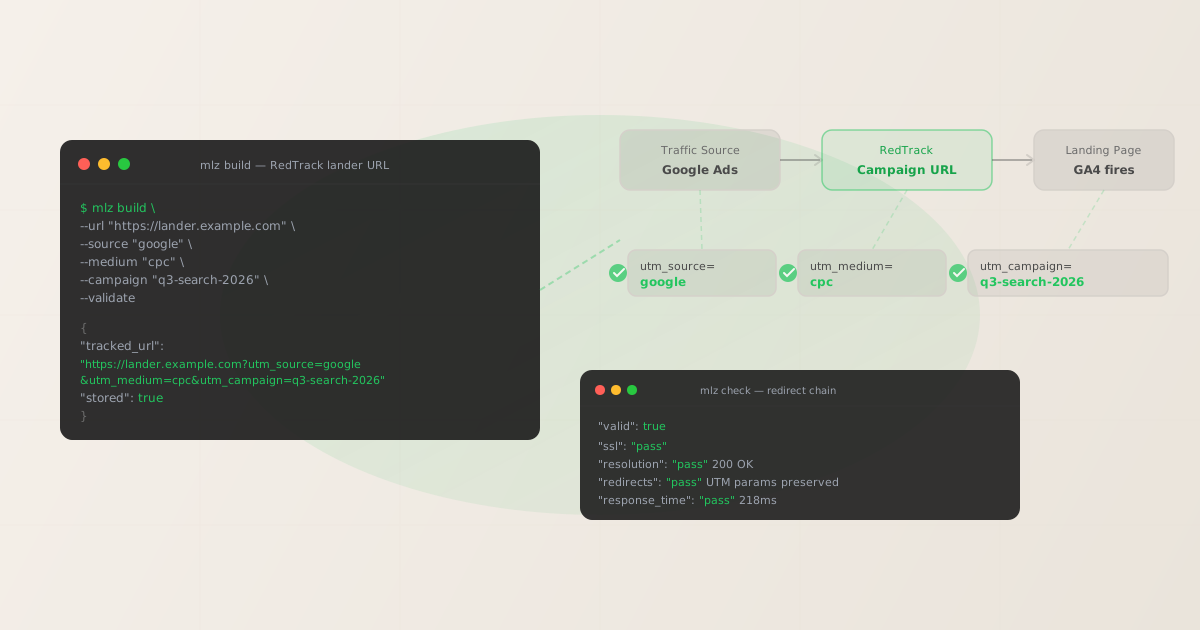
How RedTrack campaign tracking interacts with UTM parameters
RedTrack operates as a cloud-based click tracking intermediary. When you create a campaign in RedTrack, you configure a campaign tracking URL — the URL that goes into your ad platform's final URL or destination field. Every click on your ad first hits RedTrack's tracking server, which records click-level data and fires any impression or session pixels configured in your RedTrack campaign, then redirects the user to the destination URL (your landing page or offer). RedTrack's click record is built from the tracking link click; your GA4 session is built from the URL the browser lands on at the final destination. These are two independent data systems.
UTM parameters must be embedded in the destination URL — the URL you configure in RedTrack's campaign lander or offer field. When RedTrack redirects a click to https://yourdomain.com/landing?utm_source=google&utm_medium=cpc&utm_campaign=q3-search-2026, the browser loads that URL and GA4 reads the UTM parameters at session start. If the destination URL in RedTrack's campaign configuration was entered without UTM parameters, or if RedTrack's redirect configuration strips query strings during the hop, GA4 records a clean URL and classifies the session as Direct traffic. RedTrack still shows the click in its own dashboard because its tracking data is captured at the click, not at page load. The attribution failure is invisible inside RedTrack and only becomes visible when you compare RedTrack click volume against GA4 paid session counts.
The table below shows the four most common UTM tracking failure modes in RedTrack campaigns and their GA4 attribution consequence:
| Scenario | What GA4 reads at lander load | Attribution result |
|---|---|---|
| Destination URL has correct UTM params, RedTrack redirect passes them through | utm_source=google, utm_medium=cpc |
✓ Paid Search attributed correctly |
| Destination URL in RedTrack configured without UTM parameters | (empty) | ✗ Direct traffic in GA4 |
Inconsistent casing in UTM values (Google Ads vs google) |
utm_source=Google Ads |
✗ Non-standard channel; GA4 Default Channel Grouping miss |
| Landing page has a secondary redirect (custom domain, Cloudflare worker, A/B test) that strips query strings | (empty) | ✗ Organic or Direct in GA4 |
All four failure modes are invisible inside RedTrack. RedTrack records the click, fires its postback on conversion, and reports the campaign. The data problem only surfaces as unexplained Direct traffic inflation in GA4 — usually discovered days after the campaign launched, when the attribution window is already past. The fix is to validate UTM parameters before any campaign goes live.
Building UTM destination URLs for RedTrack with mlz build
mlz build generates UTM-tagged destination URLs with normalized, lowercase-hyphenated parameter values — the format GA4's Default Channel Grouping expects. These are the URLs you paste into the destination or lander field in RedTrack's campaign configuration. The --validate flag checks that the destination resolves with HTTP 200 and that no redirect in the path strips query strings before the analytics pixel fires. Below are three channels commonly tracked through RedTrack: Google Ads search, Facebook paid social, and TikTok Ads.
# Google Ads search — branded keyword campaign
$ mlz build \
  --url "https://yourdomain.com/landing" \
  --source "google" \
  --medium "cpc" \
  --campaign "q3-search-2026" \
  --content "ad-variant-b" \
  --validate

{
  "tracked_url": "https://yourdomain.com/landing?utm_source=google&utm_medium=cpc&utm_campaign=q3-search-2026&utm_content=ad-variant-b",
  "params": {
    "utm_source": "google",
    "utm_medium": "cpc",
    "utm_campaign": "q3-search-2026",
    "utm_content": "ad-variant-b"
  },
  "destination_url": "https://yourdomain.com/landing",
  "link_id": "lnk_gg_q3s26_vb",
  "campaign_id": "cmp_q3-search-2026",
  "stored": true,
  "created_at": "2026-06-21T08:10:04.000Z"
}

# Facebook Ads — prospecting campaign, image creative
$ mlz build \
  --url "https://yourdomain.com/landing" \
  --source "facebook" \
  --medium "paid-social" \
  --campaign "q3-social-2026" \
  --content "image-static-01" \
  --validate

{
  "tracked_url": "https://yourdomain.com/landing?utm_source=facebook&utm_medium=paid-social&utm_campaign=q3-social-2026&utm_content=image-static-01",
  "params": {
    "utm_source": "facebook",
    "utm_medium": "paid-social",
    "utm_campaign": "q3-social-2026",
    "utm_content": "image-static-01"
  },
  "stored": true,
  "created_at": "2026-06-21T08:11:22.000Z"
}

# TikTok Ads — UGC video campaign
$ mlz build \
  --url "https://yourdomain.com/landing" \
  --source "tiktok" \
  --medium "paid-social" \
  --campaign "q3-social-2026" \
  --content "ugc-video-01" \
  --validate

{
  "tracked_url": "https://yourdomain.com/landing?utm_source=tiktok&utm_medium=paid-social&utm_campaign=q3-social-2026&utm_content=ugc-video-01",
  "params": {
    "utm_source": "tiktok",
    "utm_medium": "paid-social",
    "utm_campaign": "q3-social-2026",
    "utm_content": "ugc-video-01"
  },
  "stored": true,
  "created_at": "2026-06-21T08:12:09.000Z"
}
The tracked_url from each JSON response is the URL you paste into the destination or lander field in RedTrack's campaign settings. mlz build normalizes all parameter values to lowercase-hyphenated format, preventing the most common GA4 channel grouping failures. utm_source=Google Ads and utm_source=google create two separate source rows in GA4 — mlz build ensures every link uses google. The stored: true field confirms the link is saved to the MissingLinkz campaign library, giving your team an auditable record of every RedTrack destination URL with its UTM parameters.
Validating the RedTrack campaign redirect chain with mlz check
Configuring a correct destination URL in RedTrack is necessary but not sufficient. The RedTrack campaign tracking URL — the URL you put into your ad platform's final URL or destination field — routes clicks through RedTrack's servers first. If RedTrack's redirect does not pass query strings through to the destination URL, or if the destination URL has a secondary redirect (custom domain redirect, Cloudflare Worker rewrite, A/B testing middleware) that drops query strings before GA4 fires, UTM parameters are lost. mlz check walks the complete redirect chain from any URL through every hop to the final response, confirming that UTM parameters are present at the destination where the analytics pixel loads.
$ mlz check "https://yourdomain.com/landing?utm_source=google&utm_medium=cpc&utm_campaign=q3-search-2026"

{
  "url": "https://yourdomain.com/landing?utm_source=google&utm_medium=cpc&utm_campaign=q3-search-2026",
  "valid": true,
  "checks": [
    { "check": "url_format", "status": "pass", "message": "URL format is valid." },
    { "check": "ssl", "status": "pass", "message": "URL uses HTTPS." },
    { "check": "resolution", "status": "pass", "message": "Destination responded with 200.", "details": { "status_code": 200, "response_time_ms": 218 } },
    { "check": "redirects", "status": "pass", "message": "No redirects detected." },
    { "check": "response_time", "status": "pass", "message": "Response time: 218ms.", "details": { "response_time_ms": 218 } }
  ],
  "status_code": 200,
  "response_time_ms": 218,
  "validated_at": "2026-06-21T08:18:41.000Z"
}
Run mlz check on the UTM-tagged destination URL — the exact URL with query string that RedTrack will deliver traffic to after its internal redirect. The redirects check is the critical result: a pass confirms no redirect in the destination path stripped the query string. A fail on redirects means something in the chain between the destination URL and the final page load — a custom domain redirect, a Cloudflare rewrite rule, A/B testing middleware, or a link rotator — is dropping UTM parameters before GA4 fires. Fix the redirect configuration, update the destination URL in RedTrack's campaign settings if necessary, and run mlz check again before launching. For campaigns with split testing across multiple landers in RedTrack, run mlz check against each lander URL independently — a failed redirect on one path means a percentage of your traffic arrives without UTM attribution.
RedTrack UTM tracking gotchas for performance marketers
- RedTrack's internal click ID tokens are not UTM parameters — never place them in UTM fields
- RedTrack uses its own internal click identifier (often called the SubID or click ID) for postback conversion tracking. When a conversion fires on the landing page or offer, RedTrack expects this click ID to be passed back in the postback URL so it can match the conversion to the originating click record. This system is completely separate from UTM parameters. UTM parameters (
utm_source,utm_medium,utm_campaign,utm_content,utm_term) are read by GA4 and third-party attribution tools via JavaScript pixel at page load. RedTrack's click ID is read by RedTrack's server via postback after conversion. They serve different attribution systems. Never use RedTrack's click ID tokens as UTM values — doing so pollutes GA4 with tracking IDs instead of readable source, medium, and campaign values. - RedTrack's "direct tracking" mode changes how clicks reach the landing page — validate regardless of tracking mode
- RedTrack supports a direct tracking mode where clicks go directly to the landing page URL without routing through RedTrack's redirect server first. A JavaScript snippet on the landing page records the click data for RedTrack instead. In direct tracking mode, the landing page URL in your ad platform contains RedTrack's tracking parameters as query string values, not UTM parameters. If you also need GA4 attribution, you must add UTM parameters to the same landing page URL — alongside RedTrack's tracking parameters — so the analytics pixel can read them at page load. Run
mlz checkagainst the landing page URL regardless of which tracking mode you use to confirm the destination resolves correctly and all parameters are preserved. - Postback-tracked affiliate offers do not support UTM attribution — install the pixel on a pre-sell page instead
- Many RedTrack campaigns route traffic to an affiliate network offer URL (MaxBounty, CJ Affiliate, ClickBank, ShareASale) as the final destination. The affiliate network's page is a separate domain where your GA4 pixel does not load. RedTrack's postback tracking works on this flow — the affiliate fires a conversion postback using the click ID — but GA4 attribution stops at the last page that loads your GA4 pixel. For affiliate campaigns where GA4 attribution matters, insert a pre-sell or bridge page on your own domain before the offer URL. Configure the bridge page URL in RedTrack's lander field with UTM parameters generated by
mlz build. The bridge page passes traffic to the affiliate offer. GA4 attribution is recorded at the bridge page; RedTrack conversion tracking is recorded via postback from the affiliate network. - Multiple ad networks in one RedTrack campaign require per-network UTM source values — not a single shared source
- Some RedTrack users run multi-traffic-source campaigns: the same landing page receives traffic from Google, Facebook, and Taboola simultaneously, all routed through a single RedTrack campaign. If all three sources use the same destination URL — with a single
utm_sourcevalue or no source at all — GA4 cannot differentiate the traffic. Build a separate destination URL for each traffic source usingmlz build: one with--source "google" --medium "cpc", one with--source "facebook" --medium "paid-social", and one with--source "taboola" --medium "native". Configure each traffic source in RedTrack's campaign to point to its corresponding UTM-tagged destination URL. This gives GA4 separate session rows per source and keeps your attribution clean. - Funnel builder landing pages (ClickFunnels, GoHighLevel) often add their own redirects that strip UTM parameters
- RedTrack users frequently send traffic to landing pages built on ClickFunnels, GoHighLevel, Kajabi, or similar funnel platforms. These platforms sometimes perform their own domain redirects or path rewrites when a page loads — particularly when custom domains are configured. These platform-level redirects can strip query strings before the page's JavaScript (including your GA4 pixel) runs. The symptom is that
mlz checkon the destination URL shows afailon theredirectscheck, or the final resolved URL no longer contains the UTM parameters. Fix this by reviewing the funnel platform's custom domain configuration and ensuring query string pass-through is enabled. Once fixed, rerunmlz checkto confirm UTM parameters survive to the page where GA4 fires.
FAQ
- Where do I put UTM parameters in a RedTrack campaign?
- Put UTM parameters in the destination URL — the landing page URL you configure in the RedTrack campaign's lander or offer field. This is the URL RedTrack redirects traffic to after recording the click. GA4 reads UTM parameters from the URL the browser loads at the final destination, which is the lander URL after RedTrack's redirect. Build the lander URL with
mlz buildto get a correctly normalized UTM-tagged URL, then paste thetracked_urloutput into RedTrack's campaign lander field. The RedTrack campaign tracking URL (the URL you put in your ad platform) does not need UTM parameters — it is RedTrack's internal routing URL, not the final page where GA4 fires. - How do I confirm UTM parameters survive the RedTrack redirect to my landing page?
- Run
mlz checkon the UTM-tagged destination URL — the exact URL with query string that RedTrack will deliver traffic to after its redirect. For example:mlz check "https://yourdomain.com/landing?utm_source=google&utm_medium=cpc&utm_campaign=q3-launch". Theredirectscheck in the JSON output confirms whether any redirect in the path dropped the query string. If it returnsfail, inspect the destination URL's redirect chain — a custom domain redirect, Cloudflare rewrite, or A/B test middleware on the landing page is the most common culprit in RedTrack setups. Fix the redirect, update the RedTrack campaign if needed, and rerunmlz checkbefore the campaign goes live. - Can RedTrack attribution and GA4 attribution run simultaneously?
- Yes — RedTrack and GA4 are independent attribution systems that do not interfere with each other. RedTrack records click data via its redirect server and tracks conversions via server-side postback using its internal click ID. GA4 records sessions via JavaScript pixel on the landing page and attributes them using UTM parameters in the URL at page load. Both run in parallel. A correctly configured RedTrack campaign — where the lander URL has properly formatted UTM parameters that survive the redirect — feeds both RedTrack's click record and GA4's session attribution simultaneously. The same applies to Triple Whale and Northbeam, which also read UTM parameters independently of RedTrack.
- What UTM medium should I use for native ad networks in RedTrack?
- Use
utm_medium=nativefor Taboola, Outbrain, MGID, and Revcontent. This matches GA4's Default Channel Grouping definition for the Native channel and keeps native traffic cleanly separated from paid social (paid-social), paid search (cpc), and display (display). Many RedTrack users run Google, Facebook, and native networks simultaneously — using the correct medium for each ensures GA4's channel attribution stays accurate across the full media mix. - How do I handle UTM tracking when RedTrack routes directly to an affiliate offer URL?
- When RedTrack's campaign routes directly to an affiliate offer URL with no landing page in between, GA4 attribution is not possible — the offer URL is on the affiliate network's domain, where your GA4 pixel does not load. RedTrack postback tracking still functions via the affiliate network's conversion pixel and your configured postback URL. For campaigns where GA4 attribution matters, insert a bridge page on your own domain between RedTrack's redirect and the affiliate offer URL. Build the bridge page URL with UTM parameters using
mlz build, configure it as the lander in RedTrack, and let the bridge page pass traffic forward to the offer. GA4 attribution records the session at the bridge page; RedTrack conversion tracking records via postback from the affiliate network after the conversion event.
Recommended posts
Build RedTrack-compatible destination URLs and validate every campaign redirect chain
mlz build generates correctly normalized UTM links to embed as destination URLs inside RedTrack's campaign configuration. mlz check validates the full redirect chain — confirming UTM parameters survive from RedTrack's servers to the landing page where GA4 and other analytics tools fire.
1,000 links/month free. No credit card.
Your API key
Save this now — it won't be shown again.
npm install -g missinglinkz
Free plan: 1,000 links/month. No credit card. See the UTM tracking for developers guide for the full programmatic workflow including API and MCP integration.