UTM Tracking for Magento (Adobe Commerce): How to Build and Validate Campaign Links
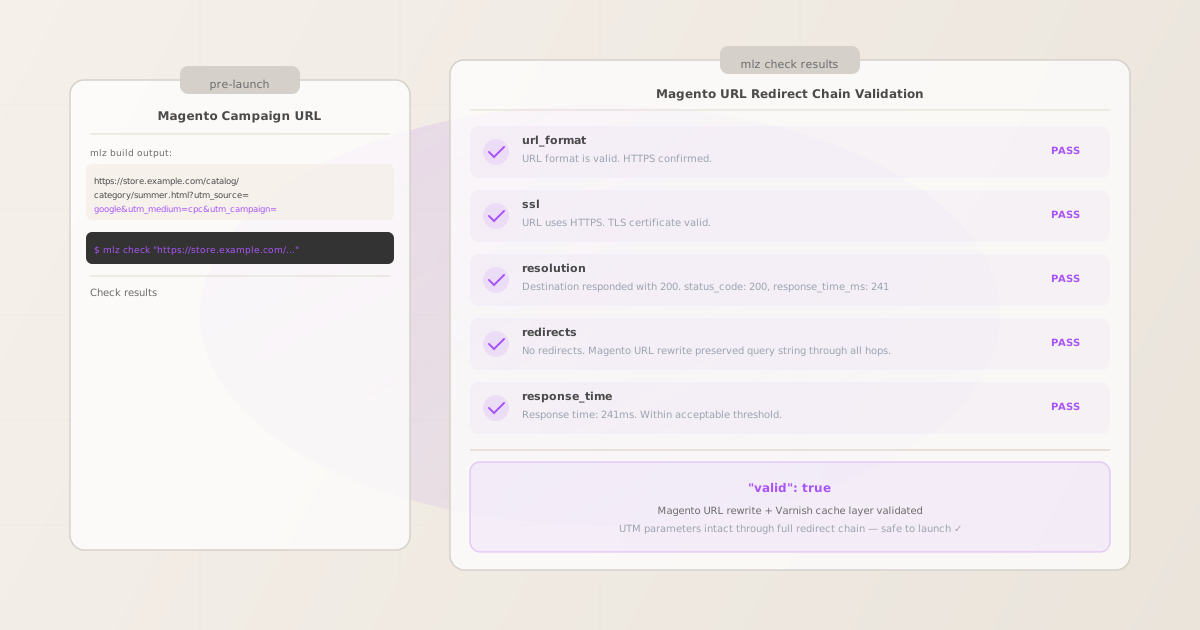
To add UTM tracking to Magento (Adobe Commerce) campaign links, append UTM parameters to the product, category, or CMS page URLs your ads, emails, and social posts link to. MissingLinkz mlz build enforces lowercase-hyphenated formatting across all UTM values, preventing the GA4 source fragmentation that manual entry causes when team members type UTM values inconsistently. mlz check validates that Magento’s URL rewrite engine, Varnish full-page cache layer, and Nginx/Apache web server configuration don’t strip query strings before GA4 records the session. The most common Magento UTM tracking failure: Magento’s URL rewrite system issues a 301 redirect for a category URL with layered navigation parameters applied (e.g., /catalog/category/view/id/12?size=M to /catalog/category/name.html) that drops all query strings including UTM parameters — your campaign drives traffic but GA4 records a Direct session with no attribution.
How Magento handles UTM parameters
Magento (both Magento 2 Open Source and Adobe Commerce) is a self-hosted or cloud-hosted ecommerce platform with a complex URL routing layer. Campaign links point to product pages (e.g., /summer-tee.html), category pages (/catalog/category/summer-apparel.html), or CMS pages (/landing/summer-sale). GA4 reads UTM parameters from the browser URL after the Magento storefront renders.
Magento routes incoming requests through multiple layers before the page renders: the web server (Nginx or Apache) handles SSL termination and static file serving; Varnish or another full-page cache (FPC) handles cached HTML responses; and Magento’s own routing layer applies URL rewrites defined in the url_rewrite database table. Each of these layers is a potential point where UTM parameters can be stripped or where a redirect can fire without preserving the original query string.
Magento’s URL rewrite system is particularly important for campaign link tracking. Magento generates URL rewrites for products and categories automatically based on the URL key defined in the admin. When a product’s URL key changes or a category is reorganized, Magento adds a new URL rewrite entry but may keep the old URL as a 301 redirect target. Campaign links using old URL formats will hit these 301 redirects — and whether the redirect preserves query strings depends on the Nginx/Apache configuration and how Magento generates the redirect response. Use mlz build to generate normalized UTM-tagged URLs and mlz check to validate the complete redirect chain before any campaign launches. For the full UTM parameter specification, see the UTM tracking for developers guide.
Building Magento campaign URLs with mlz build
Magento installations typically serve large product catalogs across multiple channels and marketing teams. Without a consistent naming tool, each campaign manager independently generates UTM values and introduces the casing inconsistencies that fragment GA4’s Acquisition report. GA4 treats google and Google as separate sources, and cpc and CPC as separate mediums. In a large Magento store with dozens of active campaigns across paid search, email, social, and display, this fragmentation compounds quickly.
The recommended UTM naming convention for Magento campaigns: utm_source identifies the traffic origin (google, klaviyo, facebook, dotdigital); utm_medium identifies the channel type (cpc, email, social, display); utm_campaign identifies the specific promotion (summer-sale-2026, b2b-autumn-2026). Use utm_content to differentiate between creative versions or product placements. mlz build enforces these values through structured flags, normalizing values to lowercase-hyphenated format and preventing casing inconsistencies that fragment GA4 data.
$ mlz build \
  --url "https://store.example.com/catalog/category/summer-apparel.html" \
  --source "google" \
  --medium "cpc" \
  --campaign "summer-sale-2026" \
  --content "shopping-category" \
  --validate

{
  "tracked_url": "https://store.example.com/catalog/category/summer-apparel.html?utm_source=google&utm_medium=cpc&utm_campaign=summer-sale-2026&utm_content=shopping-category",
  "params": {
    "utm_source": "google",
    "utm_medium": "cpc",
    "utm_campaign": "summer-sale-2026",
    "utm_content": "shopping-category"
  },
  "destination_url": "https://store.example.com/catalog/category/summer-apparel.html",
  "link_id": "lnk_mag_sum26",
  "campaign_id": "cmp_summer-sale-2026",
  "stored": true,
  "created_at": "2026-07-09T09:00:00.000Z"
}
The tracked_url value is what goes into your Google Ads Final URL, Klaviyo email template, or Meta ad destination. For Magento product page campaigns linking to a specific product detail page:
mlz build --url "https://store.example.com/summer-tee.html" --source "klaviyo" --medium "email" --campaign "summer-sale-2026" --content "product-feature"
Note that Magento product URLs end in .html by default (configurable via Stores › Configuration › Catalog › Search Engine Optimization › Product URL Suffix). Always use the current URL key from the Magento admin, including the correct suffix, when building campaign links. For naming conventions and how consistent casing prevents GA4 data fragmentation, see the UTM naming conventions guide.
Validating Magento URLs with mlz check
Once you have the UTM-tagged Magento URL from mlz build, validate it end-to-end with mlz check before placing it in any ad, email, or social post. mlz check follows the complete redirect chain from the URL you provide, confirms the server responds with a 200 status code, and verifies that query parameters survive every hop through Magento’s URL rewrite system, Varnish full-page cache layer, and web server configuration. Run this validation before any campaign launch, and re-run it after Magento upgrades, Varnish configuration changes, URL key updates in the admin, or category/product reorganizations.
$ mlz check "https://store.example.com/catalog/category/summer-apparel.html?utm_source=google&utm_medium=cpc&utm_campaign=summer-sale-2026"

{
  "url": "https://store.example.com/catalog/category/summer-apparel.html?utm_source=google&utm_medium=cpc&utm_campaign=summer-sale-2026",
  "valid": true,
  "checks": [
    { "check": "url_format", "status": "pass", "message": "URL format is valid." },
    { "check": "ssl", "status": "pass", "message": "URL uses HTTPS." },
    { "check": "resolution", "status": "pass", "message": "Destination responded with 200.", "details": { "status_code": 200, "response_time_ms": 241 } },
    { "check": "redirects", "status": "pass", "message": "No redirects detected." },
    { "check": "response_time", "status": "pass", "message": "Response time: 241ms.", "details": { "response_time_ms": 241 } }
  ],
  "status_code": 200,
  "response_time_ms": 241,
  "validated_at": "2026-07-09T09:01:00.000Z"
}
A valid: true result confirms the Magento URL resolves with a 200 status code and all query parameters survive the complete URL rewrite and Varnish cache redirect chain. If valid is false, the checks array identifies the failing step. The most common Magento failure: a redirects check showing parameter loss during Magento’s URL rewrite redirect for an outdated product or category URL key, or a resolution failure where a category has been disabled or a product has been removed from the catalog. For a walkthrough of diagnosing redirect chain failures, see how to check if a redirect strips UTM parameters.
Magento UTM tracking gotchas
- Magento URL rewrite redirects for renamed products or categories drop query strings
- When a product’s URL key is changed in the Magento admin (e.g., renaming
summer-teetoclassic-summer-tee), Magento adds a URL rewrite entry that redirects the old URL to the new one. These rewrites are stored in theurl_rewritetable and served by Magento’s routing layer. Whether the redirect preserves the original query string depends on how Magento generates the redirect response — and by default, Magento’s URL rewrite 301 redirects do not preserve query strings unless explicitly configured to do so. Any campaign link using an old URL key will hit this redirect and lose its UTM parameters. Always verify the current canonical URL in the Magento admin before building campaign links, and runmlz checkto confirm no redirect fires for the URL you’re using. - Varnish full-page cache can strip or ignore query parameters depending on VCL configuration
- Magento 2 supports Varnish as a full-page cache (FPC) layer, and Adobe Commerce Cloud deployments include Varnish by default. Varnish’s caching logic is controlled by VCL (Varnish Configuration Language) files. Magento ships a default Varnish VCL that is designed to pass query strings through to the Magento application layer — but it also strips certain query parameters (specifically, parameters starting with
gclid,fbclid, and similar tracking tokens) to improve cache hit rates. Depending on the VCL version and any customizations your team has made, UTM parameters may be normalized, sorted, or in some configurations stripped entirely by Varnish before the request reaches Magento. Runmlz checkagainst your Magento storefront URL to verify that UTM parameters survive the Varnish layer. If they don’t, check your VCL’svcl_hashandvcl_recvsubroutines for query string handling. - Layered navigation URLs contain multiple query parameters that compete with UTM parameters
- Magento’s layered navigation (the attribute-based filtering on category pages) appends its own query parameters to category URLs when a customer applies a filter — e.g.,
?color=60&size=167. Campaign links should never point to filtered category URLs because: (1) the filter parameters are attribute option IDs that change between Magento installations and deployments; (2) combining layered navigation parameters with UTM parameters creates very long URLs that may be truncated by ad platforms. Always build campaign links to the base category or product URL without any layered navigation parameters. If your campaign is specifically promoting a filtered view (e.g., “all red dresses on sale”), create a dedicated landing page in Magento rather than using a layered navigation URL as the campaign destination. - Adobe Commerce B2B module introduces company-scoped URLs that may behave differently
- Adobe Commerce’s B2B module allows company-specific catalogs, pricing, and customer groups. In B2B deployments, some category or product URLs may redirect differently based on the customer’s company context or login state. A campaign link validated by
mlz check(which does not log in as a company user) may behave differently for an authenticated B2B buyer who is redirected to a company-specific catalog view. For B2B campaigns targeting specific company accounts, test campaign URL resolution both as an unauthenticated user (whichmlz checksimulates) and as an authenticated member of the target company account to identify any company-specific redirect behaviour. - Magento’s HTTPS enforcement redirect for HTTP links can drop query strings in some Nginx configurations
- Magento requires HTTPS and may be configured to redirect HTTP requests to HTTPS. If a campaign link inadvertently uses
http://instead ofhttps://— common when campaign URLs are manually typed or copied from an HTTP source — the HTTPS enforcement redirect may not preserve the query string depending on how the Nginx or Apache configuration handles the redirect.mlz buildalways generates HTTPS URLs when the destination URL starts withhttps://. Validate the generated URL withmlz checkto confirm the HTTPS URL resolves cleanly without any HTTP-to-HTTPS redirect firing. For automating validation across all active Magento campaign URLs, see automating campaign link validation in CI/CD.
Frequently asked questions
- How do I add UTM parameters to a Magento product or category link?
- Append UTM parameters directly to the Magento product or category page URL used as the destination in your ads, emails, or social posts. The format is:
https://store.example.com/summer-tee.html?utm_source=google&utm_medium=cpc&utm_campaign=summer-sale-2026. Use MissingLinkzmlz buildto generate these URLs with consistent lowercase-hyphenated formatting. Always use the current canonical URL key from your Magento admin — campaign links using renamed or old URL keys will hit a 301 redirect that may drop the query string. - Why are my Magento UTM parameters disappearing in GA4?
- The most common causes are: (1) Magento’s URL rewrite redirect fires for an old or renamed product/category URL key and does not preserve the query string; (2) Varnish’s VCL configuration strips or normalizes query parameters including UTM parameters as part of cache key generation; (3) Nginx or Apache’s HTTPS enforcement redirect does not carry query strings forward; (4) layered navigation parameters in the destination URL conflict with UTM parameters and cause the URL to fail or redirect. Run
mlz checkagainst the full UTM-tagged URL to identify exactly which step in the redirect chain is stripping parameters. - Does Varnish strip UTM parameters in Magento?
- Magento’s default Varnish VCL is designed to pass UTM parameters through to the Magento application. However, VCL customizations — particularly in the
vcl_hashsubroutine which controls which parameters are included in the cache key — can cause Varnish to strip or ignore query parameters. Adobe Commerce Cloud deployments have a managed VCL that may be updated by Magento during platform upgrades. Runmlz checkto verify that UTM parameters survive the Varnish layer after any VCL changes or platform upgrades. - What UTM values should I use for Magento campaigns?
- Use lowercase-hyphenated values consistently. For Google Ads:
utm_source=google,utm_medium=cpc. For Klaviyo email:utm_source=klaviyo,utm_medium=email. For Meta:utm_source=facebook,utm_medium=social. For display:utm_source=display-network-name,utm_medium=display. Campaign slug:utm_campaign=summer-sale-2026. Useutm_contentto differentiate creative versions:utm_content=banner-300x250. Run all URLs throughmlz buildto enforce lowercase-hyphenated formatting and prevent GA4 attribution fragmentation. - How do I validate Magento UTM campaign links at scale before a major promotion?
- For campaigns with many destination URLs — common for Magento stores with large catalogs running seasonal promotions — automate validation by scripting
mlz checkagainst a list of URLs in a shell loop or integrating it into your CI/CD pipeline. A non-zero exit code frommlz checkindicates a failing URL:mlz check "https://store.example.com/summer-tee.html?utm_source=google&utm_medium=cpc&utm_campaign=summer-2026" || echo "FAIL: URL validation failed". For a complete automated validation workflow, see automating campaign link validation in CI/CD and how to build UTM links programmatically.
Recommended posts
Build and validate Magento UTM campaign links before every launch
mlz build generates normalized, consistently cased UTM destination URLs for Magento campaigns — eliminating source and medium fragmentation in your GA4 Acquisition report. mlz check validates the full redirect chain, catching Magento URL rewrite redirects for renamed product and category URL keys, Varnish VCL query string handling, Nginx HTTPS enforcement redirects, and layered navigation URL conflicts that silently strip UTM parameters before GA4 fires.
1,000 links/month free. No credit card.
Your API key
Save this now — it won't be shown again.
npm install -g missinglinkz
Free plan: 1,000 links/month. No credit card. See how to build UTM links programmatically for the full Magento bulk campaign workflow.