UTM Tracking for Insider: How to Build and Validate Campaign Links
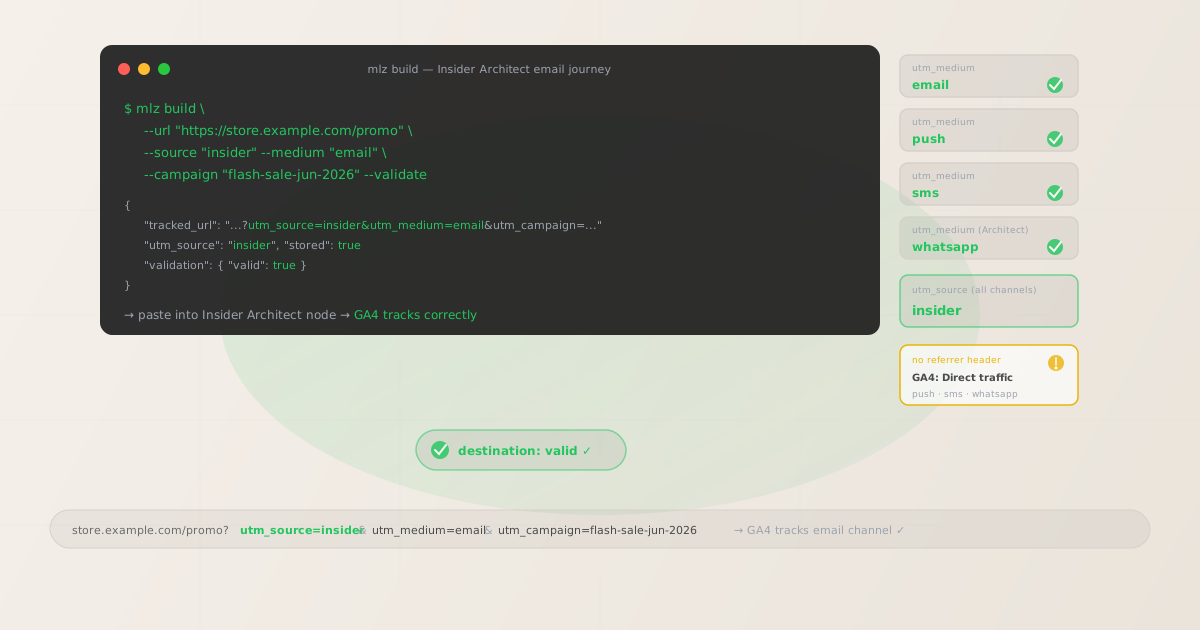
Insider is a cross-channel Growth Management Platform (GMP) used by retail, e-commerce, and travel brands to orchestrate personalized customer journeys across email, push notifications, in-app messages, SMS, WhatsApp, and web personalization (AI-powered banners, overlays, and product recommendations). The UTM challenge with Insider is the same one affecting every multi-channel engagement platform: push notifications (mobile and web), SMS, and WhatsApp have no HTTP referrer header. When a user taps a push notification, clicks an SMS link, or opens a URL from a WhatsApp message, the browser opens the destination URL without any referrer, and GA4 classifies the session as Direct traffic. The only reliable fix is to include UTM parameters in every action URL, SMS link, and WhatsApp message link before building the campaign in Insider's Architect journey designer. Build each tracked URL with mlz build --source "insider" --medium "push" (or the channel-appropriate medium), add --validate to confirm the destination resolves correctly, and paste the resulting tracked_url into the Insider campaign editor before the journey activates.
Why Insider UTM tracking requires careful setup
Insider sends campaigns across six channel types, and each has a different behavior in terms of GA4 attribution. Email sent from Insider carries a referrer in many email clients when a user clicks a link — GA4 can read the referrer and attribute the session to email. But Insider does not automatically append UTM parameters to email links, so attribution depends on the referrer being present and correctly interpreted, which varies across email clients, device types, and privacy settings. Relying on the referrer alone results in some email sessions appearing as Direct and others as Referral in GA4 — fragmented attribution that underreports email's actual contribution.
For push notifications (both mobile app push and web push from Insider), there is no referrer at all. The notification payload contains the destination URL, and when a user taps the notification, the device opens that URL without passing a referrer header to the destination server. Without UTM parameters in the push notification action URL, every push-driven session in GA4 appears as Direct.
Insider's web personalization features — Smart Recommender (product recommendation widgets), banners, overlays, and exit-intent popups — generate links to product pages and landing pages directly on the website. When a visitor clicks an Insider-powered recommendation widget or banner CTA on the site, the resulting page view is attributed to Direct or Referral in GA4 because the click originates from the same domain. Adding UTM parameters to the destination URLs in these web personalization elements allows GA4 to identify them as Insider-driven traffic with a distinct campaign attribution.
| Insider channel | Referrer in GA4? | Without UTM parameters | Recommended utm_medium |
|---|---|---|---|
| Sometimes (unreliable) | Email or Direct depending on client | ✓ email |
|
| Mobile push notification | No | Direct in GA4 | ✓ push |
| Web push notification | No | Direct in GA4 | ✓ web-push |
| SMS | No | Direct in GA4 | ✓ sms |
| No | Direct in GA4 | ✓ whatsapp |
|
| In-app message (web URL) | No | Direct in GA4 | ✓ in-app |
| Web personalization (banners, overlays) | Same-domain (Referral or Direct) | Direct or self-referral in GA4 | ✓ web-personalization |
Building tracked Insider campaign URLs with mlz build
Build your tracked URLs with mlz build before opening Insider's campaign editors or Architect journey designer. For push notifications, paste the tracked_url into the notification's Action URL or Deep Link URL field in the push editor. For email, paste it into each hyperlink in the email HTML editor. For SMS and WhatsApp, paste the tagged URL as the message link before Insider's link shortening wraps it. For in-app messages with web URL CTAs, enter the tagged URL in the CTA destination field. For web personalization elements (banners, overlays, recommendation widget CTAs), enter the tagged URL as the element's click-through destination. Add --validate to each build command to confirm the destination URL resolves correctly before the campaign activates.
# Email campaign
$ mlz build \
  --url "https://store.example.com/flash-sale" \
  --source "insider" \
  --medium "email" \
  --campaign "flash-sale-jun-2026" \
  --validate

{
  "tracked_url": "https://store.example.com/flash-sale?utm_source=insider&utm_medium=email&utm_campaign=flash-sale-jun-2026",
  "params": {
    "utm_source": "insider",
    "utm_medium": "email",
    "utm_campaign": "flash-sale-jun-2026"
  },
  "stored": true
}

# Push notification for the same campaign
$ mlz build \
  --url "https://store.example.com/flash-sale" \
  --source "insider" \
  --medium "push" \
  --campaign "flash-sale-jun-2026" \
  --validate

{
  "tracked_url": "https://store.example.com/flash-sale?utm_source=insider&utm_medium=push&utm_campaign=flash-sale-jun-2026"
}

# Web personalization overlay CTA (same campaign, onsite medium)
$ mlz build \
  --url "https://store.example.com/flash-sale" \
  --source "insider" \
  --medium "web-personalization" \
  --campaign "flash-sale-jun-2026" \
  --validate

{
  "tracked_url": "https://store.example.com/flash-sale?utm_source=insider&utm_medium=web-personalization&utm_campaign=flash-sale-jun-2026"
}
In GA4, filter by utm_campaign=flash-sale-jun-2026 to see all sessions from this Insider campaign across email, push, and web personalization in a single campaign report view. Pivot on utm_medium to compare which channel drove the most sessions and conversions. A consistent utm_campaign slug across all channels groups every touchpoint into one campaign row, while distinct utm_medium values allow per-channel attribution analysis and custom channel grouping in GA4.
UTM tracking for Insider Architect journeys
Insider's Architect is its visual customer journey orchestration tool — the primary interface for building multi-step, multi-channel automation sequences. An Architect journey can include email, push, in-app message, SMS, and WhatsApp nodes triggered by events (purchase, browse abandonment, cart abandonment, account creation) or attributes (inactivity, segment membership, lifecycle stage). For each Architect journey node that delivers a message with a URL to an external destination, build a separate tracked URL using a consistent utm_campaign slug for the whole journey and matching utm_medium to the channel of each node. Use utm_content to identify individual Architect nodes so GA4 can show which step in the journey sequence drove each conversion.
# Node 1: Push notification (1 day after purchase)
$ mlz build \
  --url "https://store.example.com/accessories" \
  --source "insider" \
  --medium "push" \
  --campaign "post-purchase-upsell" \
  --content "push-day1" \
  --validate

{
  "tracked_url": "https://store.example.com/accessories?utm_source=insider&utm_medium=push&utm_campaign=post-purchase-upsell&utm_content=push-day1"
}

# Node 2: Email (3 days after purchase)
$ mlz build \
  --url "https://store.example.com/accessories" \
  --source "insider" \
  --medium "email" \
  --campaign "post-purchase-upsell" \
  --content "email-day3" \
  --validate

{
  "tracked_url": "https://store.example.com/accessories?utm_source=insider&utm_medium=email&utm_campaign=post-purchase-upsell&utm_content=email-day3"
}

# Node 3: WhatsApp with bundle offer (7 days after purchase)
$ mlz build \
  --url "https://store.example.com/bundle-offer" \
  --source "insider" \
  --medium "whatsapp" \
  --campaign "post-purchase-upsell" \
  --content "wa-day7-bundle" \
  --validate

{
  "tracked_url": "https://store.example.com/bundle-offer?utm_source=insider&utm_medium=whatsapp&utm_campaign=post-purchase-upsell&utm_content=wa-day7-bundle"
}
With this tagging structure, GA4's campaign report for utm_campaign=post-purchase-upsell shows all upsell revenue attributable to this Insider Architect journey across push, email, and WhatsApp nodes. The utm_content dimension identifies which Architect step was the last touchpoint before the upsell conversion. Use this data to optimize the journey: if email-day3 drives the most upsell conversions, consider adding a second email node or adjusting the timing of the push and WhatsApp nodes.
Insider UTM tracking gotchas
- Insider's web personalization links create self-referral sessions in GA4 without UTM parameters
- Insider's Smart Recommender, In-App Messages (web), and web banners are served on your website's pages through the Insider tag (JavaScript snippet). When a visitor clicks a recommendation widget or banner CTA, the destination page is typically another page on the same domain. GA4 treats this as a self-referral — it may record the session as a new session with a Direct source, or continue the existing session depending on whether the destination domain matches the referring domain's configuration in GA4. Adding UTM parameters to Insider web personalization CTA URLs creates a distinct attribution event. Build tracked URLs with
utm_source=insider&utm_medium=web-personalizationand enter them as the CTA destination in each web personalization element. Add your domain to GA4's referral exclusion list (Admin > Data Streams > Configure Tag Settings > Unwanted Referrals) to prevent Insider's redirect domains from creating session interruptions. - Insider's Smart Recommender generates product URLs dynamically — static UTMs may not work
- Insider's Smart Recommender generates product recommendation links at render time based on each visitor's personalization profile. Each product link points to a different product page URL, which makes it impractical to pre-build a static tracked URL for each recommendation. For Smart Recommender widgets, Insider's configuration allows you to append a static UTM string as a URL suffix to all recommendation links generated by the widget — configure this in the Smart Recommender settings as a URL parameter append rule:
utm_source=insider&utm_medium=web-personalization&utm_campaign=recommender-[zone-name]. For static-destination web personalization elements (banner CTAs, overlay CTAs), usemlz buildto pre-build the tagged destination URL and confirm it resolves correctly with--validate. - Insider's email link click-tracking may wrap your UTM-tagged URLs in a redirect
- Insider email campaigns include click-tracking that wraps all email links through an Insider redirect URL for click count measurement. The final destination URL (including its UTM parameters) is encoded in the Insider redirect URL. In most cases, the redirect preserves all query string parameters including UTM values when the user arrives at the destination. Confirm this by building a test email link with
mlz build --validateand opening the resulting URL from a real Insider email — verify that GA4 records the session with the correctutm_source=insider,utm_medium=email, and campaign values. If the redirect strips UTM parameters, check Insider's link-tracking configuration or contact Insider support for the appropriate parameter-passing option. - Insider push notifications support both web push and app push with different URL types
- Insider sends two types of push notifications: web push (browser notifications for website visitors who have opted in) and app push (mobile push to users of your iOS or Android app). Web push notifications open a browser tab directly — use
utm_medium=web-pushfor web push action URLs. App push notifications can link to either a deep link (in-app screen) or a web URL opened in the device browser — useutm_medium=pushfor app push URLs that open web destinations. Deep links to in-app screens do not generate web sessions in GA4, so UTM parameters on deep links only take effect if the app explicitly reads them and fires a GA4 event. For app push notifications pointing to web URLs, always useutm_medium=pushwith a validated URL. - Insider's A/B testing in Architect may require distinct utm_content values per variant
- Insider Architect journeys support A/B testing at individual nodes — for example, testing two versions of a push notification with different copy or images. If both variants link to the same destination URL but with different copy, you may want to track which variant drove more conversions in GA4. Build separate tracked URLs for each variant with distinct
utm_contentvalues:--content "push-variant-a"and--content "push-variant-b". This requires configuring Insider to use the appropriate variant URL for each branch of the A/B test node in Architect. Without distinctutm_contentvalues, GA4 cannot differentiate between conversions driven by each variant.
Insider UTM naming conventions
Recommended UTM parameter values for Insider, aligned with GA4 channel reporting and a lowercase-hyphenated taxonomy:
- utm_source:
insiderfor all campaigns sent from the Insider Growth Management Platform across all channels. Always lowercase, single word. A single source value for all Insider channels makes it easy to filter GA4 to see all Insider-attributed traffic, then pivot onutm_mediumfor channel breakdown. Avoid compound source values likeinsider-pushorinsider-email— the channel belongs inutm_medium. - utm_medium: Match the delivery channel —
emailfor email campaigns and Architect email nodes;pushfor mobile app push notifications;web-pushfor web browser push notifications;smsfor SMS messages;whatsappfor WhatsApp Business messages;in-appfor in-app message CTAs linking to web URLs;web-personalizationfor banners, overlays, and Smart Recommender CTAs on the website. GA4's default channel grouping does not includepush,web-push,whatsapp,in-app, orweb-personalization— add custom channel grouping rules (Admin > Data Display > Channel Groups) for each medium value. - utm_campaign: A consistent slug per campaign or Architect journey. For broadcast campaigns:
flash-sale-jun-2026,new-arrivals-jun,winback-jun-2026. For Architect journeys:post-purchase-upsell,cart-abandon-journey,onboarding-journey,browse-abandon-journey. Use the same slug across all channel nodes in an Architect journey so GA4 groups all touchpoints into one campaign row. - utm_content: Architect journey node identifier or A/B variant label. For multi-step journeys:
push-day1,email-day3,wa-day7-bundle. For A/B test variants:variant-a,variant-b. For web personalization elements:homepage-banner,exit-overlay,recommender-pdp. Omit for single-message campaigns with no variants. - utm_term: Rarely used for Insider campaigns. Reserve for cases where the same Architect journey targets meaningfully different audience segments:
utm_term=vip,utm_term=lapsed-60d,utm_term=new-customer.
See the UTM naming conventions guide for the full cross-platform reference and the UTM tracking for developers guide for programmatic generation and validation at scale.
FAQ
- Does Insider automatically add UTM parameters to campaign links?
- No. Insider does not automatically append UTM parameters to push notification action URLs, SMS links, WhatsApp message links, or in-app message CTA URLs. For email campaigns, Insider applies click-tracking redirect wrapping for its own click measurement, but this does not add UTM parameters for GA4 attribution. For web personalization elements (banners, overlays), Insider does not add UTM parameters to destination URLs. You need to manually build tracked URLs with UTM parameters and enter them in the appropriate Insider campaign editors and Architect journey nodes. Use
mlz build --source "insider" --medium "[channel]" --campaign "your-slug" --validatefor each URL. - What utm_source should I use for Insider?
- Use
utm_source=insiderfor all campaigns across all Insider channels (email, push, SMS, WhatsApp, in-app, web personalization). A single source value makes it easy to filter GA4 to see all Insider-attributed traffic in one report, then break it down byutm_mediumfor channel comparison. Avoid channel-specific source values likeutm_source=insider-push— the channel distinction belongs inutm_medium. - How do I track Insider Architect journeys (multi-step automations) in GA4?
- Use a consistent
utm_campaignslug for all nodes in the journey, matchutm_mediumto the channel of each node (push, email, sms, whatsapp, in-app), and useutm_contentto identify each node (e.g.,push-day1,email-day3,wa-day7-bundle). In GA4, filter byutm_campaignto see all sessions from the Architect journey across all channels, then pivot onutm_mediumto compare channel performance and onutm_contentto compare individual node performance. - How do I track Insider web personalization elements in GA4?
- For static-destination web personalization elements (banner CTAs, overlay CTAs), build tracked URLs with
mlz build --source "insider" --medium "web-personalization" --campaign "element-name" --validateand enter thetracked_urlas the CTA destination in the Insider personalization editor. For Smart Recommender widgets that generate product links dynamically, configure Insider's Smart Recommender settings to append a static UTM query string (e.g.,utm_source=insider&utm_medium=web-personalization&utm_campaign=recommender) to all generated product URLs. Also add your site domain to GA4's referral exclusion list to prevent Insider's redirect domains from creating self-referral session interruptions. - How do I validate Insider campaign URLs before they go live?
- Run
mlz build --url "your-destination" --source "insider" --medium "[channel]" --campaign "your-slug" --validatefor each campaign URL before entering it in Insider. The--validateflag confirms HTTPS, resolution (200 response), redirect chain integrity, and query string preservation through any redirects — including Insider's click-tracking redirects if applicable. For email campaign landing pages that will also be promoted on other channels, runmlz inspect "your-tracked-url"to verify OG tags, Twitter Card metadata, and viewport configuration before the campaign sends. See the campaign link preflight check guide for the complete pre-launch validation workflow.
Recommended posts
Build Insider campaign links from the terminal
Use mlz build --source "insider" --medium "email" (or the channel-appropriate medium) to generate tracked URLs for every Insider campaign and Architect journey node before entering them in the Insider editor. Build a separate URL per channel node within each Architect journey — using the same --campaign slug but a different --medium for each channel step. Add --content "push-day1", --content "email-day3", etc. to identify individual Architect nodes in GA4 reports. Add --validate to confirm each destination URL resolves correctly and that UTM parameters are preserved through any redirect chain before the Architect journey goes live.
1,000 links/month free. No credit card.
Your API key
Save this now — it won't be shown again.
npm install -g missinglinkz
Free plan: 1,000 links/month. No credit card. See the UTM tracking for developers guide for the full programmatic workflow including API and MCP integration.