UTM Tracking for Everflow: How to Build and Validate Campaign Links
Everflow is a partner marketing platform used by brands, agencies, and media companies to manage affiliate programs, influencer campaigns, and referral partnerships. Everflow tracks every partner click through its own network of tracking servers — recording click-level attribution data including partner ID, sub-affiliate ID, placement, and its own internal click ID — before redirecting traffic to the brand's offer page or landing page. The result is a redirect chain: partner click → Everflow tracking server → brand destination URL. This architecture is where UTM tracking for Everflow gets complicated. Everflow's own attribution system relies on its internal click IDs and server-side conversion events for reporting inside the Everflow dashboard. GA4, Triple Whale, and any analytics tool that fires on your brand's page reads UTM parameters from the URL at page load — completely independently of Everflow's tracking. For those tools to correctly attribute partner-driven traffic, UTM parameters must be present on the destination URL (the offer page URL configured in Everflow) and must survive the redirect chain from Everflow's servers to the final page where the analytics pixel fires. Use mlz build to generate correctly normalized, per-partner UTM destination URLs for the offer URL field in Everflow's campaign configuration. Use mlz check to validate the full redirect chain before each offer goes live in your partner network.
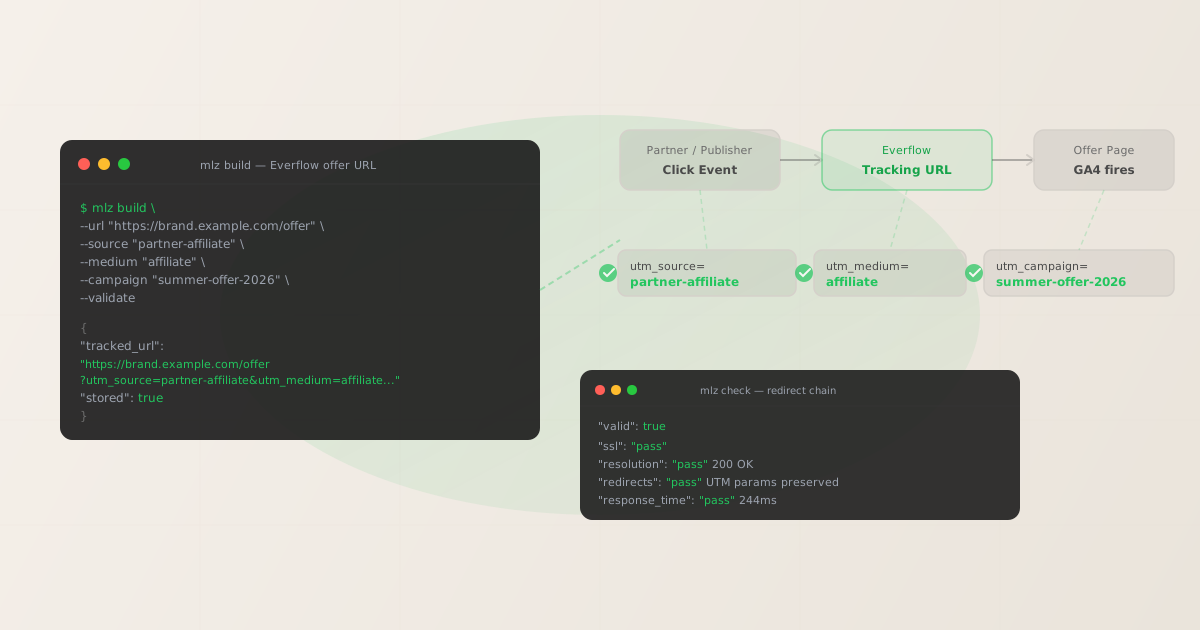
How Everflow partner tracking interacts with UTM parameters
Everflow's tracking model is built around a redirect architecture. When a brand configures an offer in Everflow, it specifies the destination URL — the brand's landing page or product page where the offer traffic should land. Everflow generates a tracking URL for each partner: a unique link that routes through Everflow's servers, records the click event with partner-specific metadata (partner ID, sub IDs, campaign ID, click timestamp), and then redirects to the brand's destination URL. That redirect is where the two tracking systems diverge.
Everflow's internal attribution is built from the partner click record it captures at its tracking server. Conversion events are reported back to Everflow via server-side postback or Everflow's JavaScript pixel on the thank-you page, using the click ID Everflow assigned. GA4's attribution is built from the URL the browser loads at the destination page — specifically the UTM parameters in that URL. If the destination URL configured in Everflow's offer does not include UTM parameters, GA4 sees a clean URL and classifies the session as Direct traffic. If UTM parameters are present but Everflow's redirect strips the query string, the same result: Direct traffic in GA4. Everflow's dashboard shows full partner attribution because its tracking runs on the click, not on page load. The attribution failure is only visible when you compare Everflow partner click volume against GA4 session counts for the corresponding landing page.
The table below shows the four most common UTM tracking failure modes in Everflow programs and their GA4 attribution consequence:
| Scenario | What GA4 reads at offer page load | Attribution result |
|---|---|---|
| Destination URL has correct UTM params, Everflow redirect passes them through | utm_source=partner-name, utm_medium=affiliate |
✓ Affiliate channel attributed correctly |
| Destination URL in Everflow offer configured without UTM parameters | (empty) | ✗ Direct traffic in GA4 |
| All partners using the same shared destination URL (no per-partner UTM source) | One utm_source value across all partners |
✗ Undifferentiated affiliate traffic — no per-partner breakdown in GA4 |
| Offer page has a secondary redirect (CDN rewrite, A/B test, geo-targeting) that strips query strings | (empty) | ✗ Organic or Direct in GA4 |
These failures are silent in Everflow. Everflow records partner click counts correctly regardless of what happens to UTM parameters on the destination URL. The data gap surfaces as unexplained Direct traffic in GA4, usually discovered during a revenue attribution review when GA4 partner-sourced conversions don't match Everflow's conversion count. Build UTM parameters into each destination URL before configuring any Everflow offer.
Building per-partner UTM destination URLs for Everflow with mlz build
mlz build generates UTM-tagged destination URLs with normalized, lowercase-hyphenated parameter values. These are the URLs you configure in Everflow's offer destination field. For Everflow programs with multiple partners, each partner should get a distinct utm_source value so GA4 can differentiate partner traffic independently. The --validate flag checks that the destination resolves with HTTP 200 and that no redirect in the destination path strips the query string before the analytics pixel fires. Below are examples for three common Everflow partner scenarios: an affiliate partner, an influencer, and a referral program participant.
# Affiliate partner — named partner source
$ mlz build \
  --url "https://brand.example.com/offer" \
  --source "partner-affiliate" \
  --medium "affiliate" \
  --campaign "summer-offer-2026" \
  --content "coupon-20pct" \
  --validate

{
  "tracked_url": "https://brand.example.com/offer?utm_source=partner-affiliate&utm_medium=affiliate&utm_campaign=summer-offer-2026&utm_content=coupon-20pct",
  "params": {
    "utm_source": "partner-affiliate",
    "utm_medium": "affiliate",
    "utm_campaign": "summer-offer-2026",
    "utm_content": "coupon-20pct"
  },
  "destination_url": "https://brand.example.com/offer",
  "link_id": "lnk_aff_summer26_cpn20",
  "campaign_id": "cmp_summer-offer-2026",
  "stored": true,
  "created_at": "2026-06-21T09:04:18.000Z"
}

# Influencer partner — social media promotion
$ mlz build \
  --url "https://brand.example.com/offer" \
  --source "influencer-instagram" \
  --medium "influencer" \
  --campaign "summer-offer-2026" \
  --content "story-link" \
  --validate

{
  "tracked_url": "https://brand.example.com/offer?utm_source=influencer-instagram&utm_medium=influencer&utm_campaign=summer-offer-2026&utm_content=story-link",
  "params": {
    "utm_source": "influencer-instagram",
    "utm_medium": "influencer",
    "utm_campaign": "summer-offer-2026",
    "utm_content": "story-link"
  },
  "stored": true,
  "created_at": "2026-06-21T09:05:31.000Z"
}

# Referral program partner — customer referral
$ mlz build \
  --url "https://brand.example.com/offer" \
  --source "referral-program" \
  --medium "referral" \
  --campaign "summer-offer-2026" \
  --content "email-invite" \
  --validate

{
  "tracked_url": "https://brand.example.com/offer?utm_source=referral-program&utm_medium=referral&utm_campaign=summer-offer-2026&utm_content=email-invite",
  "params": {
    "utm_source": "referral-program",
    "utm_medium": "referral",
    "utm_campaign": "summer-offer-2026",
    "utm_content": "email-invite"
  },
  "stored": true,
  "created_at": "2026-06-21T09:06:44.000Z"
}
Each tracked_url from the JSON output is the URL you paste into the destination field of the corresponding Everflow offer configuration. Using a distinct utm_source per partner type — partner-affiliate, influencer-instagram, referral-program — allows GA4 to report on each partner channel independently. If you run multiple affiliates through one Everflow program, you can further differentiate using the partner's name as part of the utm_source value (partner-acmecorp, partner-widgetco), creating per-partner rows in GA4's traffic acquisition report. The stored: true field confirms the link is saved to the MissingLinkz campaign library for audit and team reference.
Validating the Everflow campaign redirect chain with mlz check
Configuring the correct destination URL in Everflow's offer settings is the first step. The second step is confirming the complete redirect chain — from Everflow's tracking server through to the final landing page — preserves UTM parameters to the point where GA4 fires. The destination URL configured in Everflow may itself have a secondary redirect: a custom domain redirect on the brand's CDN, geo-targeting middleware that rewrites the URL based on country code, or an A/B testing layer that sends traffic to variant pages. Any of these can strip query strings before the analytics pixel loads. mlz check validates the full chain.
$ mlz check "https://brand.example.com/offer?utm_source=partner-affiliate&utm_medium=affiliate&utm_campaign=summer-offer-2026"

{
  "url": "https://brand.example.com/offer?utm_source=partner-affiliate&utm_medium=affiliate&utm_campaign=summer-offer-2026",
  "valid": true,
  "checks": [
    { "check": "url_format", "status": "pass", "message": "URL format is valid." },
    { "check": "ssl", "status": "pass", "message": "URL uses HTTPS." },
    { "check": "resolution", "status": "pass", "message": "Destination responded with 200.", "details": { "status_code": 200, "response_time_ms": 244 } },
    { "check": "redirects", "status": "pass", "message": "No redirects detected." },
    { "check": "response_time", "status": "pass", "message": "Response time: 244ms.", "details": { "response_time_ms": 244 } }
  ],
  "status_code": 200,
  "response_time_ms": 244,
  "validated_at": "2026-06-21T09:12:05.000Z"
}
Run mlz check on the UTM-tagged destination URL — the exact URL with query string that Everflow will deliver partner traffic to after its tracking redirect. The redirects check is the critical result: a pass confirms no redirect in the path stripped the query string. A fail means something between the configured destination URL and the final page load is dropping UTM parameters before GA4 fires. The most common culprits in Everflow setups are CDN geo-targeting rewrites, Cloudflare Page Rules that rewrite URLs at the edge, or brand-side A/B testing layers that generate new URLs without carrying the query string forward. Fix the redirect issue, update the destination URL in Everflow's offer configuration if needed, and run mlz check again before the offer goes live in your partner network.
Everflow UTM tracking gotchas for partner program managers
- Everflow's internal click IDs are not UTM parameters — never use them in UTM fields
- Everflow assigns an internal click ID to each partner click event. This click ID is used in server-side postback URLs for conversion attribution within Everflow's platform. It is a completely separate system from UTM parameters. UTM parameters (
utm_source,utm_medium,utm_campaign,utm_content,utm_term) are read by GA4 and third-party analytics tools via JavaScript pixel at page load. Everflow's click ID is read by Everflow's server via postback after conversion. Never use Everflow's click ID token or sub-ID macros as UTM values — they produce illegible strings in GA4's traffic acquisition report and provide no useful attribution data in the analytics layer. - All partners using a single shared offer URL means GA4 cannot differentiate partner traffic
- A common Everflow configuration mistake is routing all partners to the same destination URL with the same UTM parameters — or no UTM parameters at all. In this scenario, GA4 sees all partner-driven traffic as a single undifferentiated pool. It is impossible to compare which affiliate partner, influencer, or referral source is driving the highest-quality conversions without per-partner UTM source values. Build a distinct destination URL for each partner type (and, where volume warrants, each individual partner) using
mlz buildwith a unique--sourcevalue per partner. Configure each partner's Everflow tracking offer to point to its corresponding UTM-tagged destination URL. This creates separate rows in GA4's traffic acquisition report per partner without any additional GA4 configuration. - Influencer and content creator links may go through link shorteners or bio link tools that strip UTM parameters
- Influencer partners often share Everflow tracking links via link shortening services (Bitly, TinyURL) or bio link tools (Linktree, Later) rather than sharing the raw Everflow tracking URL. When the link shortener or bio link tool redirects to the Everflow tracking URL, and then Everflow redirects to the destination URL, the chain has gained additional hops that may strip query strings. The safest approach for influencer campaigns in Everflow is to provide each influencer with the direct Everflow tracking URL and instruct them not to wrap it in a link shortener. If a link shortener is unavoidable, run
mlz checkon the shortener URL with UTM parameters to confirm the full chain passes — but note that the shortener URL is the address that goes into the ad platform or bio, not the Everflow tracking URL directly. - Everflow's geo-redirect feature can conflict with UTM query strings on the destination URL
- Everflow supports geo-based offer routing: traffic from different countries can be redirected to different destination URLs based on the visitor's country code. If geo-routing is configured at the Everflow level, the destination URL a visitor actually lands on may be different from the URL you configured with UTM parameters. The UTM-tagged destination URL for the US audience may not apply to UK traffic if UK visitors are routed to a separate UK landing page. In geo-routing setups, build separate UTM-tagged destination URLs for each geo — one per country or region — and configure the corresponding Everflow geo-routing rules to point to the correct UTM-tagged destination for each geography. Run
mlz checkon each geo-specific destination URL independently to confirm every path is clean. - Offer pages with server-side rendering or edge-side A/B testing may not preserve query strings in the final URL
- Some brand offer pages use server-side rendering (Next.js, Nuxt, SvelteKit) or edge-side A/B testing (Cloudflare Workers, Netlify Edge Functions) that rewrite the URL at the server before the browser receives the HTML response. In these architectures, the URL in the browser address bar when the page loads may be different from the URL passed to the server — specifically the query string may be stripped or moved into cookies before the page renders. GA4's JavaScript pixel reads UTM parameters from the URL in the browser address bar at page load. If server-side rewrites strip the query string, GA4 sees a clean URL. Confirm with your engineering team that the offer page's server or edge middleware passes query strings through to the final rendered page, then run
mlz checkto verify before any Everflow partner campaign goes live.
FAQ
- Where do I put UTM parameters in Everflow?
- Put UTM parameters in the destination URL — the offer page URL you configure in each Everflow offer's destination field. Everflow generates partner tracking URLs that route partner clicks through Everflow's servers first. Those tracking URLs are what partners share or embed in their content. After Everflow's tracking server records the click, it redirects the user to your destination URL. GA4 reads UTM parameters from the URL the browser lands on at the final destination. Build your destination URL with
mlz buildto get a correctly normalized UTM-tagged URL, then paste thetracked_urloutput into Everflow's offer destination field. The Everflow partner tracking URL itself does not need UTM parameters — that is the tracking intermediary, not the final page where analytics pixels fire. - How do I differentiate between multiple affiliate partners in GA4 when they all use Everflow?
- Use a distinct
utm_sourcevalue for each partner. If you have three affiliate partners — AcmeCorp, WidgetCo, and BestDeals — build three separate destination URLs withmlz build: one with--source "partner-acmecorp", one with--source "partner-widgetco", and one with--source "partner-bestdeals". Configure each partner's Everflow offer to use their corresponding UTM-tagged destination URL. GA4 will report each partner as a separate row in its traffic and conversion reports, enabling per-partner ROI analysis without any additional GA4 configuration. For large affiliate programs with dozens of partners, this approach scales with amlz buildscript that loops through a partner list CSV and generates a unique destination URL for each row. - Can Everflow partner tracking and GA4 attribution run simultaneously without conflict?
- Yes — Everflow and GA4 are completely independent attribution systems. Everflow records click data via its tracking server and matches conversions via server-side postback using its internal click ID. GA4 records sessions via JavaScript pixel on the landing page and attributes them using UTM parameters in the URL at page load. Both run in parallel on the same user session without conflict. A correctly configured Everflow offer — where the destination URL contains properly formatted UTM parameters that survive Everflow's redirect — feeds both Everflow's click record and GA4's session attribution simultaneously. The same applies to Triple Whale and other analytics tools that read UTM parameters from the landing page URL.
- How do I validate that Everflow's redirect passes UTM parameters to my offer page?
- Run
mlz checkon the UTM-tagged destination URL — the exact URL with query string that Everflow will deliver traffic to after its tracking redirect. Example:mlz check "https://brand.example.com/offer?utm_source=partner-affiliate&utm_medium=affiliate&utm_campaign=summer-offer-2026". Theredirectscheck in the output confirms whether any redirect in the destination URL's own chain stripped the query string. Note that this validates the destination URL path only — not Everflow's internal tracking server redirect. To test the full Everflow tracking chain including Everflow's own redirect, click a live partner tracking URL in a browser with the browser's developer tools Network tab open, and confirm the final URL that loads contains the UTM query string. - What UTM medium should I use for different partner types in Everflow?
- Use
utm_medium=affiliatefor traditional affiliate partners (coupon sites, content publishers, comparison sites). Useutm_medium=influencerfor social media influencers and content creators. Useutm_medium=referralfor customer referral program participants. Useutm_medium=partnerfor strategic business-to-business partners. These values keep partner traffic cleanly separated from paid media (cpc,paid-social), organic channels (organic), and email (email) in GA4's Default Channel Grouping and attribution reports.
Recommended posts
Build Everflow-compatible partner destination URLs and validate every redirect chain
mlz build generates correctly normalized, per-partner UTM destination URLs to configure in Everflow's offer settings. mlz check validates the full redirect chain — confirming UTM parameters survive from the destination URL to the offer page where GA4 and other analytics tools fire.
1,000 links/month free. No credit card.
Your API key
Save this now — it won't be shown again.
npm install -g missinglinkz
Free plan: 1,000 links/month. No credit card. See the UTM tracking for developers guide for the full programmatic workflow including API and MCP integration.