UTM Tracking for Commission Factory: How to Build and Validate Affiliate Campaign Links
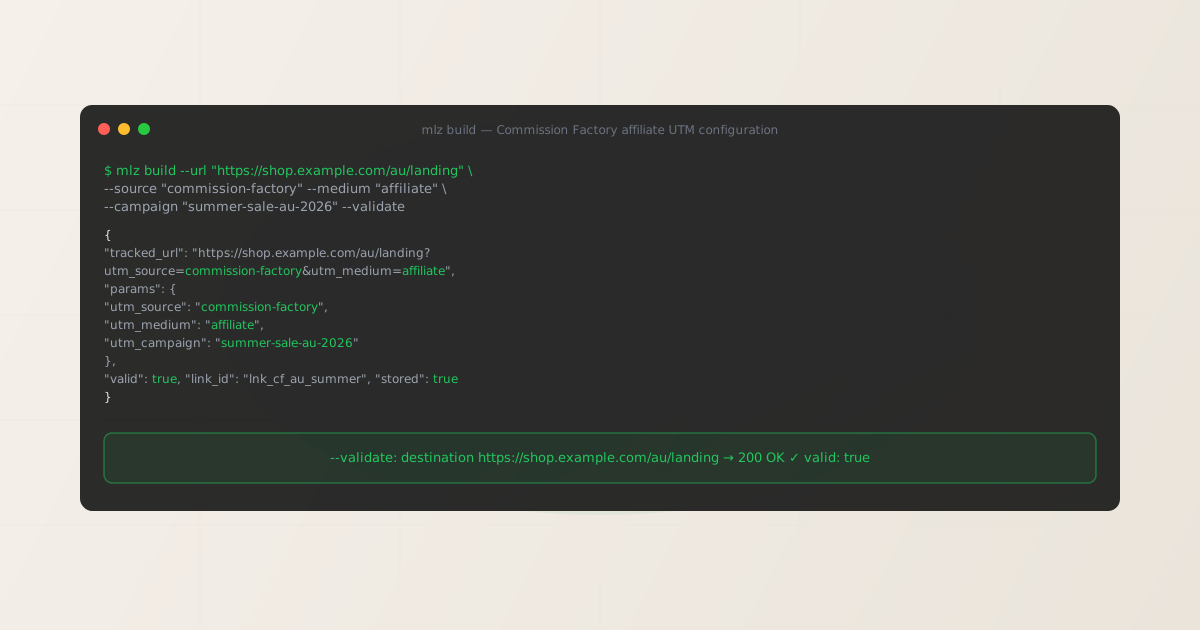
To add UTM tracking for Commission Factory, add UTM parameters to the advertiser destination URL you configure in your CF programme settings — not to the publisher-facing affiliate links that Commission Factory generates. GA4 reads UTM parameters from the landing page URL after Commission Factory’s tracking redirect delivers the visitor to your configured destination. Use MissingLinkz mlz build to generate a normalized destination URL with consistent, lowercase-hyphenated UTM values and mlz check to confirm the Commission Factory redirect chain delivers those parameters intact to your landing page. The silent failure mode: Commission Factory’s tracking redirect operates independently from GA4 UTM tracking, but advertiser-side server configurations — HTTP-to-HTTPS upgrade redirects, CDN rewrites, e-commerce platform canonical URL enforcement — can strip query parameters between Commission Factory’s delivery and the page load that GA4 fires on. A parameter format checker cannot detect this. mlz check follows the full chain from your destination URL and confirms parameters survive every hop.
How Commission Factory’s tracking architecture interacts with UTM parameters
Commission Factory is an affiliate marketing network headquartered in Sydney, Australia, with strong coverage across Australia, New Zealand, and Southeast Asia. Founded in 2011, it connects advertisers with a publisher network that includes content sites, cashback platforms, coupon affiliates, influencers, and comparison services. Commission Factory is one of the dominant affiliate networks in the ANZ market and operates the commissionfactory.com platform.
When a publisher promotes a Commission Factory programme via their affiliate link, the click routes through Commission Factory’s tracking infrastructure, which records the click event for commission attribution purposes, and then redirects the browser to the advertiser’s configured destination URL. Commission Factory’s attribution system operates separately from GA4 UTM tracking and does not depend on or interfere with UTM parameters on the destination URL.
The consequence for UTM tracking: UTM parameters belong on the destination URL you configure in Commission Factory’s advertiser portal, not on the publisher-facing affiliate tracking links that Commission Factory generates. Paste the UTM-tagged destination URL generated by mlz build into your programme’s destination URL field. For a broader explanation of how affiliate network redirects interact with UTM parameters, see the UTM tracking for developers guide.
Building Commission Factory destination URLs with mlz build
The most common UTM data quality issue in Commission Factory programmes run across multiple markets is casing inconsistency: the Australian team uses utm_source=commission-factory, the NZ team uses utm_source=CommissionFactory, and a third configuration introduces utm_source=CF. GA4 is case-sensitive and records all three as separate sources, fragmenting Affiliate channel attribution across your reports. mlz build eliminates this by enforcing lowercase-hyphenated values from structured input regardless of what the operator types.
The standard naming convention for Commission Factory programmes is utm_source=commission-factory, utm_medium=affiliate, and utm_campaign=[programme-name-or-season]. Use utm_content to differentiate between creative types, publisher categories, or promotional events within the same programme. For advertisers running separate Commission Factory programmes for different markets, use a market-specific source value such as utm_source=commission-factory-au or utm_source=commission-factory-nz to enable cross-market attribution in GA4.
$ mlz build \
  --url "https://shop.example.com/au/landing" \
  --source "commission-factory" \
  --medium "affiliate" \
  --campaign "summer-sale-au-2026" \
  --content "cashback-publishers" \
  --validate

{
  "tracked_url": "https://shop.example.com/au/landing?utm_source=commission-factory&utm_medium=affiliate&utm_campaign=summer-sale-au-2026&utm_content=cashback-publishers",
  "params": {
    "utm_source": "commission-factory",
    "utm_medium": "affiliate",
    "utm_campaign": "summer-sale-au-2026",
    "utm_content": "cashback-publishers"
  },
  "destination_url": "https://shop.example.com/au/landing",
  "link_id": "lnk_cf_au_s26",
  "campaign_id": "cmp_summer-sale-au-2026",
  "stored": true,
  "created_at": "2026-07-04T09:00:00.000Z"
}
The tracked_url value is what you paste into the Destination URL or Landing URL field in Commission Factory’s advertiser portal when configuring your programme. For market-specific programmes, generate a distinct destination URL per market using a market-specific source or content value:
mlz build --url "https://shop.example.com/nz/landing" --source "commission-factory-nz" --medium "affiliate" --campaign "summer-sale-nz-2026"
For naming conventions and how consistent casing prevents GA4 data fragmentation across affiliate sources, see the UTM naming conventions guide. To generate destination URLs programmatically for large Commission Factory product catalogues or multi-market programmes via the REST API, see how to build UTM links programmatically.
Validating the Commission Factory redirect chain with mlz check
Once you have a UTM-tagged destination URL, validate it end-to-end with mlz check before entering it into Commission Factory’s advertiser portal. mlz check follows the complete redirect chain from your destination URL, confirms the server responds with a 200 status code, and verifies that query parameters are not stripped at any intermediate hop. Run this before your Commission Factory programme activates, and re-run it after any infrastructure change that touches URL handling on your site — particularly after deploying CDN configuration changes, updating your e-commerce platform, or making changes to server-side redirect rules.
$ mlz check "https://shop.example.com/au/landing?utm_source=commission-factory&utm_medium=affiliate&utm_campaign=summer-sale-au-2026"

{
  "url": "https://shop.example.com/au/landing?utm_source=commission-factory&utm_medium=affiliate&utm_campaign=summer-sale-au-2026",
  "valid": true,
  "checks": [
    { "check": "url_format", "status": "pass", "message": "URL format is valid." },
    { "check": "ssl", "status": "pass", "message": "URL uses HTTPS." },
    { "check": "resolution", "status": "pass", "message": "Destination responded with 200.", "details": { "status_code": 200, "response_time_ms": 218 } },
    { "check": "redirects", "status": "pass", "message": "No redirects detected." },
    { "check": "response_time", "status": "pass", "message": "Response time: 218ms.", "details": { "response_time_ms": 218 } }
  ],
  "status_code": 200,
  "response_time_ms": 218,
  "validated_at": "2026-07-04T09:01:00.000Z"
}
A valid: true result means the destination URL resolves correctly and query parameters survive the full redirect chain to the final page load. If valid is false, the checks array identifies the specific failing hop. The most common failure modes for Commission Factory programmes are server-side redirect configurations that normalize or strip query strings, HTTP-to-HTTPS upgrade redirects on market-specific subdomains that do not preserve query parameters, and e-commerce platform canonical URL enforcement on deep-linked product or category pages. For a detailed walkthrough of diagnosing redirect chain failures, see how to check if a redirect strips UTM parameters.
Commission Factory UTM tracking gotchas for advertisers
- Configure UTM parameters on the destination URL, not on the publisher affiliate link
- Commission Factory generates publisher-facing tracking links controlled by the platform. As an advertiser, you do not directly modify the structure of those publisher links. The configuration point you own is the Destination URL or Landing URL field in Commission Factory’s advertiser portal for your programme. Paste the UTM-tagged URL generated by
mlz buildinto that field. When a publisher’s Commission Factory link is clicked, the network routes through its tracking infrastructure and forwards the visitor to your configured destination URL, delivering the UTM parameters to your landing page where GA4 fires. - Casing inconsistency across market teams fragments GA4 Affiliate reporting
- Commission Factory programmes running across Australia, New Zealand, and Southeast Asia are often managed by separate regional teams, each entering destination URLs manually into the advertiser portal. This introduces casing variations:
utm_source=CommissionFactoryfrom one team,utm_source=commission-factoryfrom another, andutm_source=CFfrom a third. GA4 is case-sensitive and records these as separate sources, fragmenting Affiliate channel attribution and complicating cross-market ROI analysis.mlz buildautomatically lowercases all input values and replaces spaces with hyphens, producing consistent output regardless of input. For the full explanation of GA4 case sensitivity, see are UTM parameters case sensitive in GA4? - Market-specific landing pages may have different server-side redirect configurations
- Advertisers running Commission Factory programmes in multiple ANZ and APAC markets often serve market-specific landing pages from regional subdomains or country-specific URL paths. These regional pages may have different server-side redirect configurations compared to the primary domain — particularly if regional subdomains were deployed at different times or use different hosting infrastructure. A redirect rule that strips query strings on the regional subdomain will silently drop UTM parameters before GA4 records the session. Validate each market-specific destination URL separately using
mlz checkbefore entering it into Commission Factory’s advertiser portal. - Deep-linked product and category pages may trigger e-commerce platform redirects
- When using deep links to specific product pages or category pages as Commission Factory destination URLs, the e-commerce platform (Shopify, Magento, BigCommerce, and others) may enforce canonical URL patterns that redirect the deep-linked URL to a canonical version. This canonical redirect may or may not preserve the query string depending on how the platform and its installed apps or themes handle URL normalization. Run
mlz checkagainst any deep-linked destination URL before entering it into Commission Factory to confirm UTM parameters survive to the canonical page load. - HTTP-to-HTTPS upgrades on regional servers can strip query parameters
- Advertisers operating in APAC markets where HTTPS adoption was more recent sometimes have regional subdomains or country-specific landing pages that still perform HTTP-to-HTTPS upgrades via server-side redirects. Redirect rules configured before query-string preservation became standard may strip UTM parameters during the HTTPS upgrade hop. Test any regional landing page URL — particularly those on market-specific subdomains — with
mlz checkbefore using it as a Commission Factory destination URL.
Frequently asked questions
- Where do I add UTM parameters in Commission Factory?
- In Commission Factory’s advertiser portal, navigate to your programme settings and find the Destination URL or Landing URL field. This is where you paste the UTM-tagged URL generated by
mlz build. The URL format is:https://shop.example.com/au/landing?utm_source=commission-factory&utm_medium=affiliate&utm_campaign=summer-sale-au-2026. Commission Factory will use this as the final destination when routing publisher clicks through its tracking redirect. For programmes with multiple creative types or product categories, useutm_contentto differentiate them within the same programme URL. - What utm_source value should I use for Commission Factory traffic?
- Use
utm_source=commission-factoryas the baseline for all Commission Factory network traffic. For advertisers running separate programmes on Commission Factory for different markets who want market-level attribution in GA4, useutm_source=commission-factory-au,utm_source=commission-factory-nz, and so on. Keep all values lowercase and hyphenated —mlz buildenforces this automatically. Setutm_medium=affiliateconsistently across all affiliate network traffic so GA4’s default channel grouping correctly identifies the Affiliate channel. - Does Commission Factory strip UTM parameters from my destination URL?
- Commission Factory’s tracking redirect is designed to forward the advertiser-configured destination URL intact, including all query parameters. Parameter stripping typically occurs on the advertiser’s server side after Commission Factory delivers the visitor: server-side redirect rules that normalize query strings, HTTP-to-HTTPS upgrade redirects that do not preserve the query string, or e-commerce platform canonical URL enforcement on deep-linked product pages. Run
mlz checkagainst your destination URL to confirm parameters survive the full chain to the final page load before activating your Commission Factory programme. - Can I validate Commission Factory links programmatically across a large product catalogue?
- For programmes with a large number of product-specific deep-link destination URLs, automated validation is a practical safeguard. Use
mlz checkin a shell script that tests each destination URL before it is submitted to Commission Factory, failing the submission if any URL returnsvalid: false. This prevents infrastructure changes — CDN configuration updates, e-commerce platform upgrades, redirect rule deployments — from silently breaking affiliate attribution across active Commission Factory programmes. For a complete implementation guide including GitHub Actions workflow templates, see automating campaign link validation in CI/CD. - Should I use a different utm_source for each Commission Factory publisher type?
- No — use a single consistent
utm_source=commission-factoryfor all traffic from the Commission Factory network. Differentiating by publisher type within the Commission Factory attribution layer is done through the platform’s own publisher ID and category reporting, not UTM parameters. UTM parameters are for GA4 attribution grouping; they should reflect the network (Commission Factory), not the individual publisher type. If you need publisher-type attribution in GA4 alongside Commission Factory network attribution, useutm_contentto segment by publisher category (e.g.,utm_content=cashbackorutm_content=content-publisher) rather than changingutm_source.
Build Commission Factory-ready UTM destination URLs and validate every redirect chain before your programme activates
mlz build generates normalized, consistently cased UTM destination URLs for your Commission Factory programme across all ANZ and APAC markets. mlz check validates the full redirect chain — catching server-side query string normalization, HTTP-to-HTTPS upgrade redirects, and e-commerce platform canonical URL enforcement that silently strip UTM parameters before GA4 fires.
1,000 links/month free. No credit card.
Your API key
Save this now — it won't be shown again.
npm install -g missinglinkz
Free plan: 1,000 links/month. No credit card. See the UTM tracking for developers guide for the full programmatic workflow.