UTM Tracking for Amazon Ads: How to Build and Validate Campaign Links
UTM tracking for Amazon Ads depends on one question: where does your ad send the user? If your destination is an Amazon product page, UTM parameters do not work — Amazon.com does not run GA4, so those tags are never read. Use Amazon Attribution instead. If your destination is your own website or landing page, standard UTM parameters work exactly as expected: use utm_source=amazon with utm_medium=cpc for Sponsored Products and Sponsored Brands, and utm_medium=display for Amazon DSP. This article covers the second case — building, validating, and managing UTM-tagged campaign links for Amazon Ads that send traffic to your own domain.
Amazon Attribution vs. UTM parameters: which to use
The most common source of confusion with Amazon Ads tracking is conflating two separate systems that serve different purposes. They are not interchangeable:
| Scenario | Ad destination | Tracking tool |
|---|---|---|
| Sponsored Products (to Amazon listing) | amazon.com product page | ✓ Amazon Attribution |
| External link pointing TO Amazon | amazon.com product page | ✓ Amazon Attribution |
| Sponsored Products (to your site) | Your landing page | ✓ UTM parameters |
| Sponsored Brands (to your site) | Your landing page | ✓ UTM parameters |
| Amazon DSP (display, to your site) | Your landing page | ✓ UTM parameters |
Amazon Attribution is Amazon's tool for measuring external traffic that flows into Amazon product pages. It generates tracking tags you append to off-Amazon links — in your email campaigns, social posts, or external ads — that point to Amazon.com. These tags feed Amazon's own reporting dashboards. They are not GA4 UTM parameters. If you add UTM parameters to a link pointing to an Amazon product page, GA4 never sees them — because your GA4 tag isn't on Amazon.com.
UTM parameters are for traffic that lands on pages where your GA4 tag is installed. If Amazon Ads drives users to your own website or a branded landing page you control, UTM parameters work normally and GA4 attributes the session correctly. This is the use case this article covers.
Some Amazon Ads campaign types — like Sponsored Display — can target audiences both on and off Amazon. Know which destination each ad type points to before choosing your tracking approach.
The correct utm_source and utm_medium for Amazon Ads
When Amazon Ads drives traffic to your own site, use these UTM values to ensure GA4 routes sessions to the correct channel groups:
| Amazon Ads campaign type | utm_source | utm_medium |
|---|---|---|
| Sponsored Products (own site destination) | amazon |
cpc |
| Sponsored Brands (own site destination) | amazon |
cpc |
| Amazon DSP (display, own site destination) | amazon |
display |
| Fire TV Ads (own site destination) | amazon |
display |
| Sponsored Display (off-Amazon, own site destination) | amazon |
display |
Use utm_source=amazon — not amz, amazon-dsp, or amazon_ads. GA4's default Paid Search channel group recognises amazon as a source when paired with utm_medium=cpc. Non-standard source values like amazon-dsp require custom channel group rules in GA4 to route correctly.
For Amazon DSP display campaigns, use utm_medium=display. GA4 routes utm_source=amazon&utm_medium=display to the Display channel group, keeping programmatic awareness spend separate from intent-based search spend in acquisition reports.
Unlike Google Ads and Microsoft Ads, Amazon does not append a click ID parameter (like gclid or msclkid) to destination URLs for off-Amazon landing pages. There is no auto-tagging equivalent for Amazon Ads to your own domain — UTM parameters are the only mechanism for GA4 attribution from Amazon Ads traffic.
Building Amazon Ads UTM links with mlz build
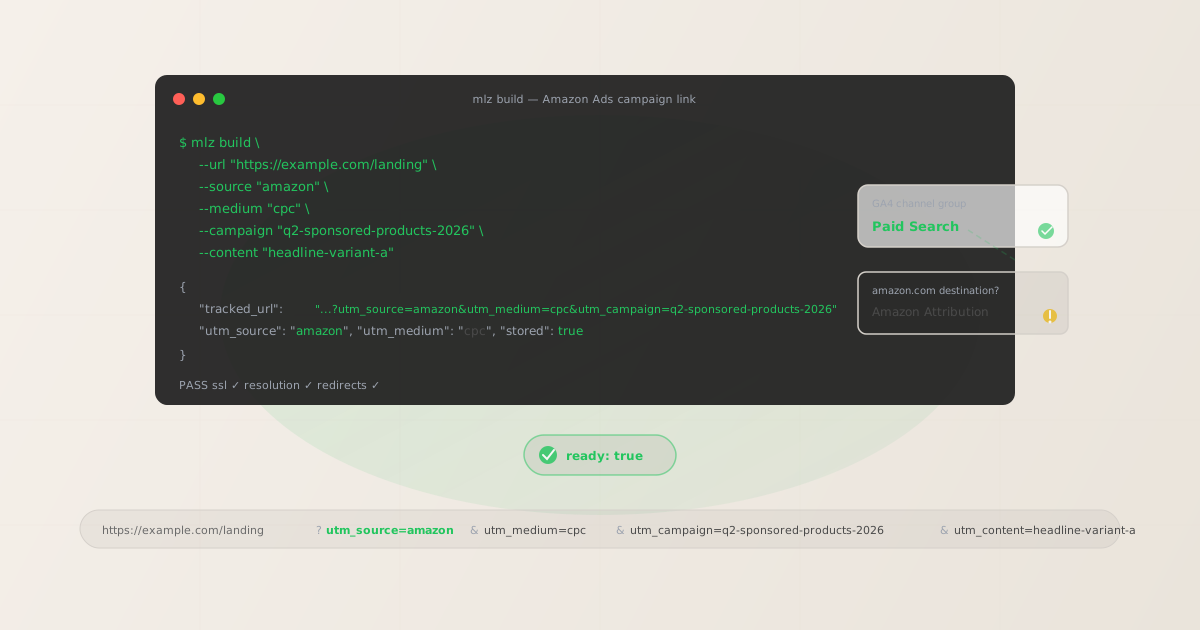
mlz build generates the tracked URL, normalises all parameter values to lowercase, and stores the link for later auditing. For Amazon Sponsored Products or Brands campaigns sending traffic to your landing page:
# Sponsored Products / Sponsored Brands — own site destination
$ mlz build \
  --url "https://example.com/landing" \
  --source "amazon" \
  --medium "cpc" \
  --campaign "q2-sponsored-products-2026" \
  --content "headline-variant-a"

{
  "tracked_url": "https://example.com/landing?utm_source=amazon&utm_medium=cpc&utm_campaign=q2-sponsored-products-2026&utm_content=headline-variant-a",
  "params": {
    "utm_source": "amazon",
    "utm_medium": "cpc",
    "utm_campaign": "q2-sponsored-products-2026",
    "utm_content": "headline-variant-a"
  },
  "link_id": "lnk_a4mx9r2k",
  "stored": true
}
For Amazon DSP retargeting display campaigns, swap --medium "cpc" for --medium "display":
# Amazon DSP — retargeting display, own site destination
$ mlz build \
  --url "https://example.com/landing" \
  --source "amazon" \
  --medium "display" \
  --campaign "q2-dsp-retargeting-2026"

{
  "tracked_url": "https://example.com/landing?utm_source=amazon&utm_medium=display&utm_campaign=q2-dsp-retargeting-2026",
  "params": {
    "utm_source": "amazon",
    "utm_medium": "display",
    "utm_campaign": "q2-dsp-retargeting-2026"
  },
  "link_id": "lnk_d7nz3x1p",
  "stored": true
}
The CLI enforces lowercase normalisation — passing --source "Amazon" or --medium "CPC" results in the lowercase canonical form in the output URL. This prevents the GA4 attribution fragmentation that occurs when the same source appears with different capitalisation across campaign variants. See the UTM naming conventions guide for the full cross-channel reference.
Validating Amazon Ads campaign links before launch
Amazon Ads reviews destination URLs when ads are submitted for approval. A URL that returns a non-200 status, redirects to a different domain, or times out causes the ad to be rejected. Run mlz build --validate to confirm the destination resolves cleanly before entering the review queue:
$ mlz build \
  --url "https://example.com/landing" \
  --source "amazon" \
  --medium "cpc" \
  --campaign "q2-sponsored-products-2026" \
  --content "headline-variant-a" \
  --validate

{
  "tracked_url": "https://example.com/landing?utm_source=amazon&utm_medium=cpc&utm_campaign=q2-sponsored-products-2026&utm_content=headline-variant-a",
  "validation": {
    "valid": true,
    "checks": [
      { "check": "url_format", "status": "pass", "message": "URL format is valid." },
      { "check": "ssl", "status": "pass", "message": "URL uses HTTPS." },
      { "check": "resolution", "status": "pass", "message": "Destination responded with 200.", "details": { "response_time_ms": 204 } },
      { "check": "redirects", "status": "pass", "message": "No redirects detected." }
    ]
  },
  "link_id": "lnk_a4mx9r2k",
  "stored": true
}
The redirect check is particularly important for Amazon Ads. If your destination URL redirects to a different domain — for example, a seasonal landing page that got unpublished and now redirects to your homepage — Amazon may reject the ad because the destination URL domain doesn't match what the user ends up on. A clean validation result means no unexpected domain hops and no approval delays. For a full pre-launch workflow including OG tag and metadata checks, see mlz publish-check.
Amazon Ads UTM tracking gotchas
- amazon.com destination = UTM parameters do nothing
- If your Sponsored Products or Sponsored Brands ad sends users to an Amazon.com product listing, adding UTM parameters to that URL accomplishes nothing for GA4 attribution. Amazon.com does not have your GA4 tag installed. The UTM parameters will appear in the URL string, but no GA4 event will fire on Amazon's page to read them. For measuring off-Amazon traffic flowing into Amazon product pages, use Amazon Attribution tags instead — these feed Amazon's own reporting dashboards and can capture impressions, clicks, and downstream Amazon purchases from external traffic sources.
- No click ID auto-tagging unlike Google or Microsoft Ads
- Google Ads appends
gclidand Microsoft Ads appendsmsclkidto destination URLs automatically when auto-tagging is enabled. Amazon Ads does not have an equivalent click ID for off-Amazon URLs. There is no automatic query parameter that Amazon appends to your landing page URLs to facilitate attribution. UTM parameters are the only mechanism available for GA4 to attribute sessions from Amazon Ads correctly — there is no fallback auto-tagging system to catch sessions where UTM tags are missing. - Sponsored Display can target on Amazon and off Amazon — know which
- Amazon Sponsored Display campaigns can serve ads both on Amazon's own pages (product detail pages, search results) and across Amazon's publisher network off Amazon. If a Sponsored Display ad sends users to your own landing page via the off-Amazon placement, UTM parameters work and GA4 will record the session. If the same campaign also drives traffic to an Amazon product page, UTM parameters are ineffective for that portion of traffic. Review the destination URL setting for each Sponsored Display campaign before applying UTM tags.
- Non-standard source values break GA4 channel groupings
- Some advertisers use
utm_source=amazon-dsp,utm_source=amz, orutm_source=amazon_ads— often to distinguish DSP traffic from Sponsored Products in the source dimension. The problem: GA4's default Paid Search channel group recognisesamazonas the source value. Non-standard variants create a new, unmatched source row in GA4's Traffic Acquisition report and do not route to Paid Search or Display channel groups without custom channel group rules. Useutm_source=amazonfor all Amazon Ads campaign types, and useutm_campaignorutm_mediumto differentiate DSP from Sponsored Products. - UTM parameters survive most redirect chains — but validate anyway
- UTM parameters are passed as query string parameters and survive standard HTTP 301/302 redirects. However, some landing page platforms, CDN edge rules, or link management systems strip unrecognised query parameters or only forward a whitelist. If your Amazon Ads destination URL passes through a redirect before landing on your page — for example, a campaign management platform's tracking URL that redirects to your landing page — validate the full chain with
mlz build --validateto confirm UTM parameters are present at the final destination. See UTM tracking best practices for the full redirect validation checklist.
Amazon Ads UTM naming conventions
Consistent naming across Amazon Ads, Google Ads, and other paid platforms is critical for clean cross-channel reporting in GA4. The recommended conventions for Amazon Ads UTM parameters:
- utm_source:
amazon— always lowercase, always this exact value for all Amazon Ads campaign types - utm_medium:
cpcfor Sponsored Products and Sponsored Brands;displayfor Amazon DSP, Fire TV Ads, and off-Amazon Sponsored Display - utm_campaign: lowercase hyphen-separated name matching the Amazon Ads campaign, e.g.
q2-sponsored-products-2026 - utm_content: ad group name or creative variant identifier for A/B testing, e.g.
headline-variant-a - utm_term: keyword or targeting segment for search-type campaigns, e.g.
campaign-link-infrastructure
If you run both Google Ads and Amazon Ads targeting similar audiences, use the same campaign slug structure in utm_campaign. This allows cross-platform comparison in GA4 by filtering on campaign name and comparing by source — showing whether Google or Amazon delivered better campaign performance for the same creative brief.
For the complete cross-channel naming reference, see the UTM naming conventions guide. For how GA4 uses these values to assign sessions to channel groups, see UTM tracking for developers.
FAQ
- Do UTM parameters work on Amazon product listing pages?
- No. Amazon.com does not run your GA4 tag, so UTM parameters appended to Amazon product URLs are never read by GA4. If you are driving traffic to amazon.com, use Amazon Attribution — Amazon's own tool for tracking external traffic flowing into Amazon product pages. Amazon Attribution generates tracking tags that report back to Amazon's dashboards (not GA4). UTM parameters are only effective when the destination URL is a page on your own domain where your GA4 tag is installed.
- What utm_source should I use for Amazon Ads?
- Use
utm_source=amazon(lowercase, no hyphens, no underscores). GA4's default Paid Search channel group condition recognisesamazonwhen paired withutm_medium=cpc. Variants likeamazon-dsp,amz, oramazon_adsdo not match GA4's default channel group definitions and will create unmatched rows in your Traffic Acquisition report. Useutm_mediumto distinguish campaign types —cpcfor search-style ads anddisplayfor DSP and display placements. - What is Amazon Attribution and how is it different from UTM parameters?
- Amazon Attribution is Amazon's measurement tool for tracking external traffic (from email, social, or paid channels) that flows into Amazon product pages. It generates Amazon-specific tracking tags that you append to links pointing to amazon.com. These tags feed Amazon's reporting dashboards — not GA4. UTM parameters are GA4's attribution mechanism, effective only on pages where your GA4 tag is installed. If your destination is amazon.com, use Amazon Attribution. If your destination is your own website, use UTM parameters. They solve different problems and are not interchangeable.
- Does Amazon DSP have auto-tagging like Google Ads?
- No. Amazon DSP does not append a click ID parameter to off-Amazon destination URLs the way Google Ads appends
gclidor Microsoft Ads appendsmsclkid. For GA4 attribution from Amazon DSP campaigns driving traffic to your own site, UTM parameters are the only mechanism available. Addutm_source=amazon&utm_medium=displayand your campaign identifier manually to all Amazon DSP destination URLs. There is no auto-tagging fallback. - How do I validate Amazon Ads destination URLs before campaigns go live?
- Use
mlz build --validateto check that your destination URL resolves with HTTPS, returns a 200 status code, and passes through any redirect chain without dropping UTM parameters. Amazon Ads reviews destination URLs during the ad approval process — a broken or redirecting destination URL causes ad rejection and delays campaign launch. Running validation before submission catches these issues when they are cheap to fix rather than after the ad enters the review queue. For a comprehensive pre-launch check, see the mlz publish-check guide.
Recommended posts
Build Amazon Ads UTM links from the terminal
Pass --source "amazon" --medium "cpc" to mlz build and get a normalised, validated URL ready for your Amazon Ads destination field. Lowercase normalisation means GA4 routes every session to the Paid Search channel group correctly. Add --validate to confirm the destination resolves cleanly before the ad enters Amazon's review queue — no manual URL testing required.
1,000 links/month free. No credit card.
Your API key
Save this now — it won't be shown again.
npm install -g missinglinkz
Free plan: 1,000 links/month. No credit card. See the UTM tracking for developers guide for the full programmatic workflow.