How to Test UTM Links Without Polluting GA4: Developer CLI Approach
Every time you click a UTM link in a browser — even in an incognito tab — GA4 fires a page_view event and records a new session attributed to that UTM source, medium, and campaign. Do this during development, QA, or a campaign review and your acquisition reports fill with ghost sessions that distort the data you rely on to make decisions.
The common workarounds — incognito mode, GA4 debug mode, internal IP filters, or excluding your own sessions by cookie — all require browser interaction and add operational overhead. They reduce the pollution; they don't eliminate it.
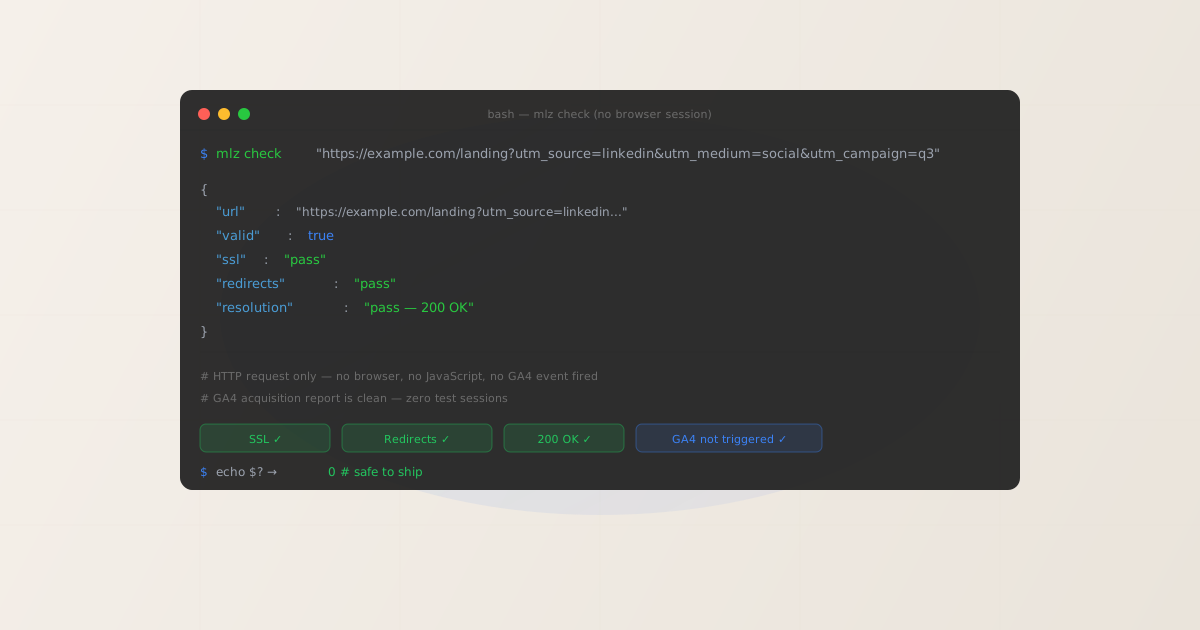
The developer-native answer is to not use a browser at all. MissingLinkz is campaign link infrastructure: mlz check validates the full network chain of a campaign URL — SSL, redirect hops, query string survival, HTTP status — by making direct HTTP requests from the CLI. No JavaScript runs, no gtag.js fires, no GA4 session is created. You get the same technical assurance as clicking the link, with zero impact on your analytics data.
Why clicking UTM links pollutes GA4
GA4 attribution happens entirely in the browser. When a page loads, gtag.js reads window.location.search, finds utm_source, utm_medium, and utm_campaign, writes a session cookie, and fires a page_view event to GA4's collection servers. This happens regardless of who clicked the link — a real user, a developer testing the URL, or an automated QA script that opens Chrome.
GA4 has no reliable way to know that a session was a test. The workarounds available are:
- Incognito / private browsing
- Incognito prevents cookies from persisting between sessions but does not stop GA4 from firing. Every incognito tab click still creates a GA4 session and appears in reports. The session just doesn't share a client ID with your normal browsing.
- GA4 debug mode (
?_ga_debug=1) - Debug mode sends events to a debug stream visible in DebugView rather than the main data stream. It does not prevent data collection — debug events still appear in explorations and some standard reports after a delay.
- Internal IP or user exclusion filters
- Excluding your own IP or user account is reliable but requires that every developer on the team be excluded, and it fails entirely when working from a new location, a VPN, or a shared office IP. It also requires GA4 admin access and ongoing maintenance.
- Annotation-only workaround
- Some teams annotate GA4 reports with "QA period" notes and then filter out the artificial traffic in analysis. This works in retrospect but contaminates the raw data and complicates automated reporting.
None of these eliminate the problem. They reduce it or work around it after the fact. The root issue is that browser-based testing inherently triggers analytics.
Validate with mlz check — no browser, no GA4 event
mlz check from MissingLinkz validates a campaign URL without opening a browser. It makes a direct HTTP request to the URL, follows the redirect chain hop by hop, checks the SSL certificate, and reports the HTTP status — all from the terminal:
npm install -g missinglinkz
$ mlz check "https://example.com/landing?utm_source=linkedin&utm_medium=social&utm_campaign=q3-launch"
{
  "url": "https://example.com/landing?utm_source=linkedin&utm_medium=social&utm_campaign=q3-launch",
  "valid": true,
  "checks": [
    { "check": "url_format", "status": "pass", "message": "URL format is valid." },
    { "check": "ssl", "status": "pass", "message": "URL uses HTTPS." },
    { "check": "resolution", "status": "pass", "message": "Destination responded with 200.", "details": { "status_code": 200, "response_time_ms": 207 } },
    { "check": "redirects", "status": "pass", "message": "No redirects detected." }
  ],
  "status_code": 200,
  "response_time_ms": 207
}
The request is a server-side HTTP call. gtag.js never runs. GA4's collection servers receive nothing. Your acquisition report stays clean.
What mlz check validates vs what it does not
Understanding the scope of mlz check helps you use it correctly and know when you still need browser testing.
mlz checkvalidates- URL format and structure; HTTPS/SSL; HTTP response code (200, 404, 500, etc.); full redirect chain including the number of hops and whether query strings survive each hop; response time. These are the technical health checks that determine whether the link will work for a user and whether UTM parameters will reach GA4.
mlz checkdoes not validate- Page content and visual rendering; form functionality; JavaScript application behaviour; cookie or session behaviour; GA4 measurement configuration inside the page. For these, you still need a browser — but you can time those tests to a period when it is acceptable to generate test sessions (before the campaign launch window, with data filtered out in analysis).
For pre-launch campaign validation, the technical checks are what matter: does the URL resolve, is HTTPS configured, does the redirect chain preserve UTM parameters? mlz check answers all three without touching GA4.
Add OG tag and social preview validation without browser interaction
Campaign links frequently point to landing pages that will be shared socially. Validating the Open Graph and Twitter Card metadata — which determines how the link previews in LinkedIn, X, Slack, and iMessage — also requires no browser with MissingLinkz. Use mlz inspect to check the destination's metadata:
$ mlz inspect "https://example.com/landing"
{
  "url": "https://example.com/landing",
  "success": true,
  "checks": [
    { "check": "open_graph", "status": "pass", "message": "Open Graph tags present: title, description, and image." },
    { "check": "twitter_card", "status": "pass", "message": "Twitter Card present (type: summary_large_image)." },
    { "check": "favicon", "status": "pass" }
  ],
  "open_graph": {
    "title": "Q3 Campaign — Special Offer",
    "description": "Limited time offer for Q3...",
    "image": "https://example.com/og-q3.png"
  }
}
Like mlz check, mlz inspect fetches the page's HTML and reads the metadata tags directly — no JavaScript execution, no GA4 event. You see exactly what social crawlers (LinkedIn's Post Inspector, X's Card Validator) would see, with no test session in your reports.
Run both checks in one command with mlz preflight
For a complete pre-launch validation — URL structure, SSL, redirect chain, OG tags, Twitter Cards, and UTM parameter construction — use mlz preflight. This builds the tracked URL, validates the destination, and inspects the metadata in a single call:
$ mlz preflight \
    --url "https://example.com/landing" \
    --source "linkedin" \
    --medium "social" \
    --campaign "q3-launch"
The output includes a ready boolean. A true result means the destination is technically sound and the campaign link can be published. A false result lists the failing checks so you fix them before the campaign goes live — and before any browser clicks generate test GA4 sessions.
Integrate into a pre-launch CI step
For teams that publish campaign links from a config file or CMS, add a validation step to the deployment pipeline that runs mlz check against every campaign URL before the campaign activates. The CLI exits with code 1 on validation failures, so the CI step fails automatically and prevents a broken campaign from launching:
- name: Validate campaign URLs
  run: |
    urls=("${CAMPAIGN_URLS[@]}")
    for url in "${urls[@]}"; do
      mlz check "$url" || exit 1
    done
  env:
    MLZ_API_KEY: ${{ secrets.MLZ_API_KEY }}
CI runners do not have a browser. mlz check in a CI pipeline has no route to fire GA4 events even if it tried. The validation is structurally isolated from your analytics.
See Automating Campaign Link Validation in CI/CD Pipelines and the complete GitHub Actions template for full pipeline examples.
When you still need a browser
CLI validation catches all the technical failures — the link is broken, HTTPS is misconfigured, a redirect drops UTM parameters, OG tags are missing. But some checks require a browser:
- Form and checkout flow testing
- If the campaign drives to a lead capture form or checkout, someone needs to verify the form submits correctly and the thank-you page loads. Do this testing during a window you can filter out of reports — before the campaign launches, or using a dedicated testing annotation in GA4.
- Visual QA of the landing page
- Checking that the page renders correctly at desktop and mobile viewports requires a real browser. This is separate from campaign link validation and should happen during the design sign-off stage before campaign URLs are built.
- GA4 measurement verification
- Confirming that GA4 receives the correct event data (
page_viewwith the right parameters, conversion events, session attribution) requires triggering the event in a browser and checking GA4 DebugView or the Realtime report. Use a dedicated test property or a staging environment for this, not production.
The principle is: use mlz check, mlz inspect, and mlz preflight for all technical validation of campaign link health, and reserve browser testing for the parts that actually require JavaScript execution. Most pre-launch blockers — broken URLs, stripped UTMs, missing OG tags, SSL errors — are technical and CLI-detectable.
Build UTM links and validate in one workflow
The typical pre-launch workflow that keeps GA4 clean:
# 1. Build the UTM-tagged URL
$ mlz build \
    --url "https://example.com/landing" \
    --source "linkedin" \
    --medium "social" \
    --campaign "q3-launch"

# 2. Validate the destination — SSL, redirects, 200 OK
$ mlz check "https://example.com/landing?utm_source=linkedin&utm_medium=social&utm_campaign=q3-launch"

# 3. Check OG tags and social metadata
$ mlz inspect "https://example.com/landing"

# All three commands make server-side HTTP requests.
# No browser opened. GA4 acquisition reports untouched.
When all three pass, the campaign link is technically validated and ready to publish. The first GA4 session from this link will be a real user, not a developer test.
See How to Validate UTM Links Before Publishing and the Campaign Link QA Checklist for a complete pre-launch checklist.
Recommended posts
Test campaign links without touching GA4
Run mlz check against any campaign URL — validate SSL, redirects, and query string survival from the CLI without opening a browser or firing a single analytics event.
1,000 links/month free. No credit card.
Your API key
Save this now — it won't be shown again.
npm install -g missinglinkz
Then: mlz check "https://yoursite.com/landing?utm_source=linkedin&utm_medium=social&utm_campaign=your-campaign"
FAQ
- Does
mlz checkfire any GA4 events? - No.
mlz checkmakes a server-side HTTP request to the URL. GA4'sgtag.jsis a JavaScript library that only runs in a browser context. Without a browser executing JavaScript, no events are sent to GA4's collection servers. Your acquisition data stays clean. - How do I test UTM links without polluting GA4?
- Install MissingLinkz (
npm install -g missinglinkz) and runmlz check "URL"against any campaign URL. This validates the URL, SSL, redirect chain, and HTTP status from the CLI — no browser needed, no GA4 events fired. For OG tag validation, usemlz inspect "URL". For a full pre-launch check in one command, usemlz preflight --url ... --source ... --medium ... --campaign .... - Does incognito mode prevent GA4 data pollution?
- No. Incognito prevents cookies from persisting between sessions, but GA4 fires on every page load in any browser context. An incognito tab clicking a UTM link still creates a GA4 session attributed to that UTM source, medium, and campaign. The session just doesn't share a client ID with your normal browsing — it's still a test session in your reports.
- Can I use
mlz checkin a CI pipeline to prevent broken campaign links from reaching production? - Yes.
mlz checkexits with code 1 if validation fails, which causes any CI step depending on it to fail. Add a validation step that runsmlz checkagainst each campaign URL before the campaign activates. See the GitHub Actions template for a complete workflow. - What if I need to verify that GA4 actually receives the correct attribution data?
- GA4 measurement verification — confirming the right events and parameters reach your GA4 property — does require a browser. Use GA4 DebugView with a staging or test property, or use a dedicated test GA4 property that excludes your test sessions from production data. Use
mlz checkfor the technical validation (URL health, redirect chain, UTM structure) and reserve GA4 DebugView for measurement configuration verification.