Pre-Publish Campaign Validation for Developers: CLI Checks Before Every Launch
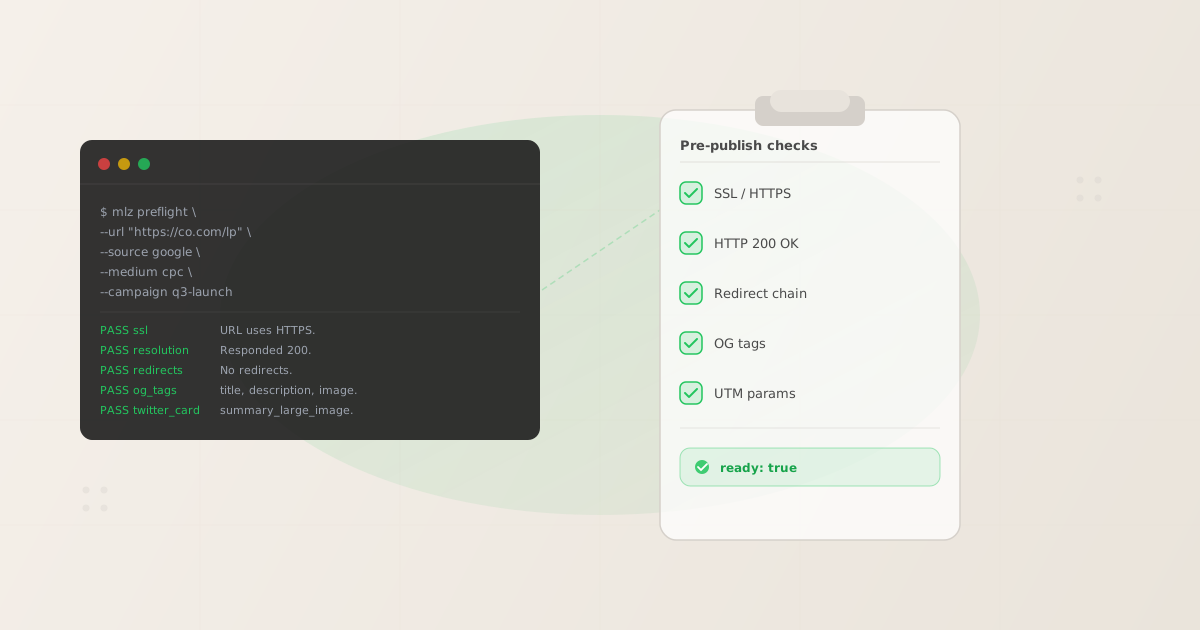
Pre-publish campaign validation means running a structured set of checks on every campaign URL before it goes live: SSL present, destination returning HTTP 200, redirect chain not stripping UTM parameters, Open Graph tags complete, and Twitter Card configured. These are the five checks every campaign link must pass before it hits a paid channel, an email send, or a social post. A broken destination on launch day means every click burns budget with zero attribution. A missing og:image means every LinkedIn share renders without a preview card. Neither failure is acceptable — and both are entirely preventable with a single terminal command. The problem is that web-only tools like Facebook Sharing Debugger and LinkedIn Post Inspector require a browser tab per URL and cannot run in scripts, CI pipelines, or AI agents. For a campaign with 20 landing pages, that means 20 browser tabs opened manually, one at a time, with no structured output and no way to automate. mlz preflight runs all five checks in a single command with JSON output and a standard exit code — the infrastructure primitive your pre-publish workflow has been missing.
Why web-based tools are not a developer workflow
Facebook Sharing Debugger, LinkedIn Post Inspector, and Twitter Card Validator each solve one problem: previewing how a single URL will render on that specific platform. That is a useful sanity check for a social media manager working on one post. It is not a developer workflow for these reasons:
- One URL at a time, no scripting
- Every web-based checker requires a human to paste a URL into a browser form and read the result visually. There is no API, no CLI, no stdout. You cannot pipe the result into a CI step, a shell script, or an AI agent. For a campaign with 30 URLs, that is 30 manual browser operations — every single launch, every single time.
- Platform-specific, not campaign-complete
- LinkedIn Post Inspector checks LinkedIn OG rendering. Facebook Sharing Debugger checks Facebook OG rendering. Neither checks SSL. Neither checks whether UTM parameters survive the redirect chain. Neither reports HTTP status. Neither tells you that
utm_source=Googlewill create a separate row fromutm_source=googlein GA4. A developer pre-publish checklist needs all of these checks in one pass. - No structured output, no exit codes
- Web tools return visual feedback — green/red, pass/fail text on a web page. There is no JSON response to parse, no exit code for CI to gate on, no artifact to store in a build log. A developer workflow requires structured output. If the check result cannot be parsed by a script, it cannot be automated.
- Cannot run before the URL is public
- Facebook Sharing Debugger requires the URL to be publicly crawlable. You cannot run it against a staging environment behind auth, a localhost tunnel, or a preview deployment.
mlz preflightmakes direct HTTP requests — it works against any URL you can reach from your machine or CI runner.
The developer-native alternative is mlz preflight: a CLI command that runs all five pre-publish checks in one call, returns structured JSON, exits with code 1 on hard failure, and works in any environment that can make an outbound HTTP request.
The 5 checks every campaign URL must pass
These are not arbitrary checks — each one maps to a real class of launch failure that costs money or loses data:
- 1. SSL / HTTPS
- If the destination URL is HTTP-only, browsers display a "Not Secure" warning. Ad platforms (Google Ads, LinkedIn) score HTTP destinations lower for Quality Score. Users abandon at higher rates. Any campaign link that starts with
http://instead ofhttps://is a hard failure — not a warning. - 2. HTTP resolution (200 status)
- A 404 on the destination URL means every click from every channel hits a dead page. Every impression spent, every email opened, every social click: wasted. Beyond 404, any non-200 status (301 loops, 500 errors, 503 timeouts) indicates a destination that should not receive campaign traffic. This check confirms the destination is alive and healthy before a single ad impression runs.
- 3. Redirect chain integrity
- Many campaign URLs route through a vanity domain, a link shortener, or a CDN rewrite before hitting the final landing page. Each hop in the redirect chain is an opportunity for UTM parameters to be silently stripped. If
?utm_source=google&utm_medium=cpcdisappears at a redirect hop, GA4 records the session as direct traffic — the campaign looks like it generated zero attributed conversions. Redirect chain validation follows every hop and confirms parameters arrive at the final destination. - 4. Open Graph tags
- When a campaign URL is shared on LinkedIn, Facebook, or Slack, the platform fetches
og:title,og:description, andog:imageto render a preview card. A missingog:imagerenders as a plain text link with no image. A missingog:titlefalls back to the raw page<title>. A missingog:descriptionis synthesized from body text. These are not acceptable for paid social campaigns where creative quality directly affects click-through rate. - 5. UTM parameter structure
mlz preflightbuilds the tracked URL for you — appendingutm_source,utm_medium, andutm_campaignto the destination — and validates the final assembled URL. This catches encoding errors, double-encoding of existing parameters, and case inconsistencies before the link is committed to any campaign system. The assembledtracked_urlis returned in the JSON response so you can copy it directly into your campaign config.
mlz preflight: one command, all five checks
Install missinglinkz globally and run mlz preflight with the destination URL and UTM parameters. The command assembles the tracked URL, runs all checks, and returns a single JSON response:
mlz preflight --url "https://example.com/landing" --source "google" --medium "cpc" --campaign "q3-launch"
Full JSON response:
{
  "ready": true,
  "tracked_url": "https://example.com/landing?utm_source=google&utm_medium=cpc&utm_campaign=q3-launch",
  "checks": [
    { "check": "ssl", "status": "pass", "message": "URL uses HTTPS." },
    { "check": "resolution", "status": "pass", "message": "Destination responded with 200." },
    { "check": "redirects", "status": "pass", "message": "No redirects detected." },
    { "check": "og_tags", "status": "pass", "message": "Open Graph tags present: title, description, and image." },
    { "check": "twitter_card", "status": "pass", "message": "Twitter Card present (type: summary_large_image)." }
  ],
  "summary": { "total": 12, "passed": 12, "warnings": 0, "failed": 0 },
  "recommendation": "All checks passed. Campaign link is ready to publish."
}
The "ready" boolean is the single gate value. The "tracked_url" field gives you the assembled campaign URL to copy directly into Salesforce, HubSpot, or a campaign YAML. The checks[] array provides per-check detail for any failure — enough context to fix the issue without guessing. mlz preflight exits with code 0 on all-pass and code 1 on any hard failure, which is the standard contract for CI integration.
For a URL-only check (no UTM assembly, just SSL and destination health), mlz check is faster:
mlz check "https://example.com/landing"
For metadata-only inspection (OG tags, Twitter Card, viewport) without assembling a UTM URL:
mlz inspect "https://example.com/landing" --format json
For the all-in-one pre-publish check before every launch, mlz preflight is the right command. See the full check taxonomy in the campaign link preflight check guide.
Wiring pre-publish validation into your developer workflow
There are three natural integration points for mlz preflight in a developer workflow. Each suits a different moment in the campaign build process.
Option 1: Terminal check before committing a campaign config file
The lightest-weight integration. Before you commit a campaign URL to a config file, a campaign YAML, or a spreadsheet export destined for Salesforce, run mlz preflight in the terminal. The exit code tells you whether the link is clean:
mlz preflight --url "https://yoursite.com/lp" --source "linkedin" --medium "paid" --campaign "june-launch" && echo "Ready to commit"
The && operator ensures the echo only runs on exit code 0. If mlz preflight finds a failure, the shell stops — you see the JSON error detail and fix before committing.
Option 2: Pre-commit hook on campaign config files
If campaign URLs live in a Git-tracked config file (a YAML, a JSON, a CSV), a pre-commit hook can automatically validate before the commit lands. Add a .git/hooks/pre-commit script that calls mlz preflight on any campaign URL changed in the staged files. The commit is blocked if any URL fails. This is the lightest CI integration — it runs locally without requiring a CI runner.
Option 3: CI step before any campaign deploy
The most robust integration: add mlz preflight as a pipeline step that runs before any campaign is pushed live. This is covered in depth in the GitHub Actions campaign link validation guide — a complete copy-paste workflow template that reads URLs from a CSV, runs mlz preflight on each, and fails the build on any hard failure.
The CI pattern is the right choice for teams where campaign URLs are managed in version control and multiple team members contribute changes. The pre-commit hook catches issues at the individual contributor level; the CI step is the shared gate that no campaign bypasses.
Multi-URL pre-publish check: shell loop over a campaign list
For a campaign launch with multiple landing pages — one per audience segment, one per ad group, one per channel — a shell loop runs mlz preflight across the full list and accumulates any failures:
#!/bin/bash
FAILED=0

while IFS=',' read -r url source medium campaign; do
  echo "Checking: $url"
  mlz preflight \
    --url "$url" \
    --source "$source" \
    --medium "$medium" \
    --campaign "$campaign" || FAILED=1
done < campaigns.csv

if [ $FAILED -eq 1 ]; then
  echo "One or more campaign links failed validation. Fix before launch."
  exit 1
fi
echo "All campaign links passed. Ready to publish."
The campaigns.csv file is a four-column CSV with one row per campaign URL:
https://yoursite.com/lp-google,google,cpc,q3-launch
https://yoursite.com/lp-linkedin,linkedin,paid,q3-launch
https://yoursite.com/lp-email,newsletter,email,q3-launch
This replaces the manual browser-tab workflow entirely. For a campaign with 20 URLs, the script runs in under 30 seconds and produces structured per-URL output. Any failure prints the JSON check detail inline so you know exactly which check failed and why — without opening a browser.
Compare this to opening Facebook Sharing Debugger 20 times, LinkedIn Post Inspector 20 times, and manually checking SSL in a browser address bar for each URL. The web-tool approach is not a workflow — it is a series of manual tasks that cannot be enforced, cannot be logged, and cannot be automated. mlz preflight in a shell loop is infrastructure. See the full campaign link QA checklist for the complete set of checks that belong in a pre-publish gate.
FAQ
- What is "pre-publish campaign validation" and which checks does it include?
- Pre-publish campaign validation is the process of running structured checks on every campaign URL before it goes live. The five core checks are: SSL (HTTPS present), HTTP resolution (destination returns 200), redirect chain integrity (UTM parameters not stripped at any hop), Open Graph tags (title, description, image present), and UTM parameter structure (correctly assembled tracked URL).
mlz preflightruns all five in a single command with JSON output. - Why can't I just use Facebook Sharing Debugger for this?
- Facebook Sharing Debugger checks only Facebook-specific OG rendering for a single URL at a time. It does not check SSL, HTTP status, redirect chain UTM preservation, or Twitter Card. It requires a browser tab per URL, produces no structured output, and cannot run in scripts or CI pipelines. It is a useful spot check for a social media manager, not a developer pre-publish workflow.
- Does
mlz preflightwork against staging environments and preview deployments? - Yes.
mlz preflightmakes direct HTTP requests from wherever it runs — your local machine, a CI runner, or a server. It does not require the URL to be publicly crawlable. If the staging environment is reachable from the machine runningmlz preflight, the check runs. This is a meaningful advantage over web-based tools that require public accessibility. - What exit code does
mlz preflightreturn for a failed check? mlz preflightexits with code 0 when all checks pass (or when only warnings are present) and code 1 when any check returns"status": "fail". This is the standard POSIX exit code convention for CI integration — any shell script or pipeline step that callsmlz preflightcan gate on the exit code without parsing the JSON. The JSON response provides the detail for logging and debugging.- Can I add
mlz preflightas a pre-commit hook instead of a CI step? - Yes — a pre-commit hook is a lightweight local integration that runs before any campaign URL is committed to version control. Add a
.git/hooks/pre-commitscript that callsmlz preflighton any changed campaign URLs. This catches broken links at the contributor level, before they reach CI. The CI gate is still the authoritative enforcement point, but pre-commit hooks shift validation left and reduce the round-trip time for fixing failures. See the GitHub Actions guide for the full CI pattern.
Recommended posts
Run your pre-publish checklist from the terminal
Install MissingLinkz and run mlz preflight on every campaign URL before it goes live. Five checks, one command, structured JSON output, standard exit codes.
1,000 links/month free. No credit card.
Your API key
Save this now — it won't be shown again.
npm install -g missinglinkz
Works in any terminal, any CI runner, any environment that can make an outbound HTTP request. No browser required.