MCP Server for Campaign Link Validation: Connect AI Agents to Your Marketing Stack
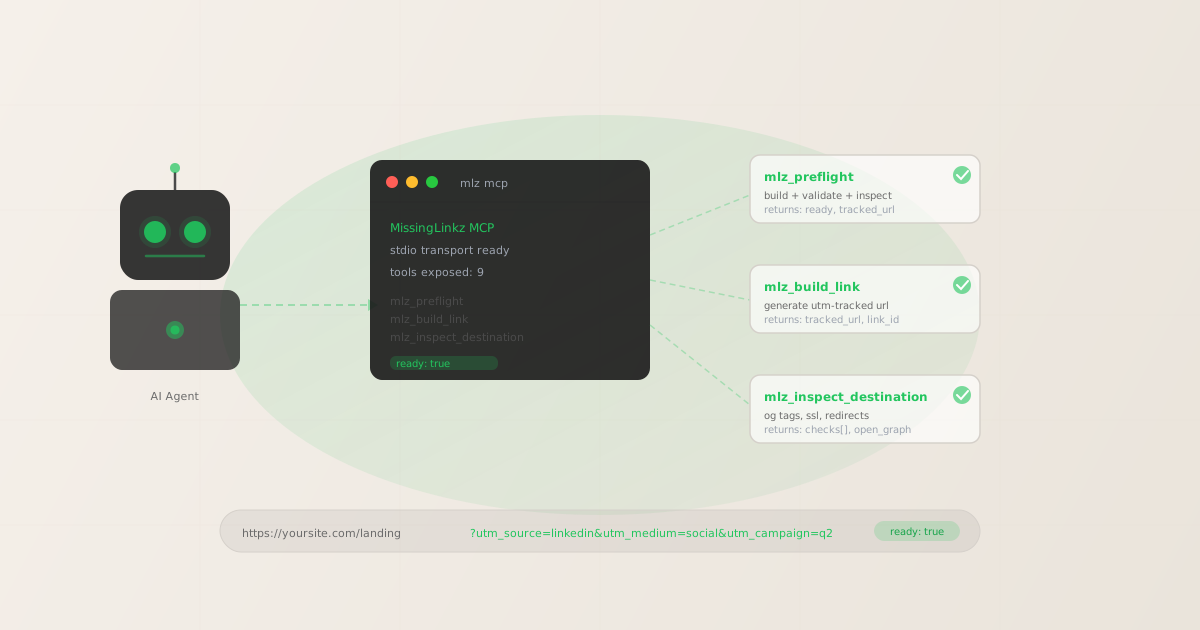
An MCP server for campaign link validation gives AI agents a structured, agent-native way to build and validate campaign URLs — no browser automation, no form-filling, no human in the loop. The Model Context Protocol (MCP) is a standard interface that lets AI agents like Claude Code and Cursor call external tools directly during a workflow. MissingLinkz ships an MCP server that exposes nine campaign link tools: mlz_preflight, mlz_build_link, mlz_inspect_destination, and six more. An agent connects to it in two minutes with a single JSON config block, and from that point can build, validate, and inspect campaign links as part of any workflow task. The difference from manually running a validator after the fact: the agent catches bad links before they make it into a campaign brief, a Slack message, or a published post. This guide covers what the MissingLinkz MCP server exposes, how to connect it in Claude Code and Cursor, and what validation mid-workflow looks like in practice.
What MCP means for marketing tooling — in 30 seconds
MCP (Model Context Protocol) is an open standard, originally published by Anthropic, that defines how AI agents discover and call external tools. Instead of an agent writing custom code to talk to every tool it wants to use, tool providers publish an MCP server that the agent connects to once. The server declares its tools in a standard format, the agent reads that declaration, and from then on it can call those tools natively — just like calling a built-in capability.
For marketing tooling, the practical impact is this: a campaign link validator that ships an MCP server can be called by any MCP-compatible agent without the developer writing a single line of integration code. The agent asks "what tools do you have?" and the server responds with a typed manifest. The agent uses those tools in its reasoning and action loop. No API key juggling in the prompt, no custom function definitions, no browser automation.
For a deeper introduction to MCP in marketing contexts, see What Is an MCP Server? A Marketer’s Guide and the MCP tools for marketing campaigns pillar guide.
Why AI agents need a campaign link validator they can call programmatically
An AI agent building a campaign brief or populating a content calendar has no reliable way to validate campaign links using web-based tools. The Facebook Sharing Debugger, LinkedIn Post Inspector, and Google’s Campaign URL Builder are all browser forms designed for human interaction. An agent trying to use them must automate browser input, scrape rendered output, and handle UI changes — a brittle approach that breaks regularly and produces unstructured results.
The correct pattern is a validator that speaks the agent’s native language: structured input (named parameters), structured output (JSON), and a clear pass/fail signal. This is what an MCP server provides. When MissingLinkz is connected via MCP, an agent calls mlz_preflight the same way it calls any internal tool — passing structured arguments, receiving a JSON response with a "ready" boolean, and branching on the result without any string parsing.
Without this, agents either skip validation entirely (relying on the human to catch broken links after the fact) or waste tokens on unreliable browser automation. Both outcomes increase manual review burden. As explored in why AI agents can’t use UTM builders, the architecture of dashboard tools is fundamentally incompatible with automated workflows.
MissingLinkz MCP server: the nine tools your agent gets
Start the server with a single command:
mlz mcp
The server uses stdio transport — it does not open a network port. Once running, MCP-compatible clients discover its tools automatically. The nine tools are:
mlz_preflight- The primary tool for pre-publish validation. Builds a UTM-tracked URL, validates the destination (SSL, resolution, redirects), and inspects the landing page (OG tags, Twitter Card, viewport, canonical, favicon) in a single call. Returns
"ready": true/false, thetracked_url, and a fullchecks[]array. This is the tool agents should call before any campaign link goes live. mlz_build_link- Generates a UTM-tagged campaign URL and stores it in the MissingLinkz campaign registry. Returns the
tracked_urland alink_idfor audit trail. Use this when you need the tracked URL without running full destination validation — for example, when bulk-generating links for a CSV that will be validated in a separate pass. mlz_inspect_destination- Fetches a URL and returns its metadata: Open Graph tags, Twitter Card tags, canonical URL, viewport, favicon, and page load time. Use this to check whether a landing page will render correctly on social platforms before committing to a UTM link for it.
mlz_validate_url- Checks a URL for SSL, HTTP resolution, redirect chain integrity, and response time. Use this for quick destination health checks when OG tag inspection is not required.
mlz_suggest_naming- Returns consistent naming recommendations for a given source or medium based on the account’s existing campaign taxonomy. Agents call this before building a link to avoid introducing naming inconsistencies.
mlz_list_campaigns- Returns the list of campaigns stored in the account. Useful for agents that need to verify a campaign name is already in the taxonomy before generating a new link.
mlz_list_links- Returns recently generated links, optionally filtered by campaign. Useful for agents building campaign reports or deduplicating link generation.
mlz_check_usage- Returns current API usage, plan tier, and remaining link quota. Agents can call this at the start of a large batch job to verify sufficient quota before proceeding.
mlz_register- Creates a new MissingLinkz account and returns an API key. Primarily used in onboarding automation scenarios where the agent needs to provision credentials.
For a full overview of MCP marketing tools and how agents compose them into workflows, see AI agent marketing workflows with MCP.
Setup in Claude Code
Claude Code reads MCP server configurations from a JSON config file. Add the MissingLinkz server to your project’s .claude/mcp.json (or the global config at ~/.claude/mcp.json):
{
  "mcpServers": {
    "missinglinkz": {
      "command": "mlz",
      "args": ["mcp"]
    }
  }
}
Prerequisites: mlz must be installed globally (npm install -g missinglinkz) and an API key must be set. If you haven’t registered yet:
mlz auth register --email [email protected]
Once the config is in place, Claude Code discovers the MissingLinkz tools at session start. You can verify with /mcp in the Claude Code interface — it should list the nine MissingLinkz tools. From that point, Claude can call them in any workflow without explicit instruction. For the full Claude Code integration guide including SKILL.md setup, see how to use MissingLinkz with Claude Code.
Setup in Cursor
Cursor reads MCP configurations from .cursor/mcp.json in your project root (for project-scoped access) or ~/.cursor/mcp.json (for global access). The config format is identical:
{
  "mcpServers": {
    "missinglinkz": {
      "command": "mlz",
      "args": ["mcp"]
    }
  }
}
After saving the config, open Cursor’s Composer panel and start a new session — MCP tools are loaded at session initialization. You can verify that the MissingLinkz tools are available by asking Cursor to list them. Once connected, Cursor can call mlz_preflight, mlz_build_link, and all other tools natively in any Composer task.
For a step-by-step Cursor-specific setup walkthrough including API key configuration, see how to connect MissingLinkz to Cursor as an MCP server.
Example agent prompts that trigger validation mid-workflow
Once connected, agents call MissingLinkz tools based on the task context — no explicit instruction to "use the MCP server" required. Here are three patterns that naturally trigger campaign link validation:
User: Build a tracked LinkedIn link for our Q3 product launch page at
https://yoursite.com/q3-launch, campaign q3-launch-2026, medium social.
Validate it before giving me the final URL.

Tool call: mlz_preflight
{
  "url": "https://yoursite.com/q3-launch",
  "campaign": "q3-launch-2026",
  "source": "linkedin",
  "medium": "social"
}

Result:
{
  "ready": true,
  "tracked_url": "https://yoursite.com/q3-launch?utm_source=linkedin&utm_medium=social&utm_campaign=q3-launch-2026",
  "summary": { "total": 12, "passed": 12, "warnings": 0, "failed": 0 },
  "recommendation": "All checks passed. Campaign link is ready to publish."
}

Claude: The link passed all 12 checks including SSL, OG tags, Twitter Card,
and redirect chain. Your validated campaign link:

https://yoursite.com/q3-launch?utm_source=linkedin&utm_medium=social&utm_campaign=q3-launch-2026User: Check whether https://yoursite.com/new-feature is ready to share
on social before I finalize the campaign brief.
Tool call: mlz_inspect_destination
{ "url": "https://yoursite.com/new-feature" }
Result:
{
"success": true,
"checks": [
{ "check": "open_graph", "status": "warn",
"message": "og:image is missing. Social previews will show no image." },
{ "check": "twitter_card", "status": "pass" },
{ "check": "ssl", "status": "pass" }
]
}
Cursor: The page has a problem: og:image is missing. On LinkedIn, Slack,
and iMessage this link will share without a preview image, which
significantly reduces click-through.
Action needed before launch: add an og:image meta tag to the page.
I've flagged this in the brief as a blocking issue.User: Before building links for the email campaign, check what naming
we use for email medium in our existing campaigns.
Tool call: mlz_suggest_naming
{ "medium": "email" }
Result:
{
"medium": "email",
"existing_values": ["email"],
"suggested": "email",
"consistent": true
}
Claude: Confirmed: your taxonomy uses utm_medium=email consistently.
Building links with medium=email now.In each case, the agent called the appropriate MCP tool without explicit instruction to do so — it inferred the right tool from the task context. This is the value of the MCP tool manifest: the agent understands what each tool does and when to use it, from the tool description alone.
Agent with MCP validation vs. agent without: what changes
The difference between an agent that has campaign link validation tools and one that does not is not just convenience — it is the difference between a workflow that surfaces problems before publication and one that relies entirely on human review after the fact.
| Scenario | Agent without MCP validation | Agent with MissingLinkz MCP |
|---|---|---|
| Destination has broken OG image | Link passes through to campaign brief; caught (or not) by human reviewer | ✓ Flagged by mlz_inspect_destination before brief is finalized |
UTM medium typo (Socail vs social) |
Typo enters GA4; discovered weeks later in attribution report | ✓ mlz_suggest_naming surfaces inconsistency before link is built |
| Landing page redirects strip UTM params | ✗ Agent has no way to detect redirect chain behavior | ✓ mlz_preflight checks redirect chain and flags UTM parameter stripping |
| SSL certificate expired on destination | Agent generates link; users see browser security warning | ✓ mlz_validate_url catches SSL failure before the link is published |
| Naming inconsistency with past campaigns | Agent uses its best guess; taxonomy drifts over time | ✓ mlz_suggest_naming enforces existing taxonomy conventions |
The validation tools do not add significant latency — mlz_preflight typically completes in under two seconds. The cost of skipping validation is not time savings; it is a campaign that launches with broken links, missing social previews, or fragmented GA4 attribution that requires manual cleanup weeks later.
What the mlz_preflight response contains
Understanding the response shape helps agents and developers write reliable conditional logic around the validation result:
{
  "ready": true,
  "tracked_url": "https://yoursite.com/q3-launch?utm_source=linkedin&utm_medium=social&utm_campaign=q3-launch-2026",
  "link_id": "lnk_9wlvd9qi",
  "campaign_id": "cmp_kbcht77d",
  "destination_url": "https://yoursite.com/q3-launch",
  "params": {
    "utm_source": "linkedin",
    "utm_medium": "social",
    "utm_campaign": "q3-launch-2026"
  },
  "checks": [
    { "check": "url_format", "status": "pass", "message": "URL format is valid." },
    { "check": "ssl", "status": "pass", "message": "URL uses HTTPS." },
    { "check": "resolution", "status": "pass", "message": "Destination responded with 200." },
    { "check": "redirects", "status": "pass", "message": "No redirects detected." },
    { "check": "og_tags", "status": "pass", "message": "Open Graph tags present: title, description, and image." },
    { "check": "twitter_card", "status": "pass", "message": "Twitter Card present (type: summary_large_image)." },
    { "check": "viewport", "status": "pass", "message": "Viewport meta tag present." }
  ],
  "summary": {
    "total": 12,
    "passed": 12,
    "warnings": 0,
    "failed": 0
  },
  "recommendation": "All checks passed. Campaign link is ready to publish.",
  "stored": true,
  "created_at": "2026-05-21T09:00:00.000Z"
}
Key fields for agent logic:
"ready": true/false— the single go/no-go signal. If false, inspectchecks[]for failed items."tracked_url"— the final UTM-tagged URL to pass downstream. Do not construct this manually."checks[]"— each check hasstatus: "pass" | "warn" | "fail". Warnings do not setready: false; failures do."link_id"— the stored link identifier. Use for audit trail, deduplication, and campaign reporting.
FAQ
- What AI agents support the MissingLinkz MCP server for campaign link validation?
- Any MCP-compatible client works: Claude Code, Claude Desktop, Cursor, and any agent framework that implements the MCP standard. LangChain and AutoGen can also use MissingLinkz by wrapping the CLI or REST API in a tool definition, though they don’t use the MCP server directly.
- Does the MCP server require an API key?
- The MCP server itself starts without an API key. However, tools that store links (
mlz_build_link,mlz_preflight) require an API key to persist results to the campaign registry. Validation-only tools (mlz_inspect_destination,mlz_validate_url) work offline without a key. SetMLZ_API_KEYin your environment or runmlz auth registerto get a key. - How is the MissingLinkz MCP server different from UTMMind’s MCP server?
- UTMMind’s MCP server focuses on UTM taxonomy governance — defining naming rules and building links within those rules. MissingLinkz adds destination validation: SSL checks, OG tag inspection, redirect chain analysis, and Twitter Card verification. The tools are complementary: UTMMind governs naming; MissingLinkz validates that the link and its destination are both ready to publish. See the comparison in UTMMind MCP vs MissingLinkz.
- Can I run the MCP server in a CI/CD environment?
- The MCP server is designed for interactive agent sessions (Claude Code, Cursor) rather than CI/CD pipelines. For automated pipeline use, the
mlz publish-check --format jsonCLI command is the correct approach — it exits with a non-zero code on validation failure, which integrates cleanly with GitHub Actions and similar tools. See automating campaign link validation in CI/CD. - How many MCP tool calls does a typical campaign link workflow consume?
- A standard "build and validate" workflow uses two tool calls:
mlz_build_link(generates and stores the URL) andmlz_preflight(validates the destination). If naming consistency checking is included, add onemlz_suggest_namingcall. For a 10-link campaign batch, expect 20–30 tool calls total. Tool calls against the MCP server count toward your monthly link quota only when a new link is stored.
Recommended posts
Connect the MCP server in two minutes
Install MissingLinkz, register for an API key, and add the MCP config to Claude Code or Cursor. Your agent will have campaign link validation tools available in the next session.
1,000 links/month free. No credit card.
Your API key
Save this now — it won't be shown again.
npm install -g missinglinkz
mlz auth register --email [email protected]
mlz mcp
Then add {"command": "mlz", "args": ["mcp"]} to your agent’s MCP config. Full tool reference in SKILL.md.