Build an AI Agent Marketing Workflow: Campaign Links from Build to Publish
An AI agent marketing workflow that handles campaign links end-to-end — building UTM-tracked URLs, validating the destination, and only publishing when the link is confirmed ready — is achievable today with the MissingLinkz MCP server. This walkthrough covers exactly how to wire one up, from connecting the agent to running a full build-validate-publish sequence with structured JSON at every step.
What an AI agent marketing workflow actually means
Most "AI marketing" workflows are AI-assisted, not AI-driven. A human writes the copy, the human opens the UTM builder, the human checks the link, and the human posts. The AI helps with the writing. That's useful — but it's not a workflow the agent can run autonomously.
A true AI agent marketing workflow is one where the agent can complete the full task without switching to a browser, without filling in a web form, and without waiting for a human to confirm each step. The agent needs:
- Structured inputs and outputs
- Every tool the agent calls should accept parameters and return JSON. If a tool returns HTML or requires a human to read a visual dashboard, the agent can't act on the result programmatically.
- A validation step with a go/no-go signal
- The agent needs a single boolean it can gate on — not a report it needs to parse manually. If the destination is broken, the agent should stop before publishing the link, not after.
- Tools accessible via MCP, CLI, or REST API
- The tools in the workflow have to be callable from code. Web forms, browser-only dashboards, and tools that require OAuth flows in a browser are dead ends for agents. See why AI agents can't use UTM builders for the full explanation.
MissingLinkz is designed around exactly these requirements: every command accepts structured parameters and returns JSON, and the mlz preflight command returns a ready boolean the agent can use as a gate.
The three stages of the workflow
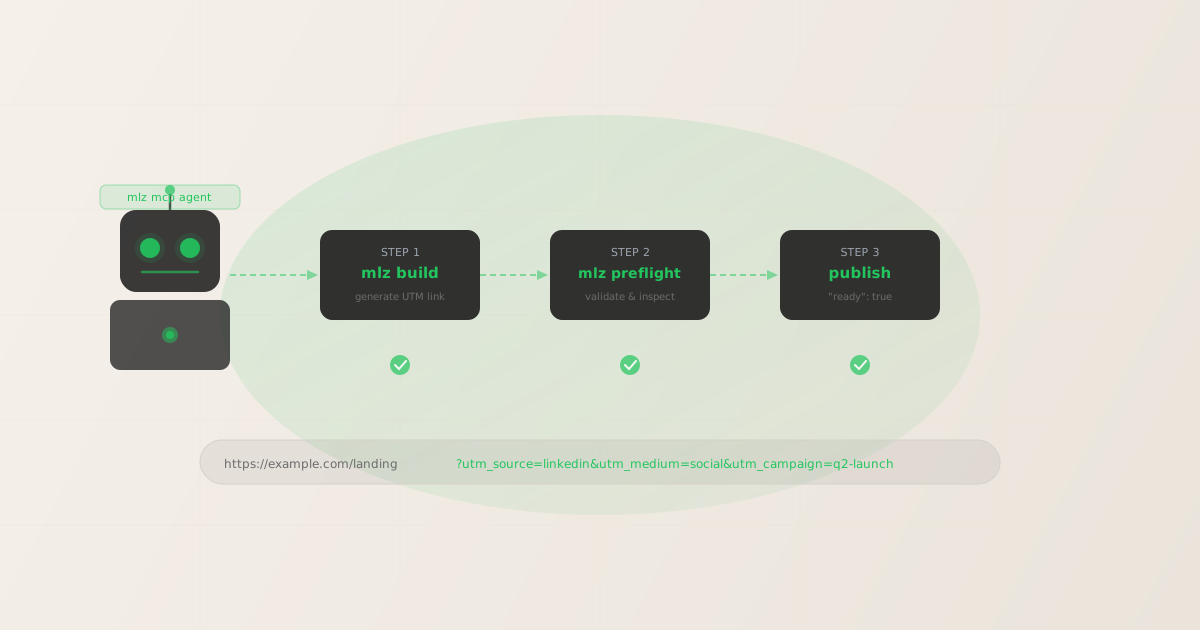
An agent-driven campaign link workflow has three stages, each with a clear tool:
| Stage | What happens | Tool |
|---|---|---|
| 1. Build | Generate the UTM-tracked link with enforced lowercase naming | mlz build |
| 2. Validate | Check SSL, resolution, redirect chain, OG tags, Twitter Cards, viewport — return ready |
mlz preflight |
| 3. Publish | If ready: true, the agent publishes the tracked URL; if false, it surfaces the failure reason |
agent decision |
The agent never has to interpret a wall of text or make a judgment call about whether the link is safe to use. The ready field in the preflight response is the gate — true means proceed, false means stop and report the reason.
Connecting MissingLinkz to your AI agent via MCP
The fastest way to make MissingLinkz available to an AI agent is via the MCP server. Install the package globally and add it to your MCP client config:
npm install -g missinglinkz
Then add this block to your MCP client configuration (Claude Code, Cursor, or any MCP-compatible agent):
{
  "mcpServers": {
    "missinglinkz": {
      "command": "mlz",
      "args": ["mcp"]
    }
  }
}
Once connected, the agent has access to nine MCP tools: mlz_preflight, mlz_build_link, mlz_inspect_destination, mlz_validate_url, mlz_list_campaigns, mlz_suggest_naming, mlz_list_links, mlz_check_usage, and mlz_register. For a campaign link workflow, the agent primarily uses mlz_build_link and mlz_preflight. See the build UTM links with an AI agent guide for a step-by-step Claude Code session.
Step 1: The agent builds the campaign link
The agent calls mlz build (or mlz_build_link via MCP) with the destination URL and UTM parameters. The command enforces lowercase hyphen-separated naming automatically — the agent doesn't need to remember or validate naming conventions itself:
mlz build --url "https://example.com/landing" --campaign "q2-launch" --source "linkedin" --medium "social"
$ mlz build \
  --url "https://example.com/landing" \
  --campaign "q2-launch" \
  --source "linkedin" \
  --medium "social"

{
  "tracked_url": "https://example.com/landing?utm_source=linkedin&utm_medium=social&utm_campaign=q2-launch",
  "params": {
    "utm_source": "linkedin",
    "utm_medium": "social",
    "utm_campaign": "q2-launch"
  },
  "destination_url": "https://example.com/landing",
  "link_id": "lnk_p4xr8kqm",
  "stored": true
}
The agent stores the tracked_url from this response — it's what gets validated in the next step and what gets published if the check passes.
Step 2: The agent runs the preflight check
With the tracked URL in hand, the agent calls mlz preflight. This command does the build, validation, and inspection in a single call and returns a structured report with a ready boolean at the top level. The agent gates on that value:
mlz preflight --url "https://example.com/landing" --campaign "q2-launch" --source "linkedin" --medium "social"
$ mlz preflight \
  --url "https://example.com/landing" \
  --campaign "q2-launch" \
  --source "linkedin" \
  --medium "social"

{
  "ready": true,
  "tracked_url": "https://example.com/landing?utm_source=linkedin&utm_medium=social&utm_campaign=q2-launch",
  "checks": [
    { "check": "ssl", "status": "pass", "message": "URL uses HTTPS." },
    { "check": "resolution", "status": "pass", "message": "Destination responded with 200." },
    { "check": "redirects", "status": "pass", "message": "No redirects detected." },
    { "check": "og_tags", "status": "pass", "message": "All essential Open Graph tags present." },
    { "check": "twitter_card", "status": "pass", "message": "Twitter Card tags configured." }
  ],
  "summary": {
    "total": 12, "passed": 12, "warnings": 0, "failed": 0
  },
  "recommendation": "All checks passed. Campaign link is ready to publish."
}
The agent reads ready: true and proceeds to publish the tracked_url. If ready is false, the agent reads the checks array for the specific failure, reports it to the human, and stops. No link goes live with a broken destination.
What the agent does when the check fails
A failed preflight isn't just a stop signal — it carries the specific reason, so the agent can surface an actionable message. Here's what the response looks like when the destination has a missing OG image:
{
  "ready": false,
  "tracked_url": "https://example.com/landing?utm_source=linkedin&utm_medium=social&utm_campaign=q2-launch",
  "checks": [
    { "check": "ssl", "status": "pass", "message": "URL uses HTTPS." },
    { "check": "resolution", "status": "pass", "message": "Destination responded with 200." },
    {
      "check": "og_tags", "status": "fail",
      "message": "og:image tag is missing. Social previews on LinkedIn and X will show no image."
    }
  ],
  "summary": {
    "total": 12, "passed": 11, "warnings": 0, "failed": 1
  },
  "recommendation": "1 check failed. Fix the issues before publishing this link."
}
The agent can extract the failure message from checks[] and present it to the human in plain language: "The landing page at example.com is missing an og:image tag — social previews will show no image on LinkedIn and X. Please add the tag and try again." The human fixes the issue; the agent re-runs the preflight; the link publishes only when ready: true.
An example agent session in Claude Code
Here's a representative exchange showing an AI agent marketing workflow using MissingLinkz tools via MCP. The agent is given a campaign brief and handles the full sequence autonomously:
Human: Build and validate a campaign link for our Q2 LinkedIn launch.
        Destination: https://example.com/q2-launch
        Source: linkedin, medium: social, campaign: q2-product-launch

Claude: I'll build and validate the campaign link now.

        [calls mlz_preflight with the provided parameters]

        Preflight result: ready: true
        All 12 checks passed — SSL, resolution, redirects,
        OG tags, Twitter Cards, viewport, and UTM parameters.

        Your campaign link is ready to publish:
        https://example.com/q2-launch?utm_source=linkedin
          &utm_medium=social&utm_campaign=q2-product-launch
The entire exchange takes under 10 seconds. The agent called one MCP tool, interpreted one JSON field, and returned the validated link. The human never opened a browser or a UTM builder. For a more detailed walkthrough with annotated screenshots, see the build UTM links with an AI agent guide.
Bulk campaign link generation in an agent workflow
For multi-channel launches where the agent needs to generate and validate one link per platform, the workflow loops through the platforms and validates each before moving to the next:
$ for SOURCE in linkedin google facebook; do
    mlz preflight \
      --url "https://example.com/landing" \
      --campaign "q2-product-launch" \
      --source "$SOURCE" \
      --medium "social" \
      --format json | jq '{source: .params.utm_source, ready: .ready, url: .tracked_url}'
  done

{ "source": "linkedin", "ready": true, "url": "...?utm_source=linkedin&..." }
{ "source": "google",   "ready": true, "url": "...?utm_source=google&..."   }
{ "source": "facebook", "ready": true, "url": "...?utm_source=facebook&..." }
An agent running this loop can generate a full set of validated campaign links for a multi-channel launch, then hand off the JSON output for scheduling or publishing — all without human intervention at the link-generation step. For the complete developer pattern with REST API examples, see how to build and validate UTM links with an AI agent programmatically.
Where automation ends and judgment begins
An agent marketing workflow handles the mechanical steps well: link generation, validation, naming consistency, bulk processing. But some decisions still belong to humans:
- Campaign strategy — which channels to activate, what the messaging is, how much budget to allocate. An agent can build the links once the strategy is set; it can't set the strategy.
- Fixing failed checks — if the destination returns 404 or is missing OG tags, the agent surfaces the failure, but fixing the landing page is a human task. The agent can retry the validation once told the fix is done.
- Publishing approval — some teams want a human to review the validated link before it goes live. The agent workflow supports this by stopping at
ready: trueand presenting the link for approval rather than posting autonomously.
The right posture is: agents handle the repetitive validation work that humans reliably get wrong or skip; humans handle the decisions that require context, judgment, or accountability. MCP tools for marketing campaigns fit cleanly on the agent side of that line — see MCP tools for marketing campaigns for the broader picture of what's possible today.
FAQ
- Do I need an API key to run this workflow?
- Not for basic link generation and validation. The CLI works offline for UTM building. An API key (free plan: 1,000 links/month) unlocks stored link history, campaign management, and usage tracking — useful for teams running multiple agents or logging generated links centrally. Register with
mlz auth register --email [email protected]. - Can I use this with Claude Code, Cursor, or another MCP client?
- Yes — any MCP-compatible client that accepts the standard
{"mcpServers": {...}}config block works. Claude Code and Cursor both support this format natively. The MCP server uses stdio transport only and doesn't require any network ports or API key to start. - What happens if the agent generates a link for a destination that's under construction?
- The preflight check catches this: if the destination returns anything other than a 200 response (404, 503, redirect loop), the
resolutioncheck fails andreadyisfalse. The agent stops and reports the failure. No bad link reaches a scheduler or publisher. - Can the agent validate links generated by other tools?
- Yes — the validation step is independent of how the link was built. You can run
mlz inspectormlz checkagainst any URL, regardless of whether it was generated bymlz build. The agent can import a list of URLs from a spreadsheet or external UTM builder and validate them all in a loop. - Is there a REST API if I want to build this without a CLI?
- Yes — the MissingLinkz REST API accepts the same parameters as the CLI and returns the same JSON responses. See the REST API guide for endpoint documentation, authentication, and curl examples. The REST API is the right choice for server-side scripts and pipelines where the CLI isn't available.
Recommended posts
Wire up your AI agent marketing workflow
Install MissingLinkz, add the MCP server to your agent config, and run a full build-validate-publish sequence in under five minutes. Every step returns structured JSON — no browser required.
1,000 links/month free. No credit card.
Your API key
Save this now — it won't be shown again.
npm install -g missinglinkz
Free plan: 1,000 links/month. No credit card. See all MCP tools in the SKILL.md reference.