utm_id Parameter in GA4: What It Is and How to Validate It (2026)
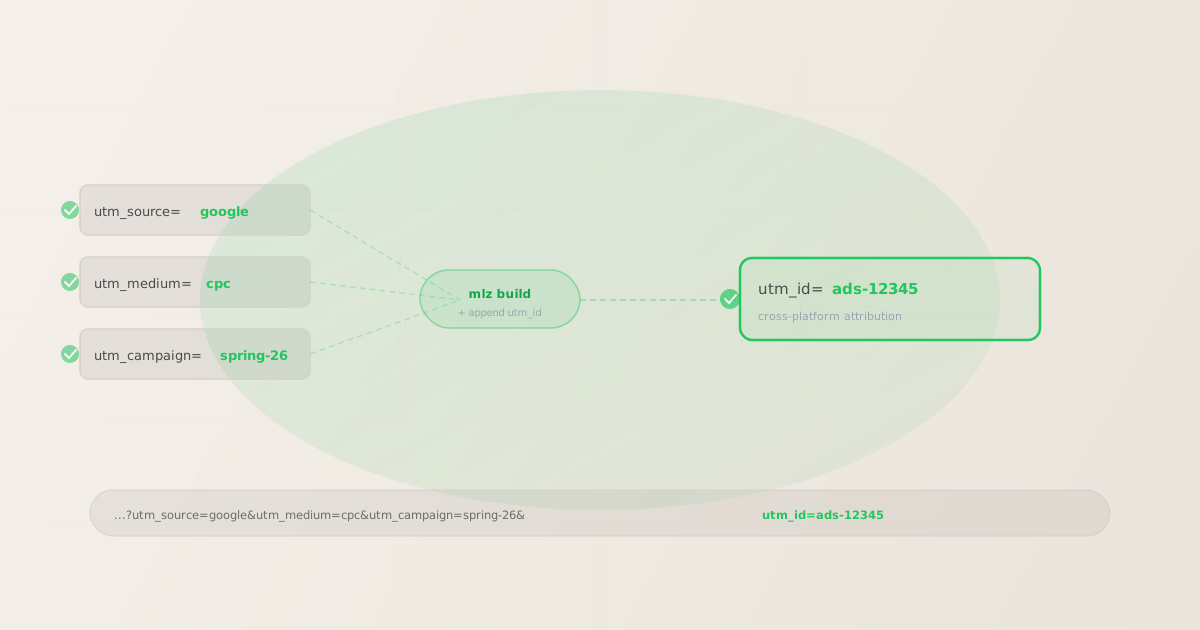
The utm_id parameter in GA4 is the sixth UTM parameter — beyond the familiar five — that links a GA4 session to a specific ad click ID or campaign record in an external system. Unlike utm_source and utm_medium, utm_id is not used for channel grouping. It lands in its own GA4 dimension (session_campaign_id) and is used primarily for cross-platform attribution: joining GA4 session data with ad spend data from Google Ads, Meta, or other platforms. If you're setting up utm_id in 2026 and want to confirm it passes through your redirect chain intact, this guide covers exactly that.
What is the utm_id parameter?
utm_id is an optional UTM parameter that GA4 maps to the session_campaign_id dimension. It was introduced to support scenarios where you need to join GA4 data with an external record — most commonly an ad campaign ID from Google Ads, Meta Ads, or another platform — without relying on that platform's auto-tagging mechanism.
The five core UTM parameters describe where a user came from: utm_source (which platform), utm_medium (which channel type), utm_campaign (which campaign), utm_term (which keyword), and utm_content (which creative variant). utm_id is different: it provides a unique identifier that lets you look up a specific record in an external system.
A typical utm_id value looks like a campaign ID, ad set ID, or order ID — something that has meaning in your ad platform's data model. For example, a Google Ads campaign with ID 12345678 might use utm_id=gads-12345678 to tie GA4 sessions back to that specific campaign's cost data.
When do you need utm_id?
Most marketing teams don't need utm_id. It's primarily useful in three scenarios:
- Manual tagging for Google Ads (without auto-tagging)
- If you've disabled Google Ads auto-tagging (which appends
gclidautomatically), you can useutm_idto carry the Google Ads campaign ID into GA4. This is common in environments where the destination URL doesn't accept query parameters reliably, or where a landing page platform stripsgclidfrom URLs. - Cross-platform attribution joins
- If you want to join GA4 session data with spend data from an external system,
utm_idgives you the key. Export GA4'ssession_campaign_iddimension, join it to your ad platform's campaign ID field, and you have ad spend per session without relying on a native platform integration. - Internal campaign tracking systems
- Some teams use
utm_idto reference their own campaign tracking database — a record in a CRM or project management tool. Every campaign link gets autm_idthat maps to the internal campaign brief, budget, and owner. GA4 data is then joinable to internal records by this ID.
If you're not joining GA4 data to an external system and your attribution comes from the standard five parameters, skip utm_id. Adding it without using the ID value creates noise in your session_campaign_id dimension without providing any benefit.
How GA4 handles utm_id differently from other UTM parameters
The five core UTM parameters flow into specific GA4 dimensions that drive channel grouping and attribution reports:
utm_source→session_sourcedimensionutm_medium→session_mediumdimensionutm_campaign→session_campaigndimensionutm_term→session_manual_termdimensionutm_content→session_manual_ad_contentdimension
utm_id maps to session_campaign_id. This dimension does not affect channel grouping — it's not used by GA4's default channel definitions. It's purely a data join key. You won't see it in the Acquisition overview; you need to create a custom report or export via the GA4 API to work with session_campaign_id data.
One practical consequence: omitting utm_id from a campaign link does not degrade attribution in standard GA4 reports. The channel grouping, source, medium, and campaign all work correctly using only the five core parameters. You only lose access to session_campaign_id as a join key.
Adding utm_id to links built with mlz build
mlz build generates UTM-tagged links using the five standard parameters. To include utm_id, build the base tracked URL first, then append the parameter to the output tracked_url:
mlz build --url "https://example.com/landing" --source "google" --medium "cpc" --campaign "spring-2026" --format json
{
  "tracked_url": "https://example.com/landing?utm_source=google&utm_medium=cpc&utm_campaign=spring-2026",
  "params": {
    "utm_source": "google",
    "utm_medium": "cpc",
    "utm_campaign": "spring-2026"
  },
  "destination_url": "https://example.com/landing",
  "created_at": "2026-04-26T10:12:00.000Z",
  "link_id": "lnk_ab3c7d9e",
  "stored": true
}
Take the tracked_url from the output and append your utm_id value:
https://example.com/landing?utm_source=google&utm_medium=cpc&utm_campaign=spring-2026&utm_id=gads-12345678
Use the combined URL in your ad platform. The utm_id value should match the campaign ID or record ID in your external system — the exact format depends on your naming convention.
For high-volume campaigns where link building is automated, use the programmatic UTM building guide to see how to generate and append custom parameters in a script or CI pipeline.
Validating that utm_id passes through your redirect chain
The most common failure mode for utm_id is the same as for all UTM parameters: a redirect chain that strips query strings. If your campaign link passes through a link shortener, landing page platform, or CDN rewrite, the utm_id value can be silently dropped before the session is recorded in GA4.
Use mlz check to validate the full URL — including utm_id — before distributing the link:
mlz check "https://example.com/landing?utm_source=google&utm_medium=cpc&utm_campaign=spring-2026&utm_id=gads-12345678"
{
  "url": "https://example.com/landing?utm_source=google&utm_medium=cpc&utm_campaign=spring-2026&utm_id=gads-12345678",
  "valid": true,
  "checks": [
    { "check": "url_format", "status": "pass", "message": "URL format is valid." },
    { "check": "ssl", "status": "pass", "message": "URL uses HTTPS." },
    { "check": "resolution", "status": "pass",
      "message": "Destination responded with 200.",
      "details": { "status_code": 200, "response_time_ms": 198 } },
    { "check": "redirects", "status": "pass",
      "message": "No redirects detected. UTM parameters preserved.",
      "details": { "hops": 0, "utm_preserved": true } },
    { "check": "response_time", "status": "pass", "message": "Response time: 198ms." }
  ],
  "status_code": 200,
  "validated_at": "2026-04-26T10:14:22.000Z"
}
The key field to check is "utm_preserved": true in the redirects result. If this is false, one of the redirect hops is stripping the query string — and your utm_id (along with all other UTM parameters) is being lost. See How to Check if a Redirect Strips UTM Parameters for a full walkthrough of diagnosing and fixing this failure.
For any link that passes through multiple hops, running this check before the campaign goes live prevents silent attribution failure. The utm_id value is treated as an opaque string by the redirect chain — it's no more or less vulnerable than any other query parameter — but if the chain strips UTMs, it strips everything including utm_id.
utm_id vs utm_content: which one?
Teams sometimes confuse utm_id with utm_content. They serve different purposes:
- utm_content
- Used to distinguish between creatives within the same campaign. If you're A/B testing two ad variants in the same campaign,
utm_content=version-aandutm_content=version-blet you compare performance in GA4's standard acquisition reports. It maps to thesession_manual_ad_contentdimension and is visible in standard GA4 reporting. - utm_id
- A lookup key for an external system. Not meant for creative differentiation — meant for joining GA4 data to an ad platform's campaign record. It maps to
session_campaign_id, which is only available in custom GA4 reports or API exports, not in the standard Acquisition UI.
If you want to differentiate ad creatives within GA4's standard reports, use utm_content. If you want to join GA4 sessions to external ad platform records, use utm_id. They can be used simultaneously — the parameters don't conflict.
Validating utm_id in a CI/CD pipeline
If your campaign links are generated programmatically — from a script, a GitHub Actions workflow, or an automated campaign build process — add mlz check as a validation step after link generation. This catches redirect-stripping issues before links are distributed to ad platforms:
# Build tracked URL
$ TRACKED_URL=$(mlz build \
  --url "https://example.com/landing" \
  --source "google" \
  --medium "cpc" \
  --campaign "spring-2026" \
  --format json | jq -r '.tracked_url')

# Append utm_id from your ad platform
$ FINAL_URL="${TRACKED_URL}&utm_id=gads-${AD_CAMPAIGN_ID}"

# Validate the full URL before distributing
$ mlz check "${FINAL_URL}" --format json | jq '.valid'
true
The mlz check output includes "valid": true/false at the top level, making it easy to gate a pipeline on whether the link resolves correctly and preserves parameters through any redirect chain. For a complete GitHub Actions workflow that validates campaign links as a CI step, see Automating Campaign Link Validation in CI/CD Pipelines.
FAQ
- Is utm_id required?
- No. The five core UTM parameters (
utm_source,utm_medium,utm_campaign, and optionallyutm_termandutm_content) are sufficient for most teams. Addutm_idonly when you need to join GA4 session data to an external system using a unique identifier. If you're not performing that kind of data join,utm_idcreates dimension noise without a corresponding benefit. - Where does utm_id appear in GA4?
utm_idmaps to thesession_campaign_iddimension. This is not visible in GA4's standard Acquisition > Overview report — you must create a custom report or use the GA4 Data API to access it. If you addutm_idto your links and don't see it anywhere in GA4, that's expected behavior: check your custom dimensions or API exports.- Does utm_id affect channel grouping in GA4?
- No. Channel grouping in GA4 is determined by
utm_sourceandutm_mediumusing GA4's default channel definitions.utm_idhas no effect on which channel a session is attributed to. A session tagged withutm_medium=cpcandutm_id=gads-123still lands in "Paid Search" based on the medium value alone. - Can utm_id contain any value?
- GA4 accepts any string as the
utm_idvalue. In practice, use a value that is meaningful in your external system — a campaign ID, order ID, or reference number. Avoid spaces (use hyphens instead) and keep it URL-safe. GA4 does not validate the format of the value, so there's no server-side rejection for malformed IDs. - What happens if utm_id is stripped by a redirect?
- The session is still recorded in GA4 with full attribution from the other UTM parameters. Only the
session_campaign_iddimension is empty. From a standard reporting perspective, nothing looks wrong — you only notice the missing value if you're building reports that join onsession_campaign_id. This is why runningmlz checkbefore distribution matters: it catches the stripping silently before it voids the data join.
Recommended posts
Validate your campaign links — including utm_id — before they go live
Install MissingLinkz to build UTM links with enforced naming conventions and check that all parameters — including utm_id — survive your redirect chain intact.
1,000 links/month free. No credit card.
Your API key
Save this now — it won't be shown again.
npm install -g missinglinkz
Free plan: 1,000 links/month. No credit card. See all commands in the SKILL.md reference.