UTM Tracking for Firebase (FCM): How to Build and Validate Campaign Links
Firebase Cloud Messaging (FCM) is Google's cross-platform push notification service used to send push notifications to Android devices, iOS devices, and web browsers. FCM underpins a large percentage of the world's mobile push notification infrastructure — countless apps built on Firebase use FCM for transactional notifications, marketing campaigns, and re-engagement sequences. The UTM attribution problem with Firebase is the same one affecting every push platform, with an important twist that trips up even experienced teams: FCM push notifications deliver the destination URL directly to the device or browser without passing an HTTP referrer header, which causes GA4 to classify all resulting sessions as Direct traffic. Additionally, Firebase Analytics tracks its own firebase_campaign, firebase_source, and firebase_medium event parameters for app events — but these are app-level parameters that do not populate GA4 web session attribution. A Firebase push notification that opens a web URL will appear as Direct in GA4 regardless of how the notification was configured in Firebase Console or Admin SDK, unless UTM parameters are appended to the destination URL. The fix is to build tracked URLs with mlz build --source "firebase" --medium "push" (or --medium "web-push" for FCM web push) before setting the notification payload, add --validate to confirm the destination resolves correctly and UTM parameters survive any redirect chain, and use the resulting tracked_url as the link value in your FCM notification payload.
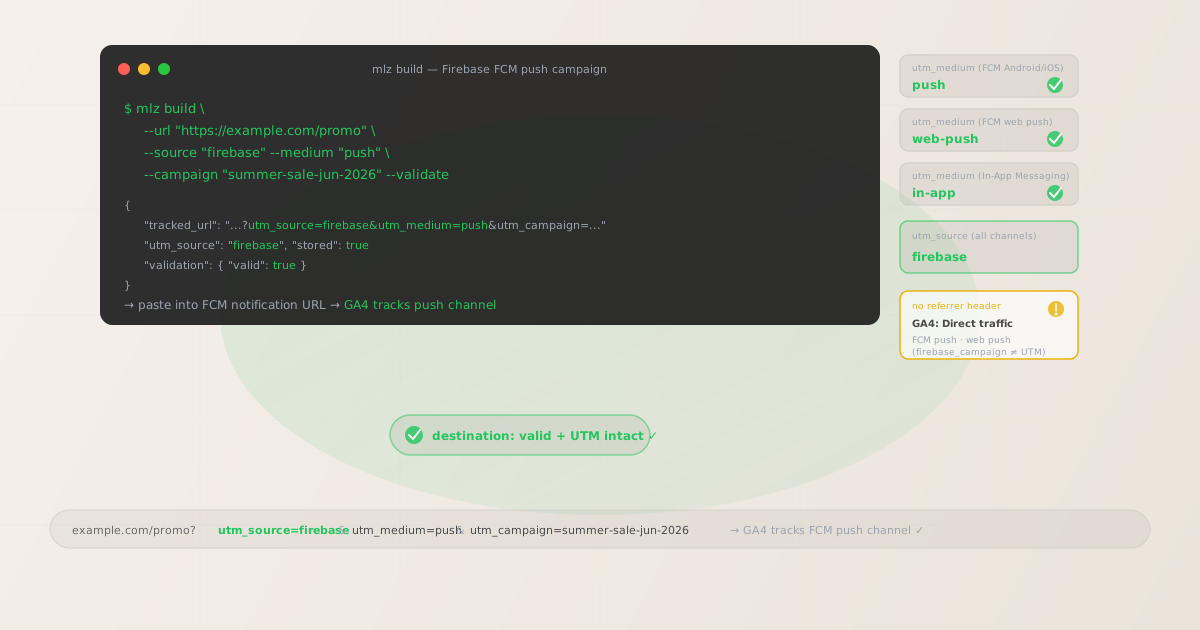
Why Firebase UTM tracking requires special attention
Firebase's integration with Google Analytics 4 creates a common misconception: because Firebase and GA4 are both Google products and can be linked in the Firebase Console, many developers assume that Firebase notification campaigns are automatically attributed in GA4. This is only true for native app events. For web sessions triggered by tapping a push notification or clicking an In-App Messaging CTA, the GA4 web attribution pipeline is separate from Firebase Analytics app event tracking, and it depends entirely on UTM parameters in the destination URL.
FCM handles push notification delivery for Android (via direct FCM connection) and iOS (via APNs, with FCM acting as the routing layer). When a user taps an FCM push notification that has a web URL as its click action, the OS opens the URL in the device browser. The OS-level URL open has no referrer header, so GA4 sees a Direct session. FCM's own delivery tracking records the notification open, but that data lives in Firebase Analytics app events (or Firebase Console campaign reports) and doesn't reach GA4's session-level attribution unless you manually bridge the two with UTM parameters.
FCM also supports web push notifications for Progressive Web Apps (PWAs) and web apps that have registered a Service Worker. When a web push notification is clicked in a desktop or mobile browser, the browser opens the notification's click action URL without a referrer. These sessions appear as Direct in GA4 just like mobile push sessions, and need the same UTM parameter treatment.
Firebase In-App Messaging delivers rich messages to users currently active in your mobile app. When an In-App Messaging campaign contains a button with a deep link to a web URL, tapping that button opens the URL in the device browser without a referrer, resulting in Direct attribution in GA4. In-App Messaging CTAs that trigger in-app navigation or open deep links within the app don't create web sessions.
| Firebase channel | Firebase Analytics tracks? | GA4 web attribution without UTM | Recommended utm_medium |
|---|---|---|---|
| FCM push (Android/iOS) | Yes (app events) | Direct in GA4 web sessions | ✓ push |
| FCM web push (PWA) | Limited | Direct in GA4 | ✓ web-push |
| Firebase In-App Messaging (web URL CTA) | Yes (in_app_message_click) | Direct in GA4 | ✓ in-app |
| Firebase Remote Config (no direct links) | Yes (config fetch events) | N/A — no link clicks | ✓ N/A |
The right column — Firebase Analytics tracking push opens — is app-level instrumentation. It tells you notification delivery and open rates within the Firebase Console. The GA4 web session column is where your conversion tracking, goal completions, and revenue attribution live. These are two separate systems, and UTM parameters are the only way to connect them for web destinations.
Building tracked Firebase campaign URLs with mlz build
Build your tracked destination URLs with mlz build before configuring your FCM notification payload. For FCM push notifications sent via Firebase Console, paste the tracked_url into the "Additional Options > Link" field or the "Click action" URL depending on your notification type. For FCM notifications sent programmatically via the Admin SDK, use the tracked_url as the value of the webpush.fcmOptions.link field (for web push) or the data payload key your app reads to open the browser (for app-to-web redirect flows). Add --validate to confirm the destination resolves and UTM parameters survive any intermediate redirects before the notification sends to production devices.
# FCM push notification (Android/iOS click action URL)
$ mlz build \
  --url "https://example.com/summer-promo" \
  --source "firebase" \
  --medium "push" \
  --campaign "summer-sale-jun-2026" \
  --validate

{
  "tracked_url": "https://example.com/summer-promo?utm_source=firebase&utm_medium=push&utm_campaign=summer-sale-jun-2026",
  "params": {
    "utm_source": "firebase",
    "utm_medium": "push",
    "utm_campaign": "summer-sale-jun-2026"
  },
  "stored": true
}

# FCM web push (PWA Service Worker notification)
$ mlz build \
  --url "https://example.com/summer-promo" \
  --source "firebase" \
  --medium "web-push" \
  --campaign "summer-sale-jun-2026" \
  --validate

{
  "tracked_url": "https://example.com/summer-promo?utm_source=firebase&utm_medium=web-push&utm_campaign=summer-sale-jun-2026"
}

# Firebase In-App Messaging button CTA
$ mlz build \
  --url "https://example.com/summer-promo" \
  --source "firebase" \
  --medium "in-app" \
  --campaign "summer-sale-jun-2026" \
  --validate

{
  "tracked_url": "https://example.com/summer-promo?utm_source=firebase&utm_medium=in-app&utm_campaign=summer-sale-jun-2026"
}
Using a consistent utm_campaign slug across all Firebase channels for the same campaign allows GA4's campaign report to aggregate sessions from FCM push, web push, and In-App Messaging in a single campaign row. Pivot on utm_medium to break down which Firebase channel drove the most web sessions and conversions. The distinction between push (mobile push via FCM to APNs or FCM connection) and web-push (browser push via Service Worker) is particularly useful when you're running both channel types simultaneously — without separate mediums, all Firebase push sessions collapse into an undifferentiated bucket in GA4.
Setting FCM tracked URLs programmatically with the Admin SDK
For teams sending FCM notifications programmatically via the Firebase Admin SDK (Node.js, Python, Go, Java), integrate mlz build into the link generation step before constructing the message payload. Run mlz build --format json to get structured JSON output, extract the tracked_url field, and use it as the notification link value.
# Generate tracked URL and extract it for use in Admin SDK payload
$ TRACKED=$(mlz build \
  --url "https://example.com/offer" \
  --source "firebase" \
  --medium "push" \
  --campaign "reengagement-jun-2026" \
  --format json | jq -r '.tracked_url')

$ echo $TRACKED
https://example.com/offer?utm_source=firebase&utm_medium=push&utm_campaign=reengagement-jun-2026

# Use $TRACKED as the link field in your Admin SDK message object
# Node.js example (pseudocode):
# const message = {
#   notification: { title: "...", body: "..." },
#   webpush: { fcmOptions: { link: process.env.TRACKED_URL } },
#   topic: "reengagement"
# };
For teams building FCM notification pipelines in CI/CD workflows — for example, a Node.js Lambda that sends re-engagement push notifications based on a user segment — use mlz build --format json in a pre-send step to generate and validate the tracked URL, then pass it to the Firebase Admin SDK. This ensures every FCM notification URL is validated before it reaches production devices and that all web sessions generated by the notification appear correctly attributed in GA4.
Firebase Dynamic Links are deprecated — what to do instead
Firebase Dynamic Links (FDL) was Google's deep link hosting service that allowed teams to create links that opened specific in-app screens on mobile while falling back to a web URL on desktop. FDL supported UTM parameter passthrough for web fallback sessions. Google deprecated Firebase Dynamic Links and shut down the service in August 2025. Teams that relied on FDL for UTM-tracked deep links need to migrate to an alternative.
For UTM tracking of web sessions previously handled by Firebase Dynamic Links, the direct replacement is to append UTM parameters to the destination URL itself rather than relying on a link hosting service. Use mlz build to generate tracked URLs for each campaign and channel, validate them before use, and store them in your campaign configuration. For deep linking needs (directing users to a specific in-app screen), use a dedicated deep link platform (Branch.io, AppsFlyer OneLink, or custom App Links/Universal Links) combined with UTM parameters on the web fallback URL.
# FDL replacement: direct UTM tracking on destination URL
# Previously: https://your-app.page.link/summer?utm_source=firebase&utm_medium=push
# Now: UTM parameters go directly on the destination

$ mlz build \
  --url "https://example.com/summer-offer" \
  --source "firebase" \
  --medium "push" \
  --campaign "summer-reengagement-2026" \
  --content "lapsed-30d" \
  --validate

{
  "tracked_url": "https://example.com/summer-offer?utm_source=firebase&utm_medium=push&utm_campaign=summer-reengagement-2026&utm_content=lapsed-30d",
  "params": {
    "utm_source": "firebase",
    "utm_medium": "push",
    "utm_campaign": "summer-reengagement-2026",
    "utm_content": "lapsed-30d"
  },
  "stored": true
}
Firebase UTM tracking gotchas
- Firebase Analytics
firebase_campaignparameter does not populate GA4 web session attribution - Firebase Analytics records
firebase_campaign,firebase_source, andfirebase_mediumas event parameters for app-level push notification open events (thenotification_openevent in Firebase Analytics). These are visible in Firebase Console's campaign reports and in the BigQuery export of Firebase event data. However, when a push notification opens a web URL in the browser, the resulting web session in GA4 is a separate data stream from the Firebase app event. GA4 attributes this web session using standard web attribution rules (referrer header or UTM parameters). Thefirebase_campaignevent parameter does not transfer to the web session. If you rely onfirebase_campaignin Firebase Console to measure campaign success, that's fine for tracking notification opens within the app — but it won't show you web conversions, goal completions, or revenue attributed to the campaign in GA4. - FCM notifications can send to multiple platforms simultaneously — each platform needs per-channel overrides
- When sending an FCM notification to a topic or user segment that includes both Android, iOS, and web subscribers simultaneously, the Firebase Admin SDK's multicast message type sends a single payload to all platform clients. If you want different UTM medium values for mobile push vs web push (recommended), configure platform-specific overrides in the message payload: use
android.fcmOptions.analyticsLabelfor Android-specific routing hints, and set separate notification link values viawebpush.fcmOptions.linkfor web push. Alternatively, send mobile push and web push as separate FCM message objects, each using atracked_urlwith the appropriateutm_medium. - Firebase's "Campaign Analytics" toggle in Firebase Console applies to Firebase Analytics events, not UTM parameters
- When creating a notification in Firebase Console, there's a "Campaign Analytics" toggle that, when enabled, attributes the notification open event to a named campaign in Firebase Analytics. This only affects the
firebase_campaignevent parameter on thenotification_openapp event — it doesn't add UTM parameters to the click action URL. The "Campaign Analytics" toggle and UTM parameters serve different purposes: Firebase Campaign Analytics tracks notification open rates within Firebase; UTM parameters track web session attribution in GA4. You need both: enable Campaign Analytics in Firebase Console for in-app funnel reporting, and add UTM parameters to the destination URL for GA4 web attribution. - Firebase In-App Messaging button URLs support deep links and web URLs — UTM parameters apply only to web URLs
- Firebase In-App Messaging button actions can be configured with either a deep link (e.g.,
myapp://product/sale) or a web URL. For buttons configured with a deep link action, the app handles the link internally — no web session is created and UTM parameters are not applicable. For buttons configured with a web URL, the app opens the URL in the device browser, creating a web session that will appear as Direct in GA4 without UTM parameters. Build tracked URLs withmlz build --source "firebase" --medium "in-app"only for In-App Messaging button actions that open web URLs. Leave deep link buttons without UTM parameters and track their conversions through Firebase Analytics in-app events instead. - Google does not have a default channel grouping for
pushin GA4 — add custom channel groups - GA4's default channel grouping does not include
pushorweb-pushas recognized channels. Sessions withutm_medium=pushorutm_medium=web-pushwill fall into GA4's "Unassigned" bucket in default acquisition reports. Configure custom channel grouping rules in GA4 (Admin > Data Display > Channel Groups):utm_medium exactly matches push→ label "Mobile Push (FCM)";utm_medium exactly matches web-push→ label "Web Push (FCM)";utm_medium exactly matches in-app→ label "In-App Messaging". Without these rules, your Firebase push campaigns will not appear as a named channel in GA4's default Acquisition reports even when UTM parameters are working correctly.
Firebase UTM naming conventions
Recommended UTM parameter values for Firebase campaigns, aligned with GA4 channel reporting and a lowercase-hyphenated taxonomy:
- utm_source:
firebasefor all Firebase-originated campaigns (FCM push, FCM web push, In-App Messaging). Usingfirebaseas the source for all channels — rather thanfcmorfirebase-messaging— aligns with how Firebase is branded in your marketing stack and makes it easy to filter GA4 to all Firebase-attributed traffic before pivoting onutm_mediumfor channel breakdown. Teams that also use Firebase Hosting for email templates could usefirebaseas the source for email campaigns sent via Firebase's email infrastructure, distinguishing them by medium. - utm_medium:
pushfor FCM mobile push notifications (Android via FCM, iOS via APNs);web-pushfor FCM web push notifications delivered to PWA Service Workers in browsers;in-appfor Firebase In-App Messaging button CTAs that open web URLs. Keeping mobile push and web push separate inutm_mediumis critical for Firebase because many teams run both FCM mobile push and FCM web push simultaneously and need to measure them independently in GA4. - utm_campaign: A consistent lowercase-hyphenated slug per campaign. For one-time campaigns:
summer-sale-jun-2026,new-release-2026-06,weekly-digest-2026-06-11. For ongoing re-engagement sequences:reengagement-lapsed-30d,cart-abandon-push,onboarding-day3. Use the sameutm_campaignslug across all Firebase channels sending for the same campaign so GA4 aggregates all channel sessions into one campaign row. - utm_content: Use to distinguish audience segments within the same campaign (
utm_content=lapsed-30d,utm_content=lapsed-60d), A/B test variants (utm_content=variant-a,utm_content=variant-b), or message copy variants for In-App Messaging campaigns with multiple button configurations. Also useful when the same notification sends to multiple platform audiences simultaneously — tag per-audienceutm_contentvalues to identify which segment drove conversions. - utm_term: Rarely used for Firebase push campaigns. Reserve for cases where the notification targets a specific keyword-based search term or audience segment identifier meaningful to your analytics team:
utm_term=high-value,utm_term=new-user.
See the UTM naming conventions guide for the full cross-platform reference and the UTM tracking for developers guide for programmatic generation and validation at scale.
FAQ
- Does Firebase Cloud Messaging automatically add UTM parameters to push notification URLs?
- No. FCM delivers whatever link URL you specify in the notification payload — it does not automatically append UTM parameters for GA4 attribution. Firebase Console's "Campaign Analytics" toggle adds
firebase_campaignevent parameters to Firebase Analytics app events, but this does not add UTM parameters to the notification's click action URL for web sessions. You need to build tracked URLs withmlz build --source "firebase" --medium "push" --campaign "your-slug" --validatebefore entering them into your FCM notification payloads, whether you're using Firebase Console or the Admin SDK. - What is the difference between firebase_campaign and utm_campaign for Firebase push notifications?
firebase_campaignis a Firebase Analytics event parameter automatically set on thenotification_openapp event when a user taps an FCM push notification. It appears in Firebase Console's Messaging > Campaigns report and in the BigQuery Firebase event export. It tracks the notification open event within the Firebase Analytics ecosystem.utm_campaignis a standard web analytics parameter in the URL query string that GA4 uses to attribute the resulting web browsing session to a campaign. When an FCM notification opens a web URL, you needutm_campaignin the URL to track web sessions in GA4. Both can be used simultaneously: enable Campaign Analytics in Firebase Console for in-app tracking, and add UTM parameters to the destination URL for GA4 web attribution.- How do I track FCM push notifications in GA4 since Firebase Dynamic Links were deprecated?
- Firebase Dynamic Links were shut down in August 2025. For GA4 web session attribution, the replacement is straightforward: append UTM parameters directly to your destination URLs. Use
mlz build --source "firebase" --medium "push" --campaign "your-campaign-slug" --validateto generate and validate a tracked destination URL, then use that tracked URL as the FCM notification click action URL. For deep linking needs (opening specific in-app screens), migrate to a dedicated deep link service (Branch, AppsFlyer OneLink, or native App Links/Universal Links with a web fallback), and add UTM parameters to the web fallback URL. - Can I use the Firebase Admin SDK with mlz build to automate UTM link generation?
- Yes. Run
mlz build --format jsonbefore constructing your FCM message payload to generate a validated tracked URL, extract thetracked_urlfield with a JSON parser likejq, and pass it to the Admin SDK message object as the notification link. For Node.js, this works well as a pre-send step in the same function that constructs the FCM message: build the tracked URL, validate it, and set it aswebpush.fcmOptions.link(for web push) or include it in the notification's data payload for your app to read and open. See the build UTM links programmatically guide for full API and npm integration examples. - How do I validate Firebase push notification URLs before they send to devices?
- Run
mlz build --url "your-destination" --source "firebase" --medium "[channel]" --campaign "your-slug" --validatefor each campaign URL before entering it into Firebase Console or the Admin SDK payload. The--validateflag confirms HTTPS, URL resolution (200 response), redirect chain integrity (including UTM preservation through any intermediate redirects), and response time. For landing pages with FCM notification CTAs, also runmlz inspect "your-tracked-url"to verify OG tags, Twitter Card metadata, and viewport configuration. See the campaign link preflight check guide for the full validation workflow.
Recommended posts
Build Firebase campaign links from the terminal
Use mlz build --source "firebase" --medium "push" for FCM mobile push (Android/iOS), --medium "web-push" for FCM web push notifications, and --medium "in-app" for Firebase In-App Messaging CTAs that open web URLs. Add --validate to confirm each destination URL resolves correctly and UTM parameters survive any redirect chain before the notification sends to devices. For Admin SDK workflows, use --format json and pipe the tracked_url field directly into your FCM message payload construction step.
1,000 links/month free. No credit card.
Your API key
Save this now — it won't be shown again.
npm install -g missinglinkz
Free plan: 1,000 links/month. No credit card. See the UTM tracking for developers guide for the full programmatic workflow including API and MCP integration.