RevOps Guide to Campaign Link Validation via API
Before any campaign URL enters your CRM as a destination — a Salesforce Campaign activity target, a HubSpot campaign URL, a Marketo landing page field — five things must pass: SSL, HTTP resolution (HTTP 200), redirect chain integrity with UTM parameters intact, Open Graph tags present for social sharing previews, and correct UTM parameter formatting. A URL that fails any of these checks will silently corrupt your attribution data, serve broken social previews, or return a 404 when a prospect clicks. Here is how to validate all five checks programmatically from any RevOps script or automation platform before the URL gets stored anywhere.
The RevOps link validation gap: what CRMs store vs. what they validate
Salesforce, HubSpot, and Marketo are built to manage campaign records and track engagement. They are not built to validate destination URLs. When a RevOps engineer or marketing operations manager adds a landing page URL to a CRM campaign, the platform stores exactly what was typed — no SSL check, no HTTP resolution check, no Open Graph inspection, no UTM parameter validation.
The result: a URL that resolves to a 404, redirects through a chain that strips UTM parameters, or lacks an og:image can sit in a CRM campaign for weeks before anyone notices. By then, ad spend has been committed, email sends have gone out, and attribution reporting has a hole in it.
- SSL / HTTPS
- Any landing page served over plain HTTP will be flagged as insecure by modern browsers. Click-through rates drop when a browser shows a security warning. The CRM stores the URL regardless.
- HTTP resolution (HTTP 200)
- A URL that returns 404, 500, or redirects to an error page will still be saved as the campaign destination. The CRM has no mechanism to detect this before the campaign goes live.
- Redirect chain integrity
- Vanity domains, CDN rewrites, and link shorteners are common in campaign stacks. Any redirect hop that strips query strings will silently drop UTM parameters — GA4 receives organic sessions instead of the attributed campaign traffic. The CRM stores the original URL without any awareness of what happens downstream.
- Open Graph tags
- When a campaign URL is shared on LinkedIn, Slack, or Facebook, the platform fetches
og:title,og:description, andog:imagefrom the page. A missingog:imageproduces an ugly preview with no thumbnail. The CRM stores the URL without checking the page's OG metadata. - UTM parameter formatting
- Case inconsistencies (
utm_source=LinkedInvsutm_source=linkedin) create separate rows in GA4, fragmenting attribution. A CRM will store either version without complaint. Consistent lowercase UTM formatting is a RevOps data quality concern, not a CRM concern.
The standard fix is a manual checklist: open the URL in a browser, run it through Facebook's Sharing Debugger, check the redirect chain in DevTools. This approach doesn't scale past five or ten URLs per week, and it depends entirely on a human remembering to run the check. For RevOps teams managing 50+ campaign URLs across multiple channels and quarters, a programmatic validation layer is the only viable path.
POST /v1/preflight: the REST API validation call
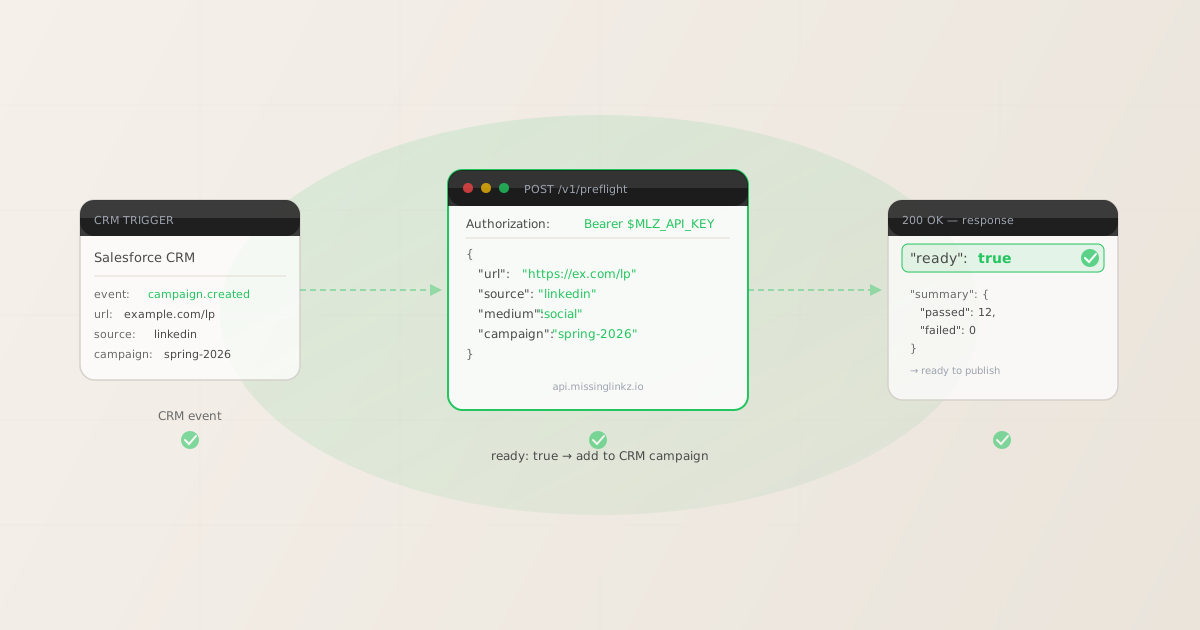
The MissingLinkz REST API exposes a single endpoint that runs all five checks — SSL, resolution, redirect chain, OG tags, and UTM integrity — in one HTTP call and returns a structured JSON response with a ready boolean. Any RevOps script, Salesforce Flow webhook handler, HubSpot custom code block, or cron job can call this endpoint directly without installing any CLI tooling.
Base URL: https://api.missinglinkz.io. Authentication: Authorization: Bearer mlz_live_.... Request body fields use source, medium, campaign — not the utm_-prefixed variants. The API assembles the full UTM-tagged URL and validates it.
$ curl -s -X POST https://api.missinglinkz.io/v1/preflight \
  -H "Authorization: Bearer $MLZ_API_KEY" \
  -H "Content-Type: application/json" \
  -d '{"url":"https://example.com/landing","source":"linkedin","medium":"social","campaign":"spring-2026"}'

{
  "ready": true,
  "tracked_url": "https://example.com/landing?utm_source=linkedin&utm_medium=social&utm_campaign=spring-2026",
  "checks": [
    { "check": "ssl", "status": "pass", "message": "URL uses HTTPS." },
    { "check": "resolution", "status": "pass", "message": "Destination responded with 200." },
    { "check": "redirects", "status": "pass", "message": "No redirects detected." },
    { "check": "og_tags", "status": "pass", "message": "Open Graph tags present: title, description, and image." },
    { "check": "twitter_card", "status": "pass", "message": "Twitter Card present (type: summary_large_image)." }
  ],
  "summary": { "total": 12, "passed": 12, "warnings": 0, "failed": 0 },
  "recommendation": "All checks passed. Campaign link is ready to publish."
}
The response structure gives RevOps three things to work with. The ready boolean is the gate: if false, do not proceed. The checks[] array identifies exactly which check failed and why — useful for surfacing actionable error details in a Slack notification or CRM note. The tracked_url field is the validated, UTM-tagged URL ready to store as the campaign destination — no separate UTM builder step required.
For the full REST API reference including all endpoints, error codes, and authentication setup, see the MissingLinkz REST API guide. For the parent overview of all validation checks, see campaign link validation: the complete guide.
Using the ready flag as a gate in RevOps workflows
The ready boolean is designed to be a machine-readable gate. A RevOps workflow reads it and branches: if true, add the URL to the CRM campaign record; if false, surface the failure detail to the campaign manager and block the URL from being stored until the issue is resolved.
This pattern fits naturally into three common RevOps integration points:
- Salesforce Flow with an external HTTP callout
- A Salesforce Flow triggered on Campaign record creation can invoke an Apex HTTP callout to
POST /v1/preflight. If the responsereadyfield isfalse, the Flow adds a Campaign Note with the failing check details and sets a customLink_Validation_Status__cfield toFailed. Ifreadyistrue, the Flow stores thetracked_urlvalue as the campaign's UTM destination field and sets the status toPassed. No manual check is required; the Salesforce record reflects validation state automatically. - HubSpot workflow with a custom code action
- HubSpot Operations Hub workflows support JavaScript custom code actions. A workflow triggered on Campaign creation or URL property change calls
POST /v1/preflightviafetch(), readsready, and sets a HubSpot campaign property accordingly. Ifreadyisfalse, the workflow enrolls the campaign manager in a notification sequence with the specific failed check as the email body. This keeps validation state visible without requiring anyone to manually re-check links. - Custom RevOps script or cron job
- For teams not ready to wire validation into the CRM platform directly, a nightly Node.js or Python script that reads pending campaign records from the CRM API, calls
POST /v1/preflightfor each URL, and writes results back as CRM notes achieves the same outcome asynchronously. This is the lowest-friction integration pattern and the right starting point for most RevOps teams.
The key principle in all three patterns: the CRM campaign record should not be considered launch-ready until ready: true has been returned for its destination URL. This is the RevOps campaign link validation automation API equivalent of a CI build gate — the campaign does not go to launch until validation passes.
For teams already running CI/CD pipelines for marketing assets, see automating campaign link validation in CI/CD for how the same ready gate works inside GitHub Actions and GitLab CI.
Batch validation for 50+ landing pages
A single quarter's campaign calendar for a mid-market RevOps team commonly includes 50 to 200 landing page URLs across paid, email, social, and event channels. Validating these one at a time via a browser tool is not practical. The MissingLinkz REST API accepts one URL per call, but a straightforward loop in Node.js or Python can process an entire campaign inventory in under two minutes.
The following Node.js script reads an array of campaign objects, calls POST /v1/preflight for each, and logs a pass/fail summary with the tracked_url ready to copy into the CRM:
const campaigns = [
  { url: "https://example.com/landing-q3", source: "linkedin",  medium: "social",  campaign: "q3-launch" },
  { url: "https://example.com/pricing",     source: "google",    medium: "cpc",     campaign: "q3-launch" },
  { url: "https://example.com/webinar",     source: "email",     medium: "email",   campaign: "q3-webinar" },
  // ... up to 200+ entries
];

const MLZ_API_KEY = process.env.MLZ_API_KEY;
const ENDPOINT = "https://api.missinglinkz.io/v1/preflight";

async function validateCampaign(campaign) {
  const res = await fetch(ENDPOINT, {
    method: "POST",
    headers: {
      "Authorization": `Bearer ${MLZ_API_KEY}`,
      "Content-Type": "application/json"
    },
    body: JSON.stringify(campaign)
  });
  return res.json();
}

(async () => {
  const results = [];
  for (const campaign of campaigns) {
    const report = await validateCampaign(campaign);
    results.push({ ...campaign, ready: report.ready, tracked_url: report.tracked_url,
                   failed_checks: report.checks.filter(c => c.status === "fail") });
    console.log(`${report.ready ? "PASS" : "FAIL"}  ${campaign.url}`);
  }
  const failures = results.filter(r => !r.ready);
  console.log(`\nSummary: ${results.length - failures.length} passed, ${failures.length} failed`);
  if (failures.length) {
    console.log("\nFailed URLs:");
    failures.forEach(f => console.log(`  ${f.url}: ${f.failed_checks.map(c => c.check).join(", ")}`));
  }
})()
The loop runs sequentially by default, which avoids rate-limit concerns and produces predictable output. For larger batches where throughput matters, you can introduce controlled concurrency using Promise.allSettled with a concurrency limit of 5–10 parallel requests. The script above is a drop-in starting point — connect it to your CRM's export API to pull URLs and to your CRM's update API to write results back.
The equivalent in Python for teams that prefer it:
import os, requests

MLZ_API_KEY = os.environ["MLZ_API_KEY"]
ENDPOINT = "https://api.missinglinkz.io/v1/preflight"
HEADERS = {"Authorization": f"Bearer {MLZ_API_KEY}", "Content-Type": "application/json"}

campaigns = [
    {"url": "https://example.com/landing-q3", "source": "linkedin",  "medium": "social",  "campaign": "q3-launch"},
    {"url": "https://example.com/pricing",     "source": "google",    "medium": "cpc",     "campaign": "q3-launch"},
    {"url": "https://example.com/webinar",     "source": "email",     "medium": "email",   "campaign": "q3-webinar"},
]

passed, failed = 0, 0
for c in campaigns:
    r = requests.post(ENDPOINT, headers=HEADERS, json=c).json()
    status = "PASS" if r.get("ready") else "FAIL"
    print(f"{status}  {c['url']}")
    if r.get("ready"):
        passed += 1
        print(f"  tracked_url: {r.get('tracked_url')}")
    else:
        failed += 1
        bad = [ch["check"] for ch in r.get("checks", []) if ch["status"] == "fail"]
        print(f"  failed checks: {', '.join(bad)}")

print(f"\nSummary: {passed} passed, {failed} failed")
Both scripts use only the standard library plus one HTTP client. No SDK required. The tracked_url field in each passing response is the fully assembled, validated UTM URL — the exact value to store as the CRM campaign destination. For programmatic UTM link generation patterns, see building UTM links programmatically.
REST API vs. CLI vs. MCP: which integration pattern fits your RevOps stack
MissingLinkz exposes the same campaign link validation engine through three surfaces. The right choice depends on where validation is triggered in your RevOps workflow:
- REST API (
POST /v1/preflight) — server-side automation - The right choice when validation is triggered by a server-side event: a CRM webhook, a Salesforce Flow callout, a HubSpot workflow custom code action, a cron job, or any script running in a cloud function. No Node.js binary required on the execution environment — any language with an HTTP client works. This is the standard integration pattern for RevOps campaign link validation automation.
- CLI (
mlz preflight) — terminal and CI/CD pipelines - The right choice when validation is run by a developer or engineer from a terminal, or wired into a CI/CD pipeline as a build gate. Install once with
npm install -g missinglinkz, then callmlz preflight --url "..." --source "..." --medium "..." --campaign "...". Returns the same JSON response as the REST API and exits with code 1 on failure. See campaign link validation in CI/CD for pipeline integration patterns. - MCP server (
mlz mcp) — AI agent workflows - The right choice when validation is called by an AI agent — Claude, Cursor, or any MCP-compatible client — as part of an automated campaign creation workflow. The MCP server exposes
mlz_preflightas a tool. The agent calls the tool with URL and UTM parameters; the tool returns the same structured JSON. No human in the loop required. See the developer UTM tracking guide for how this fits into a full AI-driven campaign stack.
For most RevOps teams, the REST API and CLI are complementary. The REST API handles automated, event-driven validation (CRM triggers, nightly batch jobs). The CLI handles ad hoc validation and pre-commit or pre-deploy gates that developers or ops engineers run manually. The MCP server is additive — it extends the same validation into AI agent workflows without changing the underlying infrastructure.
FAQ
- Does
POST /v1/preflightbuild the UTM link or just validate the destination? - It does both in one call. The request body takes
url,source,medium, andcampaign(notutm_-prefixed). The API assembles the full UTM-tagged URL, validates the destination, and returns the assembledtracked_urlalong with the validation report. This means a RevOps workflow only needs one API call to both build and validate — there is no separate build step. - Do I need an API key to call the REST API?
- Yes. The REST API requires a
Bearertoken in theAuthorizationheader for all requests. Get an API key at missinglinkz.io — the free plan includes 1,000 validations per month. Store the key as an environment variable (MLZ_API_KEY) or as a secret in your CRM platform's credential store. Never hardcode it in source code. - How do I handle validation failures in a Salesforce Flow?
- The
checks[]array in the response contains an entry for each check, with astatusfield of"pass","warn", or"fail", and a human-readablemessage. In a Salesforce Flow, deserialize the JSON response, loop overchecks[], collect entries wherestatus == "fail", and concatenate theirmessagefields into a Campaign Note or custom field. This gives the campaign manager the exact reason the URL failed without requiring them to leave Salesforce. - Can I call the API from a HubSpot Operations Hub custom code action?
- Yes. HubSpot Operations Hub custom code actions run Node.js and support
fetch(). Set yourMLZ_API_KEYas a HubSpot secret, pass it into the action as an input property, and callPOST /v1/preflightusing the fetch pattern shown in the Node.js example above. Thereadyboolean maps directly to a HubSpot workflow branch condition —ready === truecontinues,falseroutes to a notification action. - What is the rate limit for batch validation?
- The free plan allows 1,000 validations per month. There is no per-second rate limit for sequential requests. For parallel batch scripts, keep concurrency at or below 10 simultaneous requests to avoid hitting infrastructure limits. For teams validating more than 1,000 URLs per month, the Team plan provides unlimited validations at $49/month. Check your current quota at any time by calling
GET /v1/auth/statuswith your API key.
Recommended posts
Add a validation layer to your RevOps campaign workflow
Stop storing unvalidated URLs in your CRM. Call POST /v1/preflight before any campaign URL enters Salesforce, HubSpot, or Marketo — get a ready boolean, a fully assembled tracked_url, and per-check failure details in a single API call.
1,000 links/month free. No credit card.
Your API key
Save this now — it won't be shown again.
npm install -g missinglinkz
Use the REST API from any RevOps script, Salesforce Flow, or HubSpot workflow. The same validation engine powers the CLI and MCP server — one integration, every surface.