Marketing CLI: Command-Line Tools for Campaign Ops
Marketing CLI tools in 2026 span four categories: campaign link infrastructure, analytics querying, content publishing automation, and social media scheduling. The short answer to "which tools exist" is: the marketing CLI landscape is broad but uneven. A handful of categories have mature, scriptable CLI tools. Most marketing platforms still live entirely behind web dashboards. This article is a practical directory of what works from the terminal — with a clear-eyed view of the gap that breaks every automated workflow: campaign link building and validation. If you're running campaigns at scale through scripts, CI/CD pipelines, or AI agents, the web dashboard for building UTM links is the single biggest bottleneck. A form in a browser can't be called from a shell script. It can't run in GitHub Actions. It can't be invoked by Claude Code. A CLI can. Here's the full landscape, and which tool to reach for at each layer.
Why marketing needs CLI tools
The same shift that brought DevOps into software teams is arriving in marketing. Campaigns are no longer one-off events assembled by hand in dashboards. They're repeatable, parameterized processes with dozens of moving parts: dozens of destination URLs, source/medium combinations, platform variations, copy lengths, and asset sizes. Doing that manually in a web interface is slow, error-prone, and impossible to audit.
Four forces are pushing marketing teams toward the terminal:
- Automation and scripting
- A CLI command can be wrapped in a shell script and run against a CSV of campaign URLs. A web form cannot. When you're launching a campaign across ten channels with three ad variations each, building thirty UTM links one at a time in a browser is an invitation for typos. A loop over a structured input file with a CLI tool is not.
- CI/CD pipeline integration
- GitHub Actions, CircleCI, and Jenkins all run shell commands. If your campaign link generation and validation logic can be expressed as CLI steps, you can gate deployments on it, run it on every branch push, and get a failing build when a destination URL is broken. None of that is possible with a dashboard. See automating campaign link validation in CI/CD for full pipeline templates.
- AI agent workflows
- AI agents — Claude Code, Cursor, custom GPT-based bots — are most reliable when they call tools that accept structured input and return structured output. A CLI command fits that pattern exactly. A web form does not. Agents that need to build or validate campaign links as part of a larger workflow have to shell out to a CLI or call an API. There's no reliable way to have an agent fill out a browser form.
- Reproducibility and audit trails
- A command run in a terminal is loggable, version-controllable, and reproducible. A link built by hand in a web form is none of those. When an analyst asks "why did we use utm_medium=Social instead of utm_medium=social for the Q1 campaign?", a script with a commit history has an answer. A dashboard session history does not.
The marketing CLI landscape in 2026
The marketing CLI ecosystem is organized into four functional categories. Coverage is uneven: campaign link infrastructure has a purpose-built CLI with full JSON output and validation. Analytics querying has CLI wrappers for major platforms but requires platform-specific setup. Content publishing and social scheduling have CLI tools at the fringes but are mostly still dashboard-dependent. Here's the map.
- Category 1: Campaign link building and validation
- The most automation-ready category. MissingLinkz ships a full CLI (
mlz) that builds UTM-tracked links, validates destination URLs, and inspects landing page metadata — all from the terminal, all with JSON output. This is the category where a marketing CLI makes the most immediate difference. - Category 2: Analytics querying
- GA4, BigQuery, and major ad platforms have official APIs with CLI access patterns. The Google Cloud CLI (
gcloud) and BigQuery CLI (bq) let you query campaign data programmatically. The Google Analytics Data API can be called from any HTTP client. These tools require authentication setup and platform expertise but reward teams that invest with fully scriptable reporting. - Category 3: Content publishing automation
- Static site generators (Hugo, Jekyll, Next.js) and headless CMS platforms (Contentful, Sanity) all ship CLIs for content publishing. If your blog or landing pages live in a git-backed content pipeline, CLI-driven publishing is the norm. The gap is in the link-to-content handoff: the tracking link built by a marketer needs to match the URL published by the developer.
- Category 4: Social media scheduling
- Most social platforms don't offer official CLI tools. Third-party scheduling tools occasionally expose APIs but rarely ship first-class CLIs. The practical approach for teams who need scriptable social publishing is to combine API access with shell scripts that wrap the platform's REST endpoints. The scheduling layer is the weakest link in the marketing CLI stack.
Category 1: Campaign link building and validation — MissingLinkz deep dive
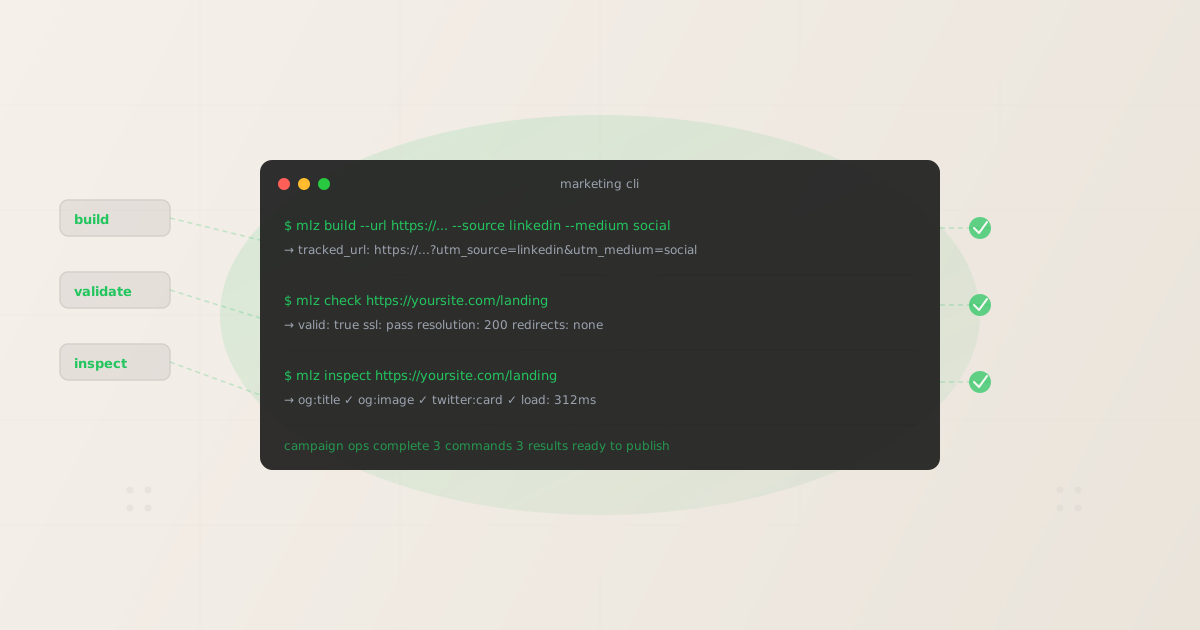
MissingLinkz is campaign link infrastructure built for CLI-first workflows. It ships three commands that cover the full campaign link lifecycle: building tracked URLs, validating destination health, and inspecting landing page metadata. Every command returns structured JSON. Every command exits with a non-zero code on failure. Both properties are what make these commands composable in pipelines and callable by AI agents.
For the full programmatic guide, see how to build UTM links programmatically.
mlz build — generate UTM-tracked campaign links
mlz build takes a destination URL plus campaign parameters and outputs a fully tracked URL. Pass --format json to get machine-readable output that scripts and agents can parse downstream.
$ mlz build \
    --url "https://yoursite.com/landing" \
    --campaign "q2-launch" \
    --source "linkedin" \
    --medium "social" \
--format json{
"tracked_url": "https://yoursite.com/landing?utm_source=linkedin&utm_medium=social&utm_campaign=q2-launch",
"params": {
"utm_source": "linkedin",
"utm_medium": "social",
"utm_campaign": "q2-launch"
},
"destination_url": "https://yoursite.com/landing",
"created_at": "2026-05-20T10:00:00.000Z",
"link_id": "lnk_abc123xy",
"campaign_id": "cmp_def456zw",
"stored": true
}mlz check — validate destination URL health
mlz check runs five checks on a destination URL: format validity, SSL, HTTP resolution, redirect chain, and response time. Use it before publishing any campaign to confirm the destination is reachable and not redirecting to a different domain that might strip UTM parameters.
$ mlz check "https://yoursite.com/landing"{
"url": "https://yoursite.com/landing",
"valid": true,
"checks": [
{ "check": "url_format", "status": "pass", "message": "URL format is valid." },
{ "check": "ssl", "status": "pass", "message": "URL uses HTTPS." },
{ "check": "resolution", "status": "pass", "message": "Destination responded with 200." },
{ "check": "redirects", "status": "pass", "message": "No redirects detected." },
{ "check": "response_time", "status": "pass", "message": "Response time: 215ms." }
],
"status_code": 200,
"response_time_ms": 215,
"validated_at": "2026-05-20T10:00:01.000Z"
}mlz inspect — verify landing page metadata
mlz inspect checks the landing page itself for social sharing readiness: Open Graph tags, Twitter Cards, favicon, and load time. Run it any time a destination URL changes or a campaign goes to a new landing page. A missing og:image discovered in a terminal before launch is far cheaper than the same discovery after 10,000 impressions generate blank social preview cards. For more on automating these checks, see automating social preview checks.
$ mlz inspect "https://yoursite.com/landing"{
"url": "https://yoursite.com/landing",
"success": true,
"checks": [
{ "check": "open_graph", "status": "pass", "message": "Open Graph tags present: title, description, and image." },
{ "check": "twitter_card", "status": "pass", "message": "Twitter Card present (type: summary_large_image)." },
{ "check": "favicon", "status": "pass", "message": "Favicon found." },
{ "check": "load_time", "status": "pass", "message": "Page load time: 312ms." }
],
"open_graph": {
"title": "Your Campaign Landing Page",
"image": "https://yoursite.com/og-image.png"
},
"load_time_ms": 312,
"inspected_at": "2026-05-20T10:00:02.000Z"
}Category 2: Analytics querying from the terminal
GA4 and most major analytics platforms expose REST APIs and, in some cases, official CLI tooling. The Google Cloud CLI (gcloud) and the BigQuery CLI (bq) give teams scriptable access to their GA4 data when it's exported to BigQuery — which is the recommended pattern for high-volume queries. The Google Analytics Data API v1 is fully accessible from curl or any HTTP client, and there are open-source thin wrappers that provide a more CLI-friendly interface.
The practical pattern for marketing analytics at scale is: use GA4's native BigQuery export, query it with the bq CLI, and schedule those queries as cron jobs or GitHub Actions steps. This gives you version-controlled, reproducible reporting without depending on GA4's UI for data extraction. The tradeoff is setup complexity: BigQuery export, IAM, and billing configuration all require DevOps involvement.
For campaign attribution specifically, the quality of your analytics output is only as good as the consistency of your input data. Mixed-case UTM parameters, inconsistent naming, and unvalidated destination URLs are the most common sources of fragmented attribution data in GA4 — which is why campaign link validation belongs upstream of any analytics query, not downstream.
Category 3: Content publishing automation
Static site generators and headless CMS platforms have mature CLI tooling. Hugo, Eleventy, and Next.js all ship CLI build and deploy commands that slot naturally into CI/CD pipelines. Contentful, Sanity, and Hygraph have CLI tools for content management and environment promotion. For teams with a git-backed content workflow, CLI-driven publishing is the default, not a workaround.
The workflow gap that marketing CLIs don't fully cover yet is the handoff between "link is built and validated" and "content is published with that link." The campaign link infrastructure layer (building the UTM link, validating the destination, checking OG tags) is solvable with mlz. The content publishing layer is handled by your CMS CLI. The gap is the coordination layer between them — which is why pipeline scripts that chain these commands together are the current best practice. More on that in the pipeline section below.
Category 4: Social media scheduling from the terminal
Social media scheduling is the category most resistant to CLI tooling. Twitter/X, LinkedIn, Instagram, and Facebook all expose APIs, but direct post scheduling via a CLI is either unsupported officially or rate-limited aggressively. Third-party scheduling platforms occasionally provide REST APIs that can be called from shell scripts, but none have emerged as a CLI-first scheduling standard.
The practical approach for teams who need scriptable social publishing is to treat scheduling as an API call from a CI/CD step: build the tracked link with mlz build, validate the destination with mlz check, inspect the landing page with mlz inspect, and then call your scheduling platform's API with the validated link. The first three steps are fully automatable today. The fourth depends on your platform's API access tier. For more on validating social content before it goes live, see automating social preview checks.
Dashboard tools vs. marketing CLI: capability comparison
The fundamental difference between dashboard-based marketing tools and CLI tools isn't features — it's interface. Dashboards are designed for human interaction. CLIs are designed for automation. That design difference determines whether a tool can be part of a pipeline, called by an agent, or run on a schedule. Here's the full comparison for campaign link workflows:
| Capability | Dashboard Tools | Marketing CLI (mlz) |
|---|---|---|
| Scriptable and automatable | ✗ Requires browser | ✓ Runs in any terminal |
| CI/CD pipeline integration | ✗ Not possible | ✓ Native with exit codes + JSON |
| AI agent callable | ✗ Web forms only | ✓ CLI + API + MCP |
| Bulk link processing | ✗ Manual, one at a time | ✓ Loop in shell script |
| Structured output | ✗ Rendered HTML | ✓ JSON with typed fields |
| Offline / no-browser use | ✗ Browser required | ✓ build, check, inspect all work locally |
Chaining MissingLinkz CLI commands in a pipeline script
The real power of CLI-first campaign link infrastructure is composability. mlz build, mlz check, and mlz inspect are independent commands that each do one thing and output JSON. That makes them chainable in shell scripts, composable in jq pipelines, and callable in sequence by AI agents.
Here's the simplest pattern: build and validate in a loop over a list of URLs. This is the shell-script equivalent of a campaign launch checklist — every destination URL gets a tracked link built and then checked, before any of them go live in copy or ad creatives.
#!/bin/bash
# Build and validate campaign links for each destination URL

for url in https://yoursite.com/page1 https://yoursite.com/page2; do
  mlz build \
    --url "$url" \
    --campaign "q2-launch" \
    --source "linkedin" \
    --medium "social"

  mlz check "$url"
done
For heavier workflows — reading from a CSV, extracting the tracked_url field from JSON output, writing results to a report file — you combine mlz build --format json with jq to parse the output. mlz inspect adds a third layer that checks the landing page itself is social-preview-ready before the tracked link is published anywhere.
Each command exits with code 0 on success and a non-zero code on failure. In a CI/CD pipeline, a non-zero exit code halts the build. This means a broken destination URL, an unresolvable hostname, or a missing og:image discovered during the mlz inspect step will block the deployment — the same guarantee you get from a failing test suite.
Integrating marketing CLIs into your DevOps pipeline
Putting a marketing CLI into a CI/CD pipeline follows the same pattern as putting any CLI tool there: install it, authenticate it, run it as a step, check the exit code. For MissingLinkz specifically, the npm install is a single line and authentication uses an environment variable.
The workflow that makes the most sense for most teams is a pre-deploy or pre-launch validation gate: run mlz check and mlz inspect on every destination URL that's about to go into a campaign. If any check fails, the pipeline fails and the team gets notified before the campaign links are handed off to ad operations or social scheduling. For a complete GitHub Actions template with MissingLinkz, see automating campaign link validation in CI/CD.
Beyond the validation gate, teams with mature DevOps practices can use mlz build as part of a link-generation pipeline: a GitHub Actions workflow that reads campaign parameters from a version-controlled YAML file, generates tracked URLs, and writes them to an output artifact that downstream steps consume. This pattern treats campaign link generation as infrastructure — reproducible, auditable, and deployable like any other infrastructure configuration.
For developer-focused context on the full UTM tracking picture, see the UTM tracking for developers guide.
- Step 1: Install the CLI in your pipeline environment
npm install -g missinglinkz— works in any Node.js-capable CI environment. Add it to your workflow's setup steps or Dockerfile. No native binaries, no platform-specific packages.- Step 2: Set your API key as an environment secret
- Add
MLZ_API_KEYto your CI/CD environment's secret store (GitHub Secrets, CircleCI environment variables, etc.). The CLI picks it up automatically at runtime. Offline UTM generation works without a key; link storage and campaign management require one. - Step 3: Add a validation step before campaign launch
- Run
mlz checkandmlz inspecton your campaign destination URLs as a named step in your pipeline. These commands produce JSON output that can be logged, archived, or parsed by downstream steps. Both exit non-zero on failure, so your pipeline automatically halts if a destination is broken. - Step 4: Gate deployments on the validation result
- Because
mlz checkandmlz inspectexit with standard Unix exit codes, they integrate naturally with any CI/CD system's step dependencies. A deployment step that depends on the validation step will not run if validation fails. No custom failure handling required.
FAQ
- What's the difference between a marketing CLI and a marketing API?
- A CLI (command-line interface) is a program you run directly in a terminal — it accepts arguments as flags and writes output to stdout. An API is an HTTP endpoint your code calls. Both are programmable. The CLI is better for interactive use, shell scripts, and CI/CD steps. The API is better for backend services, serverless functions, and environments where installing a binary isn't practical. MissingLinkz ships both: the
mlzCLI and the REST API atapi.missinglinkz.ioexpose the same functionality via their respective interfaces. - Can I use mlz without an API key?
- Yes.
mlz buildgenerates UTM-tracked links without a key — the output is returned to stdout but not stored in a campaign.mlz checkandmlz inspectwork fully without authentication since they're checking destination URLs, not accessing stored campaign data. An API key (MLZ_API_KEY) is required for link storage, campaign management, and usage tracking. - Can an AI agent like Claude use the mlz CLI directly?
- Yes, in two ways. If the agent can shell out (Claude Code, for example), it can call
mlz build,mlz check, andmlz inspectas shell commands and parse the JSON output. Alternatively,mlz mcpstarts an MCP server that exposes every command as a tool over the Model Context Protocol, which MCP-compatible agents (Claude Code, Cursor, Claude Desktop) can call natively without shell access. The MCP path is generally cleaner because the agent sees the tool schema directly. - Does mlz work in a Docker container?
- Yes.
npm install -g missinglinkzin any Dockerfile that includes Node.js will install the CLI. SetMLZ_API_KEYas an environment variable at container runtime. The CLI has no GUI dependencies and works headlessly in Alpine, Debian, or any other Linux base image. - What exit codes does mlz use?
mlz build,mlz check, andmlz inspectall exit 0 on success. They exit with a non-zero code when the operation fails — for example, whenmlz checkfinds that the destination returns a non-200 status code, or whenmlz buildis called with invalid parameters. This makes them usable in CI/CD steps, shell conditionals (if mlz check ...; then ...), andset -escripts that halt on any non-zero exit.
Recommended posts
Run your first marketing CLI command in under a minute
Install MissingLinkz and start building, validating, and inspecting campaign links from the terminal. Every command returns JSON. Every command works in CI/CD.
1,000 links/month free. No credit card.
Your API key
Save this now — it won't be shown again.
npm install -g missinglinkz
mlz build --url "https://yoursite.com" --campaign "q2-launch" --source "linkedin" --medium "social"
No account required for link generation. Add MLZ_API_KEY to enable link storage and campaign management. Full reference in SKILL.md.