mlz inspect vs og-check vs meta-preview-analyzer: Which CLI OG Tag Checker Should You Use?
If you search for a CLI OG tag checker, three tools come up: og-check (npm), meta-preview-analyzer (npx), and mlz inspect (part of MissingLinkz). They sound similar but cover very different ground. og-check renders OG tags in your terminal — nothing more. meta-preview-analyzer adds Twitter Card coverage. mlz inspect is a campaign-grade validator: OG tags, Twitter Card, viewport, canonical URL, favicon, and page load time — with structured JSON output that works in CI/CD pipelines and AI agent workflows. This comparison tells you when each tool is the right choice.
Why developers need a CLI OG tag checker
Web-based OG tag checkers like the Facebook Sharing Debugger and LinkedIn Post Inspector require a manual browser session for every URL you check. That works for occasional spot-checks but breaks down when you need to:
- Validate OG tags across dozens of campaign landing pages before a launch
- Gate a CI/CD deploy on OG tag presence
- Give an AI agent the ability to inspect a URL without opening a browser
- Script bulk checks across a list of URLs in a shell loop
All three CLI tools covered here run from the terminal and return results without a browser. The question is how much they check and whether the output is scriptable. For the full context on why CLI tools matter for automated workflows, see validating social media link previews from the command line.
Tool 1: og-check
og-check is an npm package that fetches a URL and prints its Open Graph tags to the terminal in a formatted layout. The output is designed for reading in a terminal — not for parsing in scripts.
What it checks: og:title, og:description, og:image, og:url, og:type. Nothing else.
What it does not check: Twitter Card tags, viewport meta tag, canonical URL, favicon, page load time. No JSON output. No exit code that signals pass or fail to a script. Not designed for CI/CD.
If you need to quickly confirm that a page has OG tags — and you are doing this manually, not in a script — og-check does that job cleanly. The moment you need Twitter Card coverage, JSON output, or pipeline integration, it runs out of runway.
Tool 2: meta-preview-analyzer
meta-preview-analyzer (available via npx) extends basic OG checking to include Twitter Card tags. It gives you a broader social preview picture than og-check alone.
What it checks: Open Graph tags (og:title, og:description, og:image, and type) plus Twitter Card tags (twitter:card, twitter:title, twitter:description, twitter:image).
What it does not check: Viewport meta tag (mobile readiness), canonical URL (duplicate content), favicon (browser tab branding), page load time, UTM parameter presence. No structured JSON output designed for script consumption. Not built for CI/CD exit code gating.
If your only requirement is "does this page have OG tags and Twitter Card configured?" and you are checking manually, meta-preview-analyzer covers that adequately. It is a step up from og-check for teams that care about X (Twitter) previews specifically.
Tool 3: mlz inspect
mlz inspect is the CLI inspection command in MissingLinkz, a campaign link infrastructure tool. It runs a complete pre-publish check on a URL and returns structured JSON — designed to be consumed by scripts, CI/CD pipelines, and AI agents.
mlz inspect https://example.com/landing
Output:
{
  "url": "https://example.com/landing",
  "success": true,
  "checks": [
    { "check": "fetch", "status": "pass", "message": "Page fetched successfully (312ms)." },
    { "check": "open_graph", "status": "pass", "message": "Open Graph tags present: title, description, and image." },
    { "check": "twitter_card", "status": "pass", "message": "Twitter Card present (type: summary_large_image)." },
    { "check": "favicon", "status": "pass", "message": "Favicon found." },
    { "check": "load_time", "status": "pass", "message": "Page load time: 312ms." }
  ],
  "open_graph": {
    "title": "Spring Launch 2026 — Example Co",
    "description": "Our new product is live. See what's changed.",
    "image": "https://example.com/og-spring.png",
    "type": "website"
  },
  "twitter_card": {
    "card": "summary_large_image",
    "title": "Spring Launch 2026 — Example Co"
  },
  "load_time_ms": 312
}
What it checks: Open Graph tags, Twitter Card tags, favicon, page load time. The --format json flag (or the default JSON mode) returns machine-readable output. Every check has a status field (pass, warn, fail) that scripts and pipelines can gate on.
What makes it different: The output is designed for consumption by code, not just human eyes. You can jq the checks array, pipe the result to Slack, or use it as a pre-deploy gate. The parent command mlz preflight combines inspect with URL validation and UTM building into one call — see the OG tag checking guide for the full workflow.
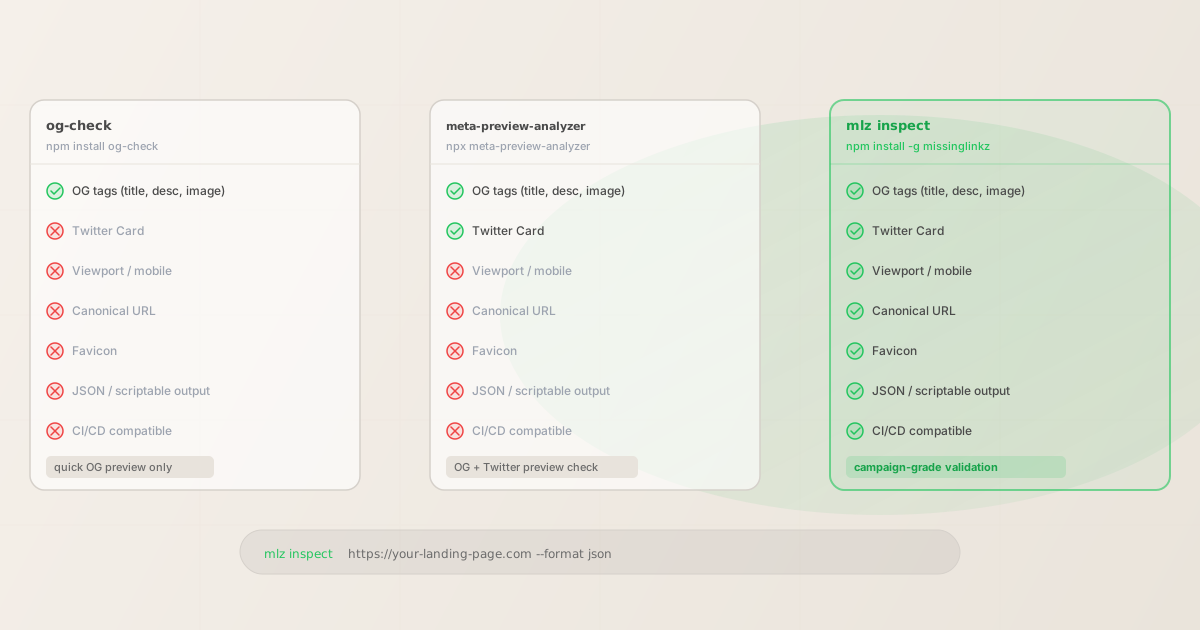
CLI OG tag checker comparison table
This is a direct CLI OG tag checker comparison of all three tools across the checks that matter for campaign pre-publish validation:
| Check | og-check | meta-preview-analyzer | mlz inspect |
|---|---|---|---|
| OG tags (title, desc, image) | ✓ Yes | ✓ Yes | ✓ Yes |
| Twitter Card tags | ✗ No | ✓ Yes | ✓ Yes |
| Viewport / mobile tag | ✗ No | ✗ No | ✓ Yes |
| Canonical URL | ✗ No | ✗ No | ✓ Yes |
| Favicon present | ✗ No | ✗ No | ✓ Yes |
| Page load time | ✗ No | ✗ No | ✓ Yes |
| Structured JSON output | ✗ No | ✗ No | ✓ Yes |
| CI/CD exit code gating | ✗ No | ✗ No | ✓ Yes |
| Works in AI agent workflows | ✗ No | ✗ No | ✓ Yes |
| Shell loop / bulk URL support | ✗ Limited | ✗ Limited | ✓ Yes |
The gap is structural: og-check and meta-preview-analyzer are terminal display tools — useful for human eyes, not for scripts. mlz inspect is built for programmatic consumption from the ground up. For the full CI/CD integration pattern, see automating campaign link validation in CI/CD.
Checking multiple URLs with mlz inspect
When you have a list of campaign landing pages to validate before launch, a shell loop with mlz inspect runs the full check across all of them and surfaces any failures immediately:
$ for url in \
    "https://example.com/landing-q2" \
    "https://example.com/webinar-april" \
    "https://example.com/product-launch"
  do
    mlz inspect "$url" --format json | jq '{url: .url, pass: ([.checks[].status] | all(. == "pass"))}'
  done

{ "url": "https://example.com/landing-q2", "pass": true }
{ "url": "https://example.com/webinar-april", "pass": false }
{ "url": "https://example.com/product-launch", "pass": true }
The second URL failed — you can immediately follow up with a full inspect on that URL to see which check failed. og-check and meta-preview-analyzer produce human-formatted terminal output that does not pipe cleanly into jq or shell conditionals this way.
Which CLI OG tag checker to use — and when
- Use og-check if
- You want a fast terminal display of OG tags for a single URL, you are working manually (no script or CI/CD), and you only care about OG tags — not Twitter Card, viewport, favicon, or JSON output. Good for a quick sanity check on a URL you are about to share manually.
- Use meta-preview-analyzer if
- You need both OG and Twitter Card coverage in a single command, you are still working manually, and you do not need the output to be consumed by a script or pipeline. Good when X (Twitter) previews are specifically what you are debugging.
- Use mlz inspect if
- You need campaign-grade validation: OG tags, Twitter Card, viewport, canonical, favicon, and load time in one pass. You need structured JSON output. You want the check to run in CI/CD, a pre-deploy hook, or an AI agent workflow. You are checking multiple URLs in a loop. This is the right tool when the check is part of a system, not a one-off human review.
FAQ
- Can og-check be used in a CI/CD pipeline?
- Not reliably.
og-checkoutputs formatted terminal text designed for human reading, not JSON or exit codes that a CI/CD step can gate on. If a page is missing an OG tag,og-checkwill display that visually but it will not cause a non-zero exit code that fails the build. For CI/CD integration,mlz inspectis the correct tool — it returns JSON and exits non-zero on failures. - Does mlz inspect check SSL and redirects too?
mlz inspectfocuses on page metadata (OG tags, Twitter Card, viewport, canonical, favicon, load time). For SSL validation and redirect chain analysis, usemlz check— or combine both withmlz preflight, which runs the full check: build a UTM link, validate SSL/redirects, and inspect all metadata in one command. See the Open Graph tags guide for how these checks fit together.- Is there a way to check OG tags AND UTM parameters in one command?
- Yes.
mlz inspectsurfaces any existing UTM parameters on the page it checks. More powerfully,mlz preflightbuilds the UTM link and validates the destination (including OG tags, Twitter Card, SSL, and redirects) in a single call — returning aready: true/falseverdict for the complete campaign link. That is the difference between inspecting a URL and validating a campaign link end-to-end. - How does mlz inspect compare to the Facebook Sharing Debugger?
- The Facebook Sharing Debugger requires a browser session and a manual click for every URL you check. It is the right tool for investigating why a specific link renders badly on Facebook.
mlz inspectis the right tool when you want to validate OG tags programmatically, run the check from a terminal or script, and get structured output back. For the full comparison of web tools vs. CLI, see validating social media link previews from the command line. - Do I need an API key to run mlz inspect?
- No.
mlz inspectworks offline without an API key for URL inspection. Install withnpm install -g missinglinkzand run immediately. An API key is only required for link storage, campaign management, and usage tracking features.
Recommended posts
Try the CLI OG tag checker built for campaigns
Install MissingLinkz and run mlz inspect on your next landing page in under 30 seconds. Structured JSON, CI/CD-ready, works in AI agent workflows.
1,000 links/month free. No credit card.
Your API key
Save this now — it won't be shown again.
npm install -g missinglinkz && mlz inspect https://your-landing-page.com
Free plan: 1,000 links/month. No credit card. See all commands in the SKILL.md reference.