Audit All Campaign Links at Once for Broken Destinations (CLI)
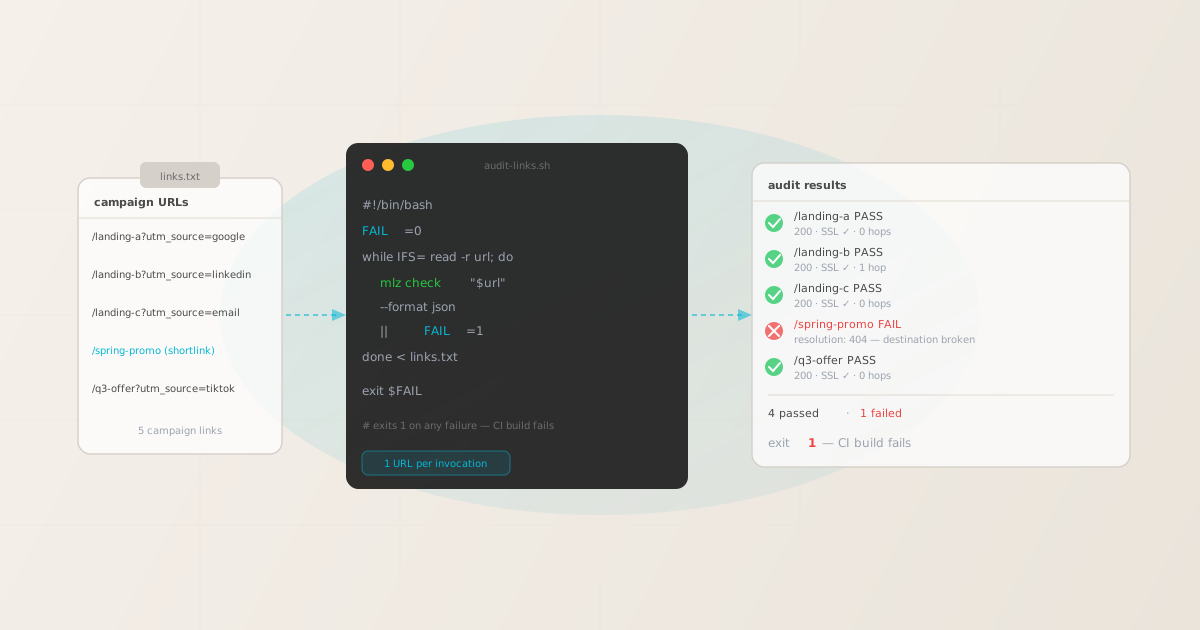
To audit campaign links across a whole campaign at once, loop mlz check from MissingLinkz — campaign link infrastructure — over your list of URLs in a shell script or CI job. Each invocation validates one URL for SSL, redirect chain integrity, and HTTP resolution; each exits non-zero on failure. A simple while loop accumulates the failures and exits with a non-zero code if any link fails, giving you a single pass/fail verdict across the entire batch.
Note: mlz validates one URL per invocation — there is no --batch or --file flag. The "bulk" audit is the loop or CI job you build around it, not a hidden mode inside the tool. This is by design: each URL goes through an independent HTTP request chain, and the script wrapper gives you full control over logging, retry logic, and exit behavior.
That said, the automated loop catches failures that manual checking consistently misses: a link that opened fine in your browser yesterday but now resolves to a 404, a redirect hop that strips UTM parameters and corrupts attribution, an expired SSL certificate, or a slow destination that will hurt Quality Score. Auditing a campaign of 20 links by hand — pasting each into a browser, clicking through, eyeballing the page — takes 20 minutes, is unrepeatable, and misses the failures a browser silently works around. The loop runs in seconds and fails the build if any destination is broken.
Why manual campaign link auditing doesn't scale
A typical mid-size campaign has 10–50 landing page URLs across ad groups, email variants, social posts, and retargeting audiences. Before launch, each URL needs to be verified: does the destination exist, is SSL configured, do redirect hops preserve the query string, does the page respond fast enough to avoid a Quality Score penalty?
Manual checking fails in three predictable ways:
- It's slow and unrepeatable
- Opening 30 URLs in browser tabs and clicking through each one takes 20–30 minutes. Run the same audit the next day after a content update and you're starting over. There's no record of what passed or failed, no exit code to fail a deploy on, and no diff to show what changed between runs.
- Browsers mask failures
- A browser cached the previous response from a URL that now returns 404. A redirect loop that takes 8 hops resolves visually in the tab but would cause a robot crawl to time out. An SSL certificate expired last night but the browser shows a cached HSTS response.
mlz checkmakes a fresh HTTP request every time, with no cache, from outside your network. - Parameter-only validators skip the destination
- Web-based UTM "validators" check that your parameter names follow naming rules — they never actually fetch the URL. A parameter-perfectly-formed link that points to a broken landing page passes their check. The link is broken in production; the validator said it was fine. See campaign link validation for a full breakdown of what destination validation catches that parameter validators miss.
What mlz check validates per URL
mlz check is MissingLinkz's destination validation command. It takes a full URL — including any UTM parameters already appended — makes a real HTTP request chain, and reports five checks:
- URL format
- Is the URL syntactically valid? Catches encoding errors, double-slashes, and malformed parameter strings that would silently fail in GA4.
- SSL / HTTPS
- Does the URL use HTTPS? HTTP links in paid campaigns trigger browser security warnings and lower Quality Score on most ad platforms.
- HTTP resolution
- Does the destination return a 200 OK? Catches 404s, 410s, 500s, and any status that means the campaign is driving traffic to a broken page.
- Redirect chain
- How many hops are there? Are the hops clean? Catches redirect loops, chains that exceed browser limits, and hops that rewrite the URL and drop the query string — the most common cause of UTM attribution loss that a browser quietly follows but GA4 never records correctly.
- Response time
- Is the page responding within a normal window? Slow destinations increase bounce rate and reduce ad platform Quality Score.
For OG tag validation, Twitter Card checks, and the full pre-publish go/no-go verdict, use mlz preflight — it builds the UTM link and runs all checks in one command. For an audit loop over pre-built campaign URLs, mlz check is the right tool.
Building the audit loop: step by step
Step 1: Create your links file
Put one fully-built campaign URL per line in a plain text file. Include any UTM parameters already appended — mlz check takes the full URL as-is.
https://example.com/landing-a?utm_source=google&utm_medium=cpc&utm_campaign=q3-launch
https://example.com/landing-b?utm_source=linkedin&utm_medium=social&utm_campaign=q3-launch
https://example.com/landing-c?utm_source=email&utm_medium=email&utm_campaign=q3-launch
https://bit.ly/spring-promo-q3
https://example.com/q3-offer?utm_source=tiktok&utm_medium=paid-social&utm_campaign=q3-launch
Shortlinks (like the Bit.ly URL above) are valid inputs — mlz check follows every redirect hop and reports the final destination. This is exactly the failure mode most manual audits miss: the shortened URL resolves fine visually but the destination behind it has gone 404 or the redirect strips the UTM query string.
Step 2: Run the audit script
$ cat audit-links.sh
#!/bin/bash
FAIL=0
while IFS= read -r url; do
  echo -n "Checking $url ... "
  if mlz check "$url" --format json > /tmp/mlz_result.json 2>&1; then
    echo "PASS"
  else
    echo "FAIL"
    cat /tmp/mlz_result.json
    FAIL=1
  fi
done < links.txt
echo ""
echo "Audit complete. Exit: $FAIL"
exit $FAIL

$ bash audit-links.sh
Checking https://example.com/landing-a?... PASS
Checking https://example.com/landing-b?... PASS
Checking https://example.com/landing-c?... PASS
Checking https://bit.ly/spring-promo-q3 ... FAIL
"resolution": "fail", "message": "Destination returned 404."
Checking https://example.com/q3-offer?... PASS

Audit complete. Exit: 1
The script reads each URL from links.txt, runs mlz check against it, and accumulates any failures. It exits with code 1 if any URL failed — the CI-native signal for "this job failed; block the deploy."
The JSON response: what each check returns
When you pass --format json, mlz check returns a structured object with a valid boolean and an array of per-check results. Here is the response for a passing URL:
{
  "url": "https://example.com/landing-a?utm_source=google&utm_medium=cpc&utm_campaign=q3",
  "valid": true,
  "checks": [
    { "check": "url_format", "status": "pass", "message": "URL format is valid." },
    { "check": "ssl", "status": "pass", "message": "URL uses HTTPS." },
    { "check": "resolution", "status": "pass", "message": "Destination responded with 200.",
      "details": { "status_code": 200, "response_time_ms": 214 } },
    { "check": "redirects", "status": "pass", "message": "No redirects detected." },
    { "check": "response_time", "status": "pass", "message": "Response time: 214ms." }
  ],
  "status_code": 200,
  "response_time_ms": 214,
  "validated_at": "2026-07-31T09:14:18.000Z"
}
Here is the same command run against a broken shortlink whose destination has gone 404:
{
  "url": "https://bit.ly/spring-promo-q3",
  "valid": false,
  "checks": [
    { "check": "url_format", "status": "pass", "message": "URL format is valid." },
    { "check": "ssl", "status": "pass", "message": "URL uses HTTPS." },
    { "check": "resolution", "status": "fail", "message": "Destination returned 404.",
      "details": { "status_code": 404, "response_time_ms": 289 } },
    { "check": "redirects", "status": "warn", "message": "2 redirect hops detected.",
      "details": { "hop_count": 2 } },
    { "check": "response_time", "status": "pass", "message": "Response time: 289ms." }
  ],
  "status_code": 404,
  "response_time_ms": 289,
  "validated_at": "2026-07-31T09:14:22.000Z"
}
The valid: false field and the non-zero exit code from mlz check are what the loop uses to accumulate the overall FAIL state. The JSON output lets you pipe the results into jq, write them to a report file, or send them to Slack as part of a notification step.
Running the audit in CI/CD
The loop pattern translates directly to any CI system. Here is a minimal GitHub Actions job that reads links.txt from the repo, runs the audit, and fails the workflow if any link is broken. See automating campaign link validation in CI/CD for a fuller template with Slack notifications and artifact upload.
name: Campaign Link Audit
on:
  schedule:
    - cron: '0 7 * * 1-5'   # nightly weekday run
  workflow_dispatch:          # trigger manually before launch

jobs:
  audit:
    runs-on: ubuntu-latest
    steps:
      - uses: actions/checkout@v4
      - uses: actions/setup-node@v4
        with: { node-version: '20' }
      - run: npm install -g missinglinkz
      - name: Audit campaign links
        run: |
          FAIL=0
          while IFS= read -r url; do
            echo -n "Checking $url ... "
            mlz check "$url" || FAIL=1
          done < links.txt
          exit $FAIL
        env:
          MLZ_API_KEY: ${{ secrets.MLZ_API_KEY }}
Two scheduling patterns are common:
- Pre-launch gate
- Trigger the audit manually (
workflow_dispatch) or as a required check on the PR that updates your campaign configuration. The build fails if any destination is broken; the campaign doesn't go live until the audit passes. - Nightly cron
- Run the audit every weekday morning against live campaign links. A destination that went 404 overnight — a page deleted after a site migration, an offer that expired and got unpublished — pages the on-call marketer before ad spend starts flowing to a broken page. This is the problem detailed in how broken campaign links waste your ad budget.
Upgrading to mlz preflight for the full go/no-go
mlz check validates the destination. mlz preflight goes further: it builds the UTM link from source, medium, and campaign arguments and then runs the full suite of checks including OG tags, Twitter Card metadata, viewport, SSL, redirect chain, and UTM parameter survival through every redirect hop. For the complete pre-publish story on a single URL, see why every campaign link needs a preflight check.
The tradeoff: mlz preflight requires --source, --medium, and --campaign as separate arguments, so you can't feed it a pre-built URL from a links.txt without parsing out the UTM parameters first. For auditing a list of already-built campaign URLs, mlz check in the loop is the right tool. For the full pre-publish check on a URL you're about to build, use mlz preflight.
Audit your campaign links before any broken destination costs you ad spend
MissingLinkz is campaign link infrastructure: install the CLI, put your URLs in a file, and run the audit loop in seconds — locally or in CI.
1,000 links/month free. No credit card.
Your API key
Save this now — it won't be shown again.
npm install -g missinglinkz
Then: while IFS= read -r url; do mlz check "$url" || FAIL=1; done < links.txt && exit $FAIL
Recommended posts
FAQ
- How do I check multiple UTM links at once?
- Put each fully-built campaign URL on its own line in a text file (e.g.
links.txt), then loopmlz checkover it:while IFS= read -r url; do mlz check "$url" || FAIL=1; done < links.txt; exit $FAIL.mlz checkvalidates one URL per invocation; the shell loop is what makes it a bulk audit. The script exits non-zero if any URL fails, so it works as a CI gate or a pre-launch script. - Does
mlz checkhave a--batchor--fileflag? - No.
mlz checkvalidates a single URL per invocation. The bulk audit is thewhileloop or CI step you wrap around it, not a flag inside the tool. This is by design: each URL is an independent HTTP request chain, and the loop gives you control over logging, retry logic, and per-URL output. - What does
mlz checkvalidate? mlz checkvalidates URL format, SSL/HTTPS configuration, HTTP resolution (destination returns 200 OK), redirect chain integrity (number of hops, clean resolution), and response time. It does not validate OG tags, Twitter Cards, or UTM parameter survival through redirects — for those, usemlz preflight.- How do I use this audit in GitHub Actions?
- Add a workflow file with a step that installs MissingLinkz (
npm install -g missinglinkz) and then runs thewhileloop against alinks.txtfile committed to your repo. Set your API key as a GitHub secret (MLZ_API_KEY) and reference it in the step'senvblock. The workflow exits non-zero if any link fails, which marks the run as failed. See automating campaign link validation in CI/CD for a complete template. - When should I use
mlz preflightinstead ofmlz check? - Use
mlz preflightwhen you want the full pre-publish go/no-go verdict on a link you're about to build: it takes--url,--source,--medium, and--campaignas separate arguments, builds the UTM-tagged URL, and runs all checks including OG tags, Twitter Cards, viewport, and UTM survival through the redirect chain. Usemlz checkin the loop when you already have a list of fully-built campaign URLs and want to audit their destinations at scale.