AI Link Agent: Automate Campaign Link Building and Validation
An AI link agent is a software agent that builds, validates, and governs campaign links autonomously — no browser, no copy-pasting, no human in the loop for each URL. The idea is straightforward: instead of a person opening a UTM builder, filling in fields, copying output, and manually checking the destination, an AI agent calls a structured tool, receives a JSON response, and moves on. The output is the same tracked URL. The process is automatic, repeatable, and scriptable at any scale. That distinction sounds simple until you try to wire a real agent into a real UTM tool. Most tools designed for humans are incompatible with agents by construction — they accept clicks, not code. The result is fragile browser-automation hacks that break on every UI update, produce no structured output, and cannot run in CI/CD. The correct architecture is campaign link infrastructure that speaks the agent's native language: CLI flags, JSON responses, and MCP tools. That is what MissingLinkz is built for.
What an AI link agent is — and why marketing teams need one
An AI link agent is any AI-powered workflow component that takes campaign context as input (destination URL, channel, campaign name) and produces a validated, tracked campaign URL as output, without requiring manual form-filling at each step.
The "agent" part means the logic runs inside an AI orchestration layer — Claude Code, Cursor, a custom GPT-powered script, a LangChain chain, or any MCP-compatible client. The "link" part means the output is specifically a campaign URL with UTM parameters attached, validated before use.
Marketing teams need this because the manual alternative does not scale. A team running campaigns across five channels with three variants per campaign produces hundreds of links per month. Each link requires building a URL, checking the destination loads, verifying OG tags render correctly for the target platform, confirming SSL, and making sure any redirect chain preserves the UTM parameters. Done manually, this process is slow, inconsistent, and routinely skipped under deadline pressure. Done via an AI link agent with the right tool backbone, the entire process runs in seconds per link.
The critical caveat is that not all tools can serve as that backbone. As covered in why AI agents can't use UTM builders, the majority of campaign link tools are web-only forms that agents cannot call reliably. The right infrastructure exposes a CLI, a REST API, and an MCP server — all of which accept structured input and return structured output.
The problem: manual UTM builders cannot be called by AI agents
When a developer tries to connect an AI agent to a standard web-based campaign link tool, they hit the same wall: the tool expects a human sitting at a keyboard. Every popular UTM builder — Google's Campaign URL Builder, UTM.io, Bitly, Rebrandly — exposes its functionality exclusively through a form in a browser. There is no CLI. There is no REST endpoint that accepts JSON. There is no MCP interface.
The agent has two bad options. It can use browser automation (Playwright, Puppeteer) to locate DOM elements by CSS selector, fill fields, click submit, and scrape the result from the rendered page. This breaks every time the UI updates, requires a running browser in the agent environment, and produces no typed output — just a string the agent has to parse. Or it can take a screenshot and ask the model to extract the URL from the image. This burns tokens, adds seconds of latency, fails on error states, and generates zero structured data for downstream workflow steps.
Both approaches share the same root cause: the tool was designed for human-computer interaction, not machine-to-machine communication. The fix is not to write better browser automation. The fix is to use a tool that was designed from the start to be called by code.
Beyond generation, there is a second problem these tools do not address at all: validation. Building a UTM link and validating the destination are separate manual steps with separate tools. An agent cannot coordinate a multi-step "generate then validate" workflow across a form-based builder, a separate SSL checker, an OG tag debugger, and a redirect tracer. The architectural answer is a single tool with a structured interface that does all of it in one call.
What makes a tool agent-callable
Four properties define whether a tool is usable by an AI agent in a production workflow:
- Structured input
- The tool accepts input as named flags, JSON, or URL parameters — not as a browser form. The agent knows exactly what fields to pass because the interface is documented, typed, and does not require a graphical interaction.
--url,--campaign,--source,--mediumare structured inputs. A text box labeled "Campaign Name" is not. - Structured output (JSON)
- The tool returns a JSON object with predictable, documented fields. The agent reads
"tracked_url"or"ready": truedirectly. It does not regex-parse a string or scrape a rendered page. A machine-readable response is the difference between a tool an agent can depend on and one it cannot. - Unambiguous success and failure signals
- The tool exits with a non-zero status code on failure, or returns a structured error response with an actionable message. The agent does not have to visually interpret an error dialog. It checks the exit code or the
"valid"field and branches accordingly. - Works without a browser or display
- The tool runs from the command line, over HTTP, or via MCP — in a CI/CD runner, a serverless function, or a headless agent process. Any tool that requires a display or a GUI automation layer is incompatible with automated pipelines and AI agent environments.
Web-based UTM builders fail all four. A CLI tool like mlz, a REST API, and an MCP server all meet all four. This is the structural reason why the MCP marketing tools pattern has emerged as the correct architecture for agent-driven campaign workflows.
How MissingLinkz works as an AI link agent backbone
MissingLinkz ships three interfaces, all of which meet the agent-callable criteria. An agent can use whichever fits its execution environment.
- CLI — for scripts, pipelines, and agents that can shell out
- The
mlzCLI accepts flags, returns JSON to stdout, and exits 0 on success. It runs in any environment with Node.js installed: a developer's terminal, a GitHub Actions runner, a Docker container, or a shell-capable agent.mlz buildgenerates the tracked URL.mlz publish-checkbuilds, validates, and inspects in one command. See how to build UTM links with an AI agent for end-to-end CLI examples. - REST API — for backend services and serverless functions
- The API at
https://api.missinglinkz.ioaccepts JSON POST requests and returns JSON. Any agent running in an environment without shell access — Cloudflare Workers, AWS Lambda, a browser-based agent — can build and validate campaign links over HTTP. The response shape matches the CLI output exactly. - MCP server — for Claude Code, Cursor, and any MCP-compatible agent
- Run
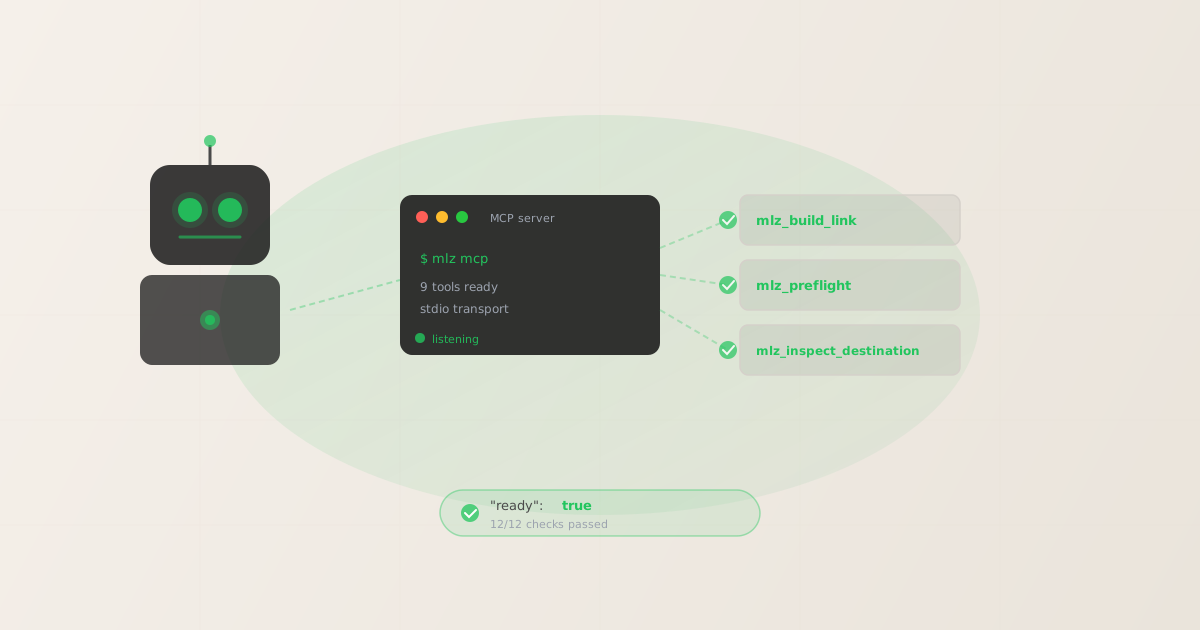
mlz mcpto start the MCP server. It speaks JSON-RPC over stdio and exposes nine tools the agent can call natively, includingmlz_build_link,mlz_preflight, andmlz_inspect_destination. The agent discovers the tools automatically — no prompt engineering required. For a full survey of the MCP marketing agent workflow, see AI agent marketing workflows with MCP.
To connect any MCP-compatible agent, add one configuration block:
{
  "mcpServers": {
    "missinglinkz": {
      "command": "mlz",
      "args": ["mcp"]
    }
  }
}
Once the server is running, the agent can call MissingLinkz tools natively without browser automation, HTML parsing, or prompt engineering for API endpoints. The server uses stdio transport only — it does not open a network port.
Walkthrough: Claude Code building and validating 10 campaign links autonomously
With MissingLinkz connected via MCP, a Claude Code session can build and validate a full batch of campaign links without any human intervention between steps. Here is what a real transcript looks like. For a complete setup guide, see how to use MissingLinkz with Claude Code.
User: Build and validate 10 LinkedIn campaign links for our spring launch.
All go to https://yoursite.com/spring-launch, campaign spring-launch-2026,
medium social. Variants: linkedin-feed, linkedin-sponsored, linkedin-inmail,
linkedin-story, linkedin-video, linkedin-carousel, linkedin-event,
linkedin-newsletter, linkedin-article, linkedin-retargeting.

Claude: I'll build and preflight each link using MissingLinkz. Starting now.

Tool call: mlz_build_link
{
  "url": "https://yoursite.com/spring-launch",
  "campaign": "spring-launch-2026",
  "source": "linkedin",
  "medium": "social",
  "content": "linkedin-feed"
}

Result:
{
  "tracked_url": "https://yoursite.com/spring-launch?utm_source=linkedin&utm_medium=social&utm_campaign=spring-launch-2026&utm_content=linkedin-feed",
  "link_id": "lnk_9wlvd9qi",
  "stored": true
}

Tool call: mlz_preflight
{
  "url": "https://yoursite.com/spring-launch",
  "campaign": "spring-launch-2026",
  "source": "linkedin",
  "medium": "social"
}

Result:
{
  "ready": true,
  "checks": [
    { "check": "og_tags", "status": "pass" },
    { "check": "ssl", "status": "pass" },
    { "check": "resolution", "status": "pass" }
  ],
  "summary": { "total": 12, "passed": 12, "warnings": 0, "failed": 0 },
  "recommendation": "All checks passed. Campaign link is ready to publish."
}

Claude: Link 1/10 built and validated. Proceeding with remaining 9 variants...
[mlz_build_link called 9 more times, all returning stored: true]
[mlz_preflight confirms destination passes 12/12 checks for all variants]

All 10 campaign links are built, stored, and validated:

1. linkedin-feed      → lnk_9wlvd9qi  ✓ ready
2. linkedin-sponsored → lnk_4mxqr2nv  ✓ ready
3. linkedin-inmail    → lnk_7kptz8wj  ✓ ready
...
10. linkedin-retargeting → lnk_2bvhx5yt ✓ ready

Destination: 12/12 checks passed. No issues found.
The agent ran 20 tool calls (10 builds + 10 preflights) without any human intervention. The destination was validated once and the result applied to all variants sharing the same landing page. Every link is stored in MissingLinkz with a unique link_id for audit trail purposes.
Walkthrough: Cursor agent validating landing pages mid-workflow
The MCP integration is not limited to Claude Code. Cursor users can add the same MCP config block and get access to all nine MissingLinkz tools from within the editor. A common pattern is mid-workflow validation: the agent is drafting a campaign brief or populating a content calendar, and it calls mlz_inspect_destination to verify each landing page before writing the final tracked URL into the document.
User: Fill in the campaign brief for Q3. Build tracked links for each landing
page. Flag any destination with a missing OG image.

Cursor: Checking each destination before building links.

Tool call: mlz_inspect_destination
{ "url": "https://yoursite.com/q3-product" }

Result:
{
  "success": true,
  "open_graph": {
    "title": "Q3 Product Launch",
    "description": "...",
    "image": null
  },
  "checks": [
    { "check": "open_graph", "status": "warn",
      "message": "og:image is missing. Social previews will show no image." }
  ]
}

Cursor: ⚠ yoursite.com/q3-product is missing og:image. The link will share
without a preview image on LinkedIn, Slack, and iMessage.

Flagging in the brief. I'll build the tracked URL but mark it as
needing a fix before the campaign goes live.

Tool call: mlz_build_link
{ "url": "https://yoursite.com/q3-product", "campaign": "q3-launch-2026",
  "source": "linkedin", "medium": "social" }

Link built: lnk_3qxmb7hs — marked [NEEDS OG IMAGE] in the brief.
The agent did not just generate a URL and move on. It caught a landing page problem that would have produced blank social previews across every channel sharing that link — before the campaign brief was finalized. This is the value of combining link building with destination validation in a single agent-callable tool.
Manual process vs. AI link agent: a direct comparison
The difference between the two approaches compounds across every campaign. At 10 links per campaign, the manual overhead is annoying. At 100 links across 5 channels, it becomes a real bottleneck and a source of errors that silently corrupt attribution data.
| Task | Manual Process | AI Link Agent (MissingLinkz) |
|---|---|---|
| Build tracked URL | Open browser, fill form, copy output | ✓ mlz_build_link returns JSON in <1s |
| Validate destination | Separate SSL checker + OG debugger + redirect tracer | ✓ mlz_preflight — 12 checks, one call |
| Scale to 100+ links | Repeat form fill 100 times; high error rate | ✓ Loop in shell or agent workflow |
| CI/CD integration | ✗ Not possible with web forms | ✓ mlz publish-check --format json in any pipeline |
| Structured output for agents | ✗ Rendered HTML; requires scraping | ✓ JSON with "ready": true flag |
Building and validating a campaign link from the CLI
If your agent or script can shell out, the CLI is the most direct path. Install once, call from anywhere:
npm install -g missinglinkz
Build a tracked link with structured JSON output:
$ mlz build \
  --url "https://yoursite.com/spring-launch" \
  --campaign "spring-launch-2026" \
  --source "linkedin" \
  --medium "social"

{
  "tracked_url": "https://yoursite.com/spring-launch?utm_source=linkedin&utm_medium=social&utm_campaign=spring-launch-2026",
  "params": {
    "utm_source": "linkedin",
    "utm_medium": "social",
    "utm_campaign": "spring-launch-2026"
  },
  "destination_url": "https://yoursite.com/spring-launch",
  "created_at": "2026-05-20T09:12:00.000Z",
  "link_id": "lnk_9wlvd9qi",
  "campaign_id": "cmp_kbcht77d",
  "stored": true
}
Every field in this response is machine-readable. An agent or pipeline step can read tracked_url directly and pass it to the next step without any string manipulation.
For full destination validation before publishing, use mlz publish-check which combines link building, URL validation, destination inspection, and optional post-copy validation into one command:
{
  "ready": true,
  "tracked_url": "https://yoursite.com/spring-launch?utm_source=linkedin&utm_medium=social&utm_campaign=spring-launch-2026",
  "checks": [
    { "check": "og_tags", "status": "pass", "message": "All essential Open Graph tags present." },
    { "check": "twitter_card", "status": "pass", "message": "Twitter Card tags configured." },
    { "check": "viewport", "status": "pass", "message": "Viewport meta tag present." },
    { "check": "ssl", "status": "pass", "message": "URL uses HTTPS." },
    { "check": "resolution", "status": "pass", "message": "Destination responded with 200." }
  ],
  "summary": { "total": 12, "passed": 12, "warnings": 0, "failed": 0 },
  "recommendation": "All checks passed. Campaign link is ready to publish."
}
The "ready": true field is the go/no-go signal. An agent reads it, branches on it, and either passes the link downstream or surfaces the failing check to the user. No interpretation required.
FAQ
- What AI agents are compatible with MissingLinkz as an AI link agent backend?
- Any agent that can run shell commands can use the
mlzCLI directly. Any agent that can make HTTP requests can use the REST API. MCP-compatible agents — Claude Code, Cursor, Claude Desktop, and any custom MCP client — connect viamlz mcpand get all nine tools natively. LangChain, AutoGen, and similar frameworks can wrap the CLI or API calls in tool definitions. - Does the AI link agent validate links automatically, or do I have to call validation separately?
- Both patterns work. The
mlz_preflightMCP tool and themlz publish-checkCLI command combine link building and full destination validation in a single call — this is the recommended pattern for most agent workflows. If you need to validate a destination independently (for example, to check a landing page before deciding whether to build the link at all), usemlz_inspect_destinationormlz checkseparately. - Can I run the AI link agent in a GitHub Actions CI/CD pipeline?
- Yes.
mlz publish-check --format jsonruns in any environment with Node.js. It exits with a non-zero code on validation failures, which fails the pipeline step and blocks deployment. See the CI/CD campaign link validation guide for a complete GitHub Actions workflow template. - How does the AI link agent handle naming convention enforcement?
- The
mlz campaigns suggestcommand returns consistent naming recommendations for sources and mediums based on existing campaign taxonomy. In an agent workflow, the agent calls this before building a link to validate its proposed parameter values against the account's established naming conventions. This prevents taxonomy drift across large teams and long-running campaigns. - Is there a rate limit on how many links the AI link agent can build per run?
- The free plan allows 1,000 links per month, which covers most individual and early-stage workflows. The Team plan ($49/month) provides unlimited links for teams running campaigns at scale. Run
mlz auth statusto check current usage and remaining quota at any time.
Recommended posts
Give your AI agent a link infrastructure it can actually call
Install MissingLinkz, start the MCP server, and connect it to Claude Code or Cursor. Your agent can build, validate, and govern campaign links autonomously — no browser required.
1,000 links/month free. No credit card.
Your API key
Save this now — it won't be shown again.
npm install -g missinglinkz
mlz mcp
Then add {"command": "mlz", "args": ["mcp"]} to your agent's MCP config. Full tool reference in SKILL.md.